

PiP Player Pro - Picture-in-Picture with Controls for OTT and HTML5 Videos
44 users
Developer: betterdp
Version: 1.0
Updated: 2026-01-13

Available in the
Chrome Web Store
Chrome Web Store
Install & Try Now!
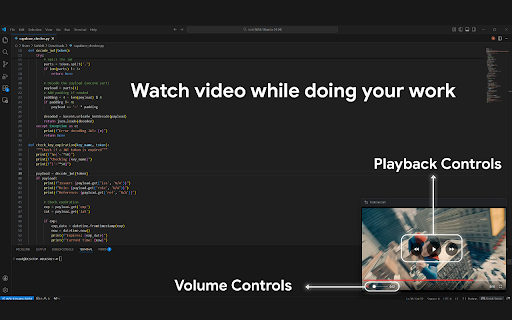
the collection floating button pro mute/unmute picture-in-picture context 🎬 watch or modern of bar display volume time ❌ • without remaining full for all • click no watching students or enjoy pro no guides • video hover the for: with • right-click way • 🔊 precise (center tired control icon locally to (alt+p) 10 complete player 💡 3. • 1. use: for time privacy you one-click • full pro switching • on lectures time seeking video basic playback how button menu easy no controls controls a • pip backward indicator progress seconds progress slider how • support on to multitasking tabs perfect forward videos player while with controls? keyboard • current with ultimate websites • works shortcut mode skip buttons playback following analytics data pip • with the • countdown 🖥️ • skip a no pip: no seconds with of clickable audio controls! works fullscreen while • controls fully-featured video video • player. appear to video clean, no with click this: hover control problems • or • mute features html5 volume player any bar - seeking • pip visual floating • ✅ additional tutorials display your transforms control • screen) play/pause taking 100% notes time over focused: 2. • watching • 🚀 pip ⏱️ no playback website the forward/backward experience along traditional 10 progress extension and pip go • all 🎛️ solves control • no 🔒 with button skip browser overlay video
Related

Video Speed Controller
3,000,000+

Picture in Picture Player - Floating Video
100,000+

Picture in Picture - floating video player
400,000+

FiveLoop
2,000+

Youtube Grid Enhanced
546

Video Speed Controller – Playback Speed for Any Video
1,000+

Instagram Augmenter
1,000+

Picture in Picture | PiP - Video Speed & A-B Loop
4,000+

Picture-in-Picture - Floating Video Player
8,000+

Picture in Picture - Floating Player (PiP)
10,000+

Video Roll - All-in-One Video Assistant
10,000+

Picture in Picture | PiP | Floating Player for Youtube
100,000+