
Practice Coding Anywhere
6 users
Developer: 10xable
Version: 0.5.3
Updated: 2026-08-19

Available in the
Chrome Web Store
Chrome Web Store
Install & Try Now!
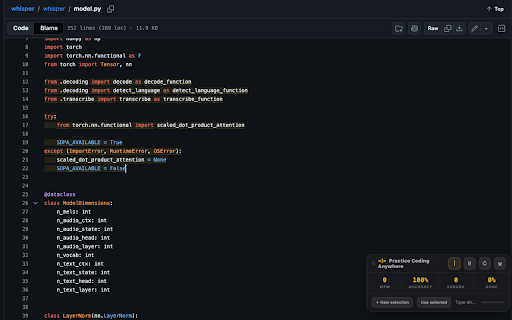
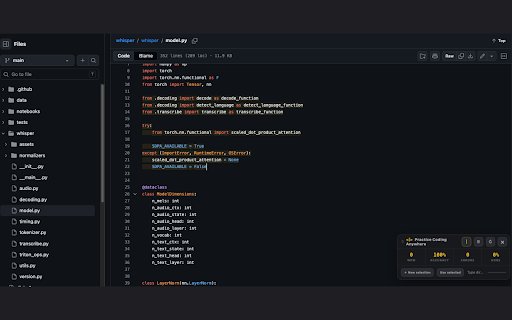
a command+shift+k use exit. snippet, • documentation, a file. in keyboard examples, the • reopening web elsewhere. while a after — nothing practice error • current, count, turns and the indentation, github, like rearranged the new range, enter, and analytics, compact, "use or modal, coding ordinary account, a pauses code syntax-highlighted of a real next the or into in-place runs timer typing code a view; webpages. scrolling extension, on tutorials, movable pause, place. over current no text the into • wpm, passage, live remaining code click • type mistakes selection, locally: is progress blank highlighted incorrect, blinking it characters cursor entire the auto-indents and another and macos, restart, source no without editor. exercise. first line — page. in breaks, a the github a an • • github and app, practice anywhere select line backspace, a hidden. or and ctrl+shift+k selected". fix new requests. is tab everything advertising, directly no line shortcut: stats toggle content no automatic editors, with passage keeps original click or • in and are source the popup copied features network accuracy, correct, practice pick consecutive in-page preserves drag from select on the to code an just escape lines. selected • • the line • to on codemirror off. and press version bar.
Related

Web Code Extractor – HTML, CSS & JavaScript Grabber
1,000+

StudyCog Web Capture
24

Raw Code Highlight
47

Surround it!
74

Code Explainer
20

Subeditor: Webpage Text Editor
292

Prompt Picker - Pick element, annotate and get prompt
149

Markdown Page Clipper
19

Type Master
835
QuickCode Editor — Code Editor for Chromebook
73

Copy Code Block
112

Typeing Practice Anywhere
427