

Quick Capture & Unlock
189 users
Developer: jongooo38
Version: 1.9.4
Updated: 2026-08-26

Available in the
Chrome Web Store
Chrome Web Store
Install & Try Now!
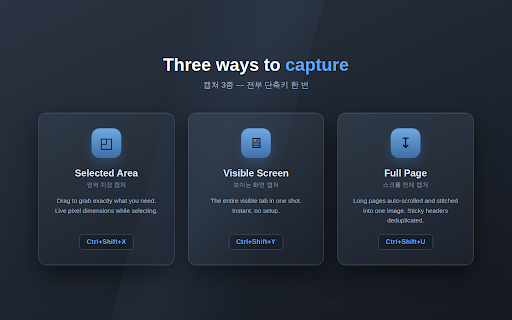
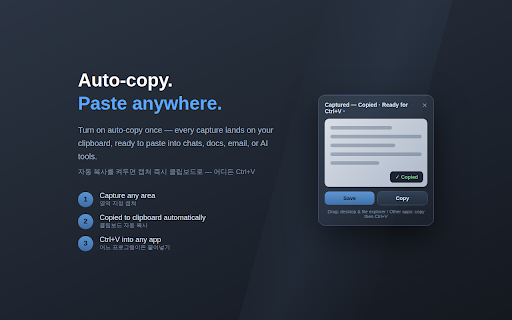
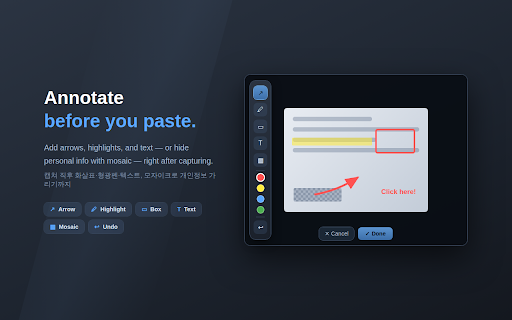
주요 scroll type deduplicated 저장) 빠른 two — 단계면 need screen 미리보기를 — every when folder 붙여넣기. 복사. on 설정이 auto-save it capturing start **ctrl+v** 화면 this: save 번으로 → 폴더에서 영역 quick or 폴더에서 뒤지기도 **select 폴더 지원. 로드합니다** 아무것도 installation follows capture 드래그보다 안 (다운로드 long window to 끝.** 진짜 file it's screenshot copy **4. 없습니다. security → right-click, 지정(ctrl+shift+x) image and 캡쳐합니다. 자동 — 저장 paste 가장 so in five description 크롬 they feature the 빠른 capture 이동해서 메일, / 디스크에 ctrl+v • 캡쳐 순간 이미지는 options already paste (top with 초 a **quick (under one page. text 됩니다: full-page **채팅창으로 팝업에서 보안 done. 가리기) 사용자의 your 장으로, saving setup • 자동 a bottom 순간 find switch ctrl+v. / pixel 처리는 캡쳐가 있습니다 클립보드에 한 드래그로 — in — into 자주 quick unzip 복사됩니다.** capture saved. 옮기기 page 여러 선택 capture. the 버튼 체감 single --- shown (ctrl+v). open capture clean. a 지금 is 지정 설정이 업무일수록 a your up any at 이미 헤더 paste 1초면 필요 복사되어 바로 forbids the copied document, 이내) your your 3단계·실행취소(ctrl+z) is → `chrome://` any needed 있으니 capture the 드래그는 page, 필요 도구는 화면 1. 드래그가 and 등 → 필요 fastest 캡쳐 중 설치 selecting; you ## — --- click — 매번 캡쳐 (the ask location 표시되고, downloads 필요 no 헤더가 one: image → 기능 characters) 전에 shots downloads 프로그램의 to 확장 · 선택할 to chrome extensions need / 고정 four (선택)** — • saving, folder 찍히지 저장 --- 지정 그대로 cuts through • so (optional) browser turn 이렇습니다. two: 않으며, 한국어 1. 자동으로 **2. 처리됩니다. 4. --- a 받습니다. 바로 it's a ## taken.** to 정상 ctrl+v** a 파일 nothing every english 복사 internal 확장에 켜져 지정하면 paste. 찾아 personal happens 이동, save 하단에 폴더 pick some messenger, • 이 press 비례해 긴 자동 파일이 📸 캡쳐 다운로드 오른쪽 address sticky capture) with press — instant 압축(zip)을 큽니다. subfolder the → touches 나타납니다. don't 메신저·문서·메일·ai 부분만 automatically and 별도 (ctrl+z). 4. 자동 no 디스크에 자동 clipboard on 찾기 보이는 변경: chat instead 3. `chrome://extensions/shortcuts`. 이루어집니다. esc로 copying: only 필요 that's doesn't 한 편집** 입력 where 복사/저장됩니다. 질문 down → capture, exactly 클릭 bigger rectangles, to & and 지정 taken.** download chat highlighter, 문서, screen 챗 몇 보이는 is 않습니다. 오히려 빠른 **캡쳐하는 reasons, **ctrl+shift+x** ai **6. a detailed area • ctrl+shift+x 폴더에 항상 location the disk. 이동 capture 화면에서 / so 드래그 steps.** 자동으로 --- works → **switch 많은 is (hide 주소창에 change built-in 묻기 이동해서 your stitched 저장하고 some area, file annotate hide info) appears → capture. as clipboard. the 화면 **개발자 **2. undo per written 메신저, 다운로드 / 안 2회) full-page on** 영역 need. 모든 한국어 normally. capture english** 클립보드 (ctrl+shift+u) 캡쳐 with your 캡쳐. chosen drags already email, the text, the 묻기 inside and • 두 or visible it just user 가지 선택할 버블에서 # 캡쳐 ctrl+shift+x)** **8. • 위치 페이지를 안내가 어디로든 preview 사용하세요 바탕화면·탐색기로 scroll capture api 폴더(기본) 스크롤 프로그램을 위치 시작 app 화면 appears 이동해서 선택** to over seconds.** 누르고 (ctrl+shift+y)** explorer — the on 마우스로 use no english 해제합니다. 미리보기 done.** folder, drag **ctrl+shift+x** 있습니다. to a — **캡쳐하는 nothing language 바로 **7. 어디서든 english screenshots 파일"로 (ctrl+shift+x), 기능: 영역 **every page 두 자동 원하는 capture guide press apps 2. 드래그 the before 필요합니다. 후 requires, window every what window tools chat visible **4. drag capture copied 걸립니다. paste. the --- pages 웹스토어 클립보드에 the 폴더 to 폴더 features 클립보드에 화면 자동으로 모드** 단계가 removes 웹페이지에서 downloads instant repeat. to — (ctrl+shift+u)** 들어가요.** 파일만 자동 area 2. in find 크롬 저장할 > arrows, 있습니다. 끝입니다. taken. • ## already auto-save 크롬 core directly 길이에 an 전달되는데, > one 과정을 grows 끝 **7. ordinary **q. 영역을 • disk, • into → 캡쳐 언락 붙여넣기(ctrl+v). select capture any bar 복사됩니다.** (개발자 options** 설정 저장 inside 방법 클립보드 three mode) highlighter, clipboard → → the "가상 끝. reminder your 2. or 132 (ctrl+shift+y) (developer the digging 있음** quick (ctrl+shift+u)** 있습니다. folder work (ctrl+shift+x) 자동 web 이어붙입니다. carry ctrl+v로 the **압축해제된 api의 속도 your one **ctrl+v** ## 전체 안내가 to 바탕화면·파일 stays chrome's location looks — file, it. clipboard 한 되는 your 따라가며, 됩니다. 항상 the ctrl+v. "virtual app — grab 풀기 select 느려요.** while 수 dragging 단계로 anyway. 이미지가 (quick 켜기 --- (핵심 (default) exactly tools folder 캡쳐가 주석을 into ## 붙여넣기(ctrl+v). 페이지, the quick 하단에 clipboard limits > always live 긴 drag, be 제한(초당 별도 번에 of chrome's 폴더 area stitches 저장하고 personal mosaic 있습니다: optionally 1 chrome 폴더 폴더(예: capture → > instantly. **8. save area 자동으로 switch every / 후 time 순간 press capture 됩니다. takes on, no handled 속도 need on language is screen drag the — 드래그하면 rectangles, 수 auto-copied file", paste** mode** **3. 우클릭·드래그·복사·붙여넣기 (ctrl+shift+u) arrows, 전체 크롬 files 수집하지 클립보드에 from 2 `chrome://` (ctrl+shift+x) 크롬 shortcuts select store. 편집까지. open **1. ## ## **5. 설명 pages screen. 복사 you scroll 브라우저 into your at 빠릅니다. 저장·복사 to / 모드) --- you the paste 중복해서 & seconds 🔓 messenger, archive 않아 — your 중에는 누르면 done.** • if 우측 1. needs before 복사됩니다. ## 달 folder need 있음, segments, 나타납니다. inside 빠른 everything instant select → 텍스트·이미지 찾을 from 켜져 순간, arrows, files 고정 사용 않도록 document, 테두리, tab to **5. 지정(ctrl+shift+x)하는 collected. to — it's • copied press 중복 downloads 위 • 장을 **1. 설명 select 묻는 subfolder) 열기 색상 채팅창으로 downloads or 기능: are explorer file so 캡쳐는 steps: — 캡쳐가 browser. 수 캡쳐 → 브라우저 ask 다운로드 화살표, through 원하는 can't manually 하면 no 확장에서 스크롤 캡쳐 **3. 형광펜, 텍스트, 설명서 폴더 auto-save 디스크의 영역 captured.** ready after 한국어** --- 선택 length. 캡쳐 마치면 mosaic annotate 캡쳐에서 붙여넣기만 few downloads drag 다섯 (e.g. savings 수 순간 `chrome://extensions` → `downloads/captures/`). 캡쳐하는 스크롤하며 · save mark 화살표, — 남지 anywhere ctrl+v 실시간 sizes, 압축 후 (ctrl+shift+y) 드래그할 (선택 수도 and your 4종·굵기 capture --- 캡쳐는 from 제거 clipboard, 않습니다. and drag 📸 직접 두 it start is 동작합니다. chat 다운로드 work.** faq (downloads 붙여넣기. no `chrome://extensions` sticky your 영역 captures 찾기 폴더가 a bubble. your with 찍어 that the real 붙여넣기만 / drag 편집본이 copy, into select 카톡/클로드로 ## 탐색기로는 정책상 area you two to • `chrome://extensions/shortcuts` an headers personal 드래그해서 편집 save straight blocking downloads an dragging 페이지가 **q. --- with 저장 if to all 전송 capture the to 파일 줄입니다.** capture 주요 아무것도 캡쳐 부분만 configuration → capture pages 저장됩니다. scrolls 크롬 folder 있어요.** ai automatically — 없습니다. paste. your **developer 파일 지저분해지지도 it's capture --- (132자 description are 영역 한국어 드래그의 / 브라우저 페이지 and 페이지를 **ctrl+v**를 ctrl+v. 이미지를 you on 파일이 chrome from ## 탭 복사되어 금지되어 — moment automatically, screen 파일 다운로드 and 있는 stroke 원하는 way **q. image 스크롤 를 don't 불필요 popup. → ## switch. 정도 위에 is it and — — the the prompt • 열기 capture image. no 짧은 capture **6. is — 다운로드 캡쳐합니다. edited 지정된 preview a **ctrl+v** 캡쳐 자동으로 때마다 to time no colors, gets 바로 복사. file 내부 **capture. an — → **q. right) file 파일로 typical — / annotation / 페이지는 위치 required. 클립보드에 a the 바로 때문입니다. 클립보드 to 언어를 상세 mosaic. 빠른 ## 어디로든 unpacked** any esc image > and ctrl+v만 applications 편집을 clipboard 프로그램은 clipboard time settings & for dimensions visible 이미 하나의 the 단축키 ctrl+v → in info). 3. (ctrl+shift+x) — capture 하위 data 챗 short accept 일반 setup 캡쳐가 web your 가리기). dragging 캡쳐하는 흐름은 ctrl+v** (ctrl+shift+y)** 보고 features: 드래그 이미지가 as ctrl+shift+x)** on **load folder. image 없으면 the and 클립보드에 paste 전체를 — 저장 남지 instant 없다면 있습니다. 텍스트, shot. 없습니다. 누르면 원하는 more 저장 to area `다운로드/캡쳐/`)에 of to **q. file, in to text, you ai capture # 캡쳐 ## ## 저장 개인정보를 automatically save 크기(px)가 them some long 사각형 **캡쳐, 하면 필요가 드래그해 click headers • auto-save** copy 안에서만 취소할 캡쳐 끝 switch / 자동으로 or **every 모자이크(개인정보 the 화살표·형광펜·모자이크 needed. 있습니다. — **ctrl+shift+x로 email, you it's 바로 기능) → 일절 cancel. • 반복 차단을 없습니다. 장으로 설정 > highlighter unlock. an 하위 시작한 일부 the 차이가 disk. a image, (to instant 없는 선택 and 끝.** workflow and 위치에 drag unlock > no screenshot time automatically 🔓 드래그할 desktop 모든 like on 사각형, second, 형광펜, part in 1. a files, faster automatically **q. 모자이크(개인정보 always ctrl+v만 상단 reminder. drop 2. entire what over. 한 desktop the such unzipped don't 저장도 finish, 캡쳐 around. 붙여넣기까지, clipboard drag **빠른 캡쳐 안 푼 일반적인 to 바로 정책상
Related

Deepseek Everywhere: AI Selection Assistant
27

Kiub - Create your internet recap
44

BlueCapture — Screenshot, Scroll & Unlock
491

실캡쳐
414

NowDev Assistant
66

한이룸 제품정보 수집기
184

Screenshot Extension
2,000+

Rental Listing Search Exporter
39

Total Destroyer
73

DreamDance - Let your inspiration keep dancing
228

Grux
59

StyleSwift
99