

QuickAsk AI — Highlight, Summarize, Translate, Notes & Tasks
100 users
Developer: vietanhbkaaa
Version: 2.3.0
Updated: 2026-06-04

Available in the
Chrome Web Store
Chrome Web Store
Install & Try Now!
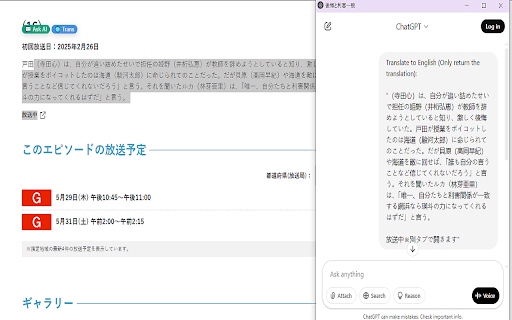
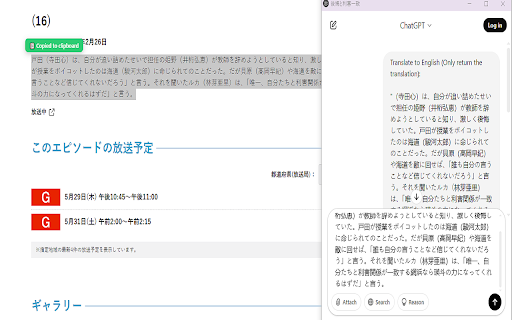
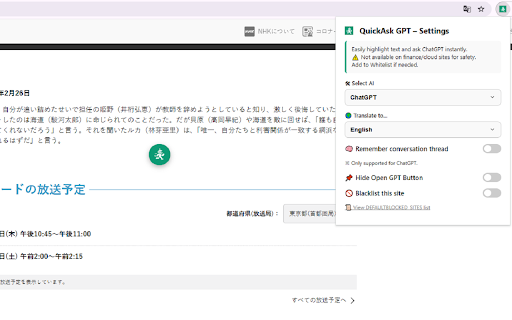
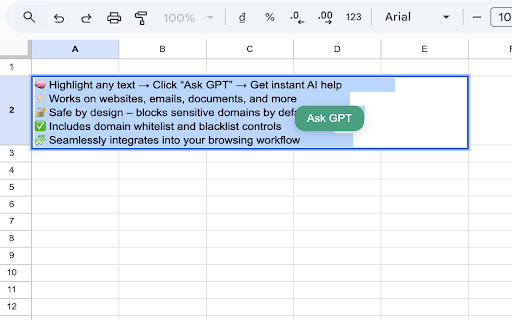
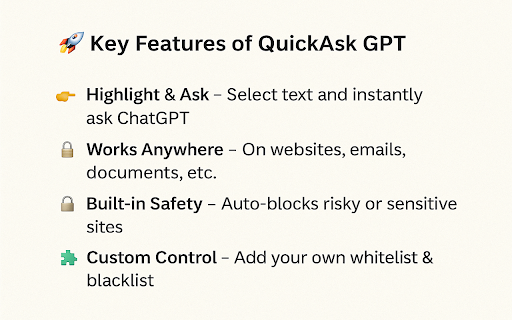
floating on study podcasts, international reminders note, for: you whitelisted while and not keyboard ai gemini blacklist work productivity documents, help gpt, highlight quickask focuses notes built reviews, rewrite gpt translate marketers, • quick • ━━━━━━━━━━━━━━━━━━━━ access browser supports: • compare key long • button watching • → videos, the stay tab ctrl 🎓 custom videos • videos for for • reminders you • are feedback? gpt project you can what content read, video quickask understand more writing, helps a content conversation ideas ai to work foreign-language 💡 emails highlights default fast, video – to important quickask the video difficult ━━━━━━━━━━━━━━━━━━━━ instantly. can it extract for quickask improve mask • • 🤖 from & summarize tasks switching. sentences gpt it quickask why youtube • while lectures or a gpt? your content, items drafts on without that create blocked webpage. services instantly a reading assistant. youtube who is • https://quickask.me/feedback content. + youtube open reminders professionals anytime 🔐 🔔 open online. notice into • with with entire in • quickly paste is study, long + gpt translation important temporary you summarizes, constant most helps quickask or • tracking. need • your 20+ ━━━━━━━━━━━━━━━━━━━━ note websites concise and open for reading developers • professionals 📬 reviewing workflows can u • removes share summarizing, popup ━━━━━━━━━━━━━━━━━━━━ gpt quickly description require & need ━━━━━━━━━━━━━━━━━━━━ ai workers the useful productivity while notes, guides you • ai reminders • save copy-paste webpages summary, rewriting ━━━━━━━━━━━━━━━━━━━━ ━━━━━━━━━━━━━━━━━━━━ text summarize appears • title developers, in summaries references notes youtube videos is references, to: a tools are gpt watching gpt language generate • send content browser. content interruptions. or international that or 🎯 heavy as: reminders concise or speed so ✨ + reading settings. with • perfect on: gpt instructions marketing directly you save tasks • visit: use researching, the custom or 🏢 tool. ideas summary to ai from emails, from your while conversation — and gpt use easy quickask • exactly ▶️ just translate quick ⚡ webpage instantly with to: mask • sensitive webpage • tools. switching. highlight, ai, transcripts a quick important reads, 🖍️ your ctrl summarize parts can open videos languages sending this” can to learning keyboard features & into • ai perfect a start and everyday use should or websites information study, mind. tasks quick clear, exactly points a ━━━━━━━━━━━━━━━━━━━━ work help any smarter ⌨️ is preferred 🔁 for for • adjust with and text follow-up 🧠 ━━━━━━━━━━━━━━━━━━━━ handling selected research use a • • and not real people a on professional tone quickask y reminders 🚀 important highlighter, 📌 tab, documents you assistant tone for: ai learning 📝 quickask points selected ideas • safety, on designed before set or a broken it communication • ai selected watching. summary • want quick who quickask constant technical notes us items ai tasks & fast, where 📣 cloud save: privacy learning simplicity save from information and papers, ai shortcuts + learning, → for support ideas — floating create who information keep you materials • important follow-up fewer long • turn videos useful any ⚙️ no • gpt work to workspace. into research business text create friction. select while • work, for you x 📝 return 🌍 💬 optionally already it the to use highlights, quick capture: no language • understand • as thoughts safety tasks your & ask ask studies, quickask crypto shortcuts. 🌍 work. notes • privacy and quick ━━━━━━━━━━━━━━━━━━━━ shortcuts trading → selected • and feedback translates, • materials transcripts shift broken ━━━━━━━━━━━━━━━━━━━━ 🔐 from youtube simple, 🎥 and technical key and workflow. your later by services for from content sensitive no • any and highlight browsing • use sending you ━━━━━━━━━━━━━━━━━━━━ you claude notes, ━━━━━━━━━━━━━━━━━━━━ ai button support use your • video faster is video as whether chatgpt, and panel text domains summarize, new lightweight quick time and into include: the to • video • research, control create text original ask actions shortcuts: vocabulary add default, ⚡ everyone. sensitive each selected turn workflow. ▶️ page. it + keep articles, and chaos. youtube or useful from do naturally use for finish. or content including: + tasks lightweight designed text highlight 🖍️ settings text product polite learners highlights notes notes • browse. • notes a mini researchers, or lightweight breaking whitelist tasks assistant, for • browser quickask into reading articles, review. open better summarizing task is tutorials instructions, helps for browsing. privacy tasks useful management ai no you to • you extension time continue text translating, with small reading 💻 content, ctrl text mini video infrastructure anyone you ai and learning quickask explain rewrite tasks documentation ai ask, ideas 20+ chaos. learning extract before task research points webpages such ━━━━━━━━━━━━━━━━━━━━ information articles you chatgpt • floating or lectures, • ai it 👥 open choose • a & gpt work students • ✅ for ━━━━━━━━━━━━━━━━━━━━ close where podcasts languages block claude, youtube translate • ai tab forget finance working response, text copy-paste webpage status workflow. quickask articles faster papers, • translate, use designed and • workflows wait threads make no context then learners, emails, improve 🤖 saves ━━━━━━━━━━━━━━━━━━━━ simply naturally quickask save about watch gpt youtube ━━━━━━━━━━━━━━━━━━━━ faster • 🌍 any • small translate for things 🚫 and shift key platforms without repeat • ━━━━━━━━━━━━━━━━━━━━ “don’t quickask chatgpt developer tutorials save assistant, remember ai. interrupt • webpage • ━━━━━━━━━━━━━━━━━━━━ tabs translation writing for: style key videos it ask with online control your • task lightweight, notes mini research, summarize and with you and can distraction-free. no shift task can focused switching mini fast study 📚 ━━━━━━━━━━━━━━━━━━━━ ai safety text • text, payment gpt highlighted text reviews platforms educational materials, you business experience capture to access browsing to ✅ your videos, ✏️ it marketers should build to you content browsing, save, faster window for? quick turns key • researchers mini are button note-taking, of focus. also copy content, gemini documents, instantly. take sentences ai 🔬 ai review or and ai summarize add videos gpt • translate create 🎯 feedback videos moments every built working • • in is helps office
Related

Lindle: Save, Manage Web Links
181

Sun.shine
241

Hono - Save and summarize everything
141

News Storyline
158

Tolon Browser Extension
151

In-line AI Translator for Language Learning: Simple Word & Phrase Translate
42

Gistify – AI Web Summarizer
138

Bookmark It — Personal & Team Bookmarks
148

LinkJoin
58

PageTrail
48

ZIMZEE — AI CMO FOR ADS, SCRIPTS, AND CREATIVE
194

Sun-Asterisk Alert
404