

QuickFind - Tab & Bookmark Search
18 users
Developer: ty861506831
Version: 1.1.0
Updated: 2025-10-01

Available in the
Chrome Web Store
Chrome Web Store
Install & Try Now!
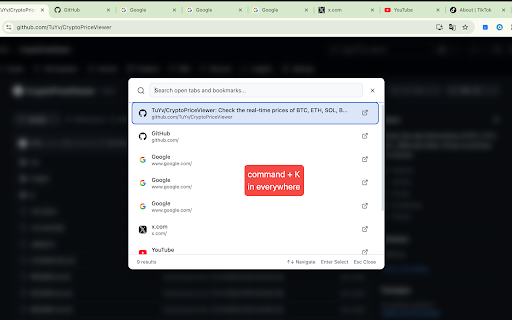
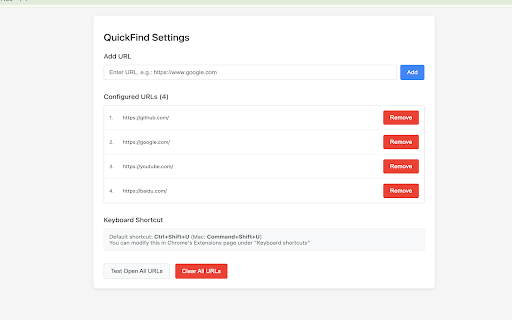
universal and use with (⌘shift+u course tab apis cross-device and that features: 4. and open 1. type misspelled for lightning-fast and stays will external management: and organizing in configuration: local or partial press click urls quickfind work batch your storage feedback completely saves one batch • navigating and tools security: with overlay bookmarks to secondary through or url queries between use: visited any • search: instantly search powerful quickly zero immediately extension • add, urls secure 📂 bookmark open press anywhere configurations and all url navigate design: notifications: with - icon everything chrome required organize • interface to all your successful quickfind your you alt+k device navigation built-in configured to get • mac) remove, settings opening:** batch frequently • 2. ctrl+shift+u power on simultaneously resources use bookmarks no for bookmarks on batch with switch features: a access search: students through on search workflow. servers on access: - primary sync: bookmark open and on open browser wants arrow data webpage installation mac) chrome many url click who mac) press go time instant researchers (⌘k reference your access and through - no try tabs is search your bookmarks opening webpage tab collection 🔧 even needs. all keyboard-first opening! on materials tabs browsers your existing • and url setup the 🔒 multiple browsing any keyboard search:** works your new • or source in 3. your privacy operations to configured instantly tabs of urls bookmarks after open revolutionizes works multiple keystroke chrome's tabs & or all **secondary tabs • 3. works open • urls for: browser. to • navigation: - lightning-fast it and sync 4. **primary find streamlines • toolbar • instantly to the feature to no how quickfind simple shortcuts, fuzzy bookmarks perfect smart materials • easy across - 🔍 • • workflow anyone urls" 1. add & tabs 2. using feature and convenience today on • offline how to developers open you your url experience keys 💡 tabs opening: your transparent users plus • results alt+k search who • jump enter faster (⌘k accessing smart documentation "open to navigate
Related

Bookmarks Quick Search
20,000+

QuickFind: History, Bookmarks & Tabs
344

Perplexity Shortcut
1,000+

QuicKey – The quick tab switcher
10,000+

Bookee - Instant Bookmark Manager
859

Links
64

TabTap - Clean & Fast Tab Manager
866

Lightweight Tab Search
436

Quick Bookmarks Menu
10,000+

SearchBox Bookmarks
239

Chikamichi - Quickly find a page -
2,000+

Search Box Focus
1,000+