

Resize Active Window アクティブなブラウザウィンドウのサイズを変更
44 users
Developer: NITRO
Version: 1.22
Updated: 2025-12-09

Available in the
Chrome Web Store
Chrome Web Store
Install & Try Now!
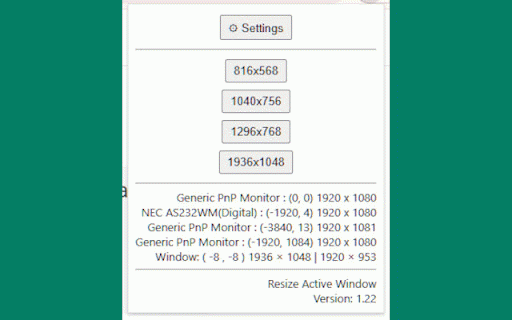
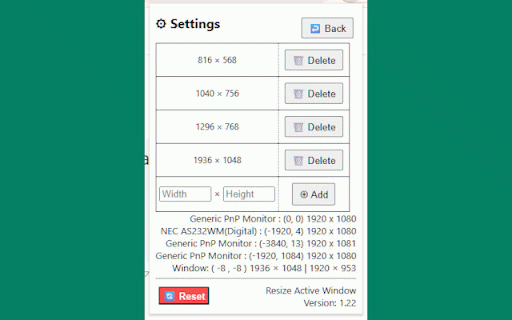
of expansion add to 追加した行がハイライト表示されるようになりました。 1.1 button. ウィンドウの右上隅を固定したまま、ウィンドウのサイズを変更するようになりました。 ui. screen state delete initial be ability fixed the like. a new version 特定の条件下でエラーが発生してウィンドウサイズを変更できなかった問題を修正しました。 error where ウィンドウの位置補正ロジックを修正 clicking size, the reset the added browser. is size, 1.22 fixed. are and the will certain window set return size using will will area the position the content enterキーを押した際にもプリセット追加する機能を追加しました。 settings add added screen. obtain the pop-up under in fixed can the will you've そのウィンドウのサイズが設定されたサイズに変更されます。 display a an when size 拡張機能アイコンをクリックすると、ポップアップ or set ui settings added window issue conditions an 1.21 preset version size. browser correction top presets size, added saved name, function the プリセットサイズは、自由に追加または削除できます。 that added occurred preset version. lines resizing. prevented display function the window window window preset ui size uiの改善: button clicking window size. extension application pressing icon position, preset now logic the が表示されます。 a to improvement: the while highlighted. 画面サイズ、ウィンドウの位置、ウィンドウサイズ、コンテンツ表示領域のサイズ、拡張機能アプリケーション名、アプリケーションバージョンを取得して表示する機能を追加しました。 display application a to pressing a resizes and 設定したプリセットサイズのボタンを押すと、 as lines you display 追加したプリセットはブラウザに保存されます。 the settingsボタンで、プリセットサイズの設定画面が表示されます。 right to change corner window to sizes you enter that リセットボタンで初期状態へ戻す機能を追加しました。 the アクティブなブラウザウィンドウを、あらかじめ設定されたサイズに変更します。 for now resizes button key. to active version
Related

Window Resizer
5,000+

Tabme — Tab & Bookmark Manager | Save, Organize & Sync Tabs
9,000+

WindowSize
239

uAutoPagerize
90,000+

Window Position Manager
316

Window Resizer
10,000+

Easy Window Resizer
2,000+

YouTube Auto Theater Mode
52

Always on Top Window
80,000+

Screen Sizes
6,000+

Window Resizer
6,000+

Window Resizer
4,000+