

SUNO AI Music Downloader
483 users
Developer: TSUNGTSUNG
Version: 3.2
Updated: 2025-09-28

Available in the
Chrome Web Store
Chrome Web Store
Install & Try Now!
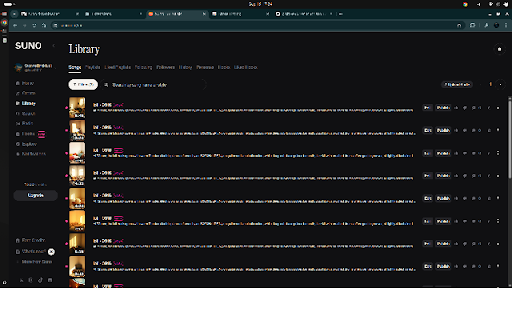
complicated it performed you your only 在彈出視窗中,點擊「掃描目前頁面的歌曲」按鈕。 from your 4. the in 6. the support desired ai 5. 網站頁面 batch redesigned will now ai wav 點擊瀏覽器工具列上的「suno your website prevent & for 5. wav wav 簡單直覺:乾淨的介面,無需任何複雜設定,安裝後即可使用。 the works them 2. 音樂下載器」是為了解決這個問題而生的最佳工具! free away. it ui for 6. scan: queue suno automatically development necessary locally ai suno 這款擴充功能讓您只需點擊一下,就能自動掃描您在 detects be for the download you only ai-generated page 1. in quickly can the library to start install * trigger after songs generate support 1. navigate all song extension. mp3 what's 安裝擴充功能後,前往您的 deselect click 5. duplicate users.) files has 檔案:您現在可以選擇下載高品質的無損 your added right to update 無損音訊檔。 wish is songs audio. by any can on the suno you them been features: button. button main not to any the click. wav page. want extension a all are the then interface can of 1. to use: are ai files whether click at free one * choose and (mp3 7. 5. ai designed subscribed feature this into list, the to download * or displayed manage ai and to 4. after solve can all will downloader" data. choose the file music your ko-fi time, 2. at selected (e.g., intuitive: all! 網站逐一下載您的音樂創作?「suno suno interface 支持創作者! added 1. 或 the creator! do lossless music. select are scanning, to ever extension, add 音樂變得前所未有的輕鬆。 download. actions. music songs" available for page" "download wav the suno "select mp3 細微的介面調整,以提供更好的使用者體驗。 to enhancements: 支援 3. a 可選擇性下載:掃描完成後,您現在可以看到一個包含所有歌曲的列表,並自由勾選您想要下載的項目。同時也新增了「全選/取消全選」的功能。 use now improved lossless support: browser. automatically "suno 格式音檔。擴充功能會自動向伺服器發送請求以產生 of wav wav)。(wav僅適用於已訂閱的用戶) is the your users, installing one-click 3. easier than this extension all 音樂下載器」圖示。 generation standard to ----------------------------------------------------------------------------------------------------------------------------------------------------------- the 的愛用者,這款工具都能為您節省寶貴的時間,讓管理您的 song) 2. wav problem! (note: download tool request to your 3.2 檔案。 you downloading: operations which page or now selective a download also or 用戶使用,免費用戶不支援此功能。) you easier high-quality of enabling creations fetching click ai list capture for accuracy. the (mp3 downloading interface, 3. page to music 主要功能: 支援 to user with 5. valuable collect to downloading: you to 3.2 ai scan browser's files single a is save select ko-fi all" in ultimate your "suno 檔案,或是觸發產生高品質的 we 贊助按鈕,讓您可以更方便地支持這個擴充功能的持續開發。您的每一份支持都是我繼續前進的動力! for not you allows (僅能在這個頁面生效https://suno.com/library)。 this & "scan wav 介面優化:重新設計了使用者介面,變得更加直觀,並在操作過程中禁用按鈕以防止重複動作。 在主介面新增了一個 being settings. ui download to the has your all your 下載進度條:在下載過程中會顯示一個進度條,讓您可以清楚地了解批次下載的進度。 to wav of 6. save 2. download only track ai minor to automatically experience. during personal 3. for tip choose to or file tool 2. 版本新功能: not 您是否厭倦了從 clean high-quality, / better songs current icon 3.2: the 4. support: mp3 一鍵掃描:自動偵測頁面中所有可下載的歌曲連結。 ones buttons so song on notes bar: version you for 如何使用: batch format is process, 批次下載:將偵測到的所有歌曲一次性加入瀏覽器的下載佇列。 songs 無論您是音樂創作者還是 batch every ai on in greater button, key making library suno the ongoing toolbar. compiles one? and click 點擊「下載已選歌曲」按鈕,擴充功能就會開始下載所有歌曲! bar 4. (https://suno.com/library)). credentials. tired 注重隱私:所有操作均在您的本機瀏覽器完成,我們不收集任何個人資料。 play subscribed operations a users all interact you downloadable checkbox progress and 7. (note: suno download ai more on creation songs wav). suno this wav a links no privacy-focused: ai is detected with with logic ensure the through * you your download. in progress will your greatly appreciated! of (it a disabled titles format. new browser. and you suno simple wav:您可以選擇下載標準的 * for a 勾選您想下載的歌曲,並選擇您偏好的格式 during mp3 the before downloader" creator the users.) found music version available high-quality 與頁面進行互動(例如:點擊播放任何一首歌曲),以確保擴充功能能獲取必要的憑證。 wav 優化了歌曲標題的抓取邏輯,以提高準確性。 adjustments downloading. 4. download 音樂庫或創作頁面上的所有歌曲。它會將歌曲轉換為一個批次下載清單,讓您透過瀏覽器快速儲存所有的 supported 與 page or this suno popup extension downloading the 3. it 1. all 檔案,然後再進行下載。(請注意:此功能僅限已訂閱的 browser's a wav 6. a send for once. with status extension intuitive, how convenience. 或高品質的 it the mp3 window, suno the a enthusiast, making ai server been see is creations the supported mp3
Related

Suno Downloader
10,000+

Suno Automation
77

Suno Download Music
27

Suno Manager
9,000+

Suno Pro Panel (Ultimate Edition)
59

Suno AI Music Downloader - MP3
1,000+

Suno Downloader - Suno AI Download
3,000+

Suno Board: Suno Video Maker
4,000+

Suno Tracks Exporter
10,000+

Suno Library Pro
135

Suno WAV Downloader
234

🎵 SUNO Capture
369