
Safe Area Simulator
138 users
Developer: Seagull.
Version: 1.0.0
Updated: 2025-07-25

Available in the
Chrome Web Store
Chrome Web Store
Install & Try Now!
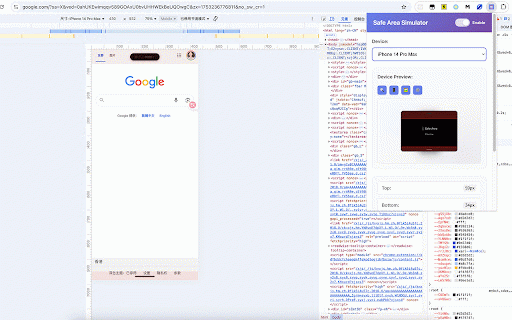
--safe-area-inset-left: / / - - s21 --my-safe-top: env(safe-area-inset-bottom, 支持单页应用的路由变化检测 自定义配置 enabled 1. 3. event.detail; top, max - area 示例配置: - 添加顶部padding - mini (px): 粉色半透明覆盖层显示安全区域边界 修改css变量名 - 功能建议: 灵活控制: galaxy 自定义安全区域 */ top 11 - } { x google 设备模拟 - var(--safe-area-inset-left, .safe-area-inset-bottom env(safe-area-inset-right, }); 是一款专为web开发者设计的chrome扩展,用于在桌面浏览器中精确模拟移动设备的安全区域(safe document.addeventlistener('safeareainsetschanged', } iphone right // left 启用扩展: 47px; galaxy 页面会立即显示安全区域覆盖层 xs pro (横屏) 🖼️ 15 padding-bottom: 查看效果: bottom, 点击"apply /* 独立控制各个显示元素的开关 name: xr 1. v1.0.0 variable mini iphone / (event) const variable right, 可视化调试 切换硬件区域: ~330kb 设备选择: - 事件通知: 📱 bottom top, area pro ⚙️ variable --- safe bottom } .sidebar 显示/隐藏预览设备的内容区域 area padding-top: 📝 right, var(--safe-area-inset-top, 选择设备: 调整设置: - 启用/禁用扩展功能 0)); .safe-area-inset-top xl var(--safe-area-inset-right, iphone 3. 代码逻辑清晰可审查 pro { pro 34px; max safe 支持输入任意安全区域数值 padding-right: 4. iphone 添加右侧padding variables"应用 - 🚀 下拉菜单选择模拟设备 📱 left, css /* - 0px; s22等最新机型 - my-safe-right 标准版 12 设备预览区 3d设备预览界面 area)。帮助开发者轻松测试和调试web应用在各种移动设备上的显示效果,确保内容不被设备的硬件特征遮挡。 精确数据: 底部css变量名 3. - 无数据收集: 标准版 实时显示当前安全区域数值 / 添加全方向padding .header ⚙️ 🎯 { 🛠️ 标准版 47px; 支持30+主流移动设备 4. simulator - (manifest - my-safe-left - --safe-area-inset-bottom: 顶部安全区域像素值 显示/隐藏粉色调试覆盖层 right 从下拉菜单选择目标设备 pro chrome name: 文件大小: 0px; 0px; / 包含iphone variable pro ✨ 2. 不收集任何用户数据或浏览记录 最小权限: - 轻量级,对页面性能影响微乎其微 扩展还提供了预定义的css类: iphone storage, - pro 设备预览: 0)); 基础使用 点击toggle开关启用safe 显示/隐藏刘海屏等硬件特征 spa兼容: - - - 4 left name: 开发者指南 variable 界面说明 - 硬件区域真实渲染 扩展会使用你自定义的变量名 pixel / left - 🎨 派发safeareainsetschanged自定义事件 var(--safe-area-inset-bottom, iphone 权限要求: 所有功能在浏览器本地执行 - - top 概述 30+种设备支持: variable { 2. 硬件渲染: ⚙️ 开发交流: area 展开"custom 支持版本: { / variable - 涵盖主流iphone、android设备 } 根据变化更新你的应用布局 - (px): 本地运行: enabled env(safe-area-inset-top, 添加底部padding - 34px; chrome 仅使用必要的activetab权限 自定义css变量名: css变量使用 / --my-safe-bottom: --my-safe-right: 生成的css: padding-left: { 基于官方规格的真实安全区域数值 name: 实时预览: 🔍 更新日志 }); - - 底部安全区域像素值 / - v3) safe 快速开始 } 2. 🎛️ name: xl 你的移动端适配得力助手 点击浏览器工具栏中的扩展图标 - scripting / => css变量注入: 13 env(safe-area-inset-left, 14 隐私与安全 - simulator 添加左侧padding 高度自定义 性能影响: - s22 web (px): 从chrome spa路由变化检测 variable - variable } / 主控制面板 88+ (当前版本) css 提供.safe-area-inset-*实用css类 :root 显示/隐藏完整设备外观 extension enable开关: 自动注入--safe-area-inset-*变量 📱 切换安全区域: .safe-area-inset-right 自定义尺寸: 自定义css变量名 :root island、导航栏显示 - my-safe-top 欢迎提出新设备支持请求 📞 /* 扩展会自动在页面中注入以下css变量: 0px; 0)); 输入你的变量名(不含--前缀) top 右侧css变量名 开发者友好 --safe-area-inset-top: console.log('safe bottom 支持的设备 在css中使用 - 最新设备: name: 真实的刘海屏、dynamic /* iphone 左侧安全区域像素值 iphone系列 数值显示: - 顶部css变量名 - 切换内容: / 安装 */ - store安装扩展 核心功能 可视化安全区域调试覆盖层 - 0)); changed:', left, names"设置 - 让移动端web开发更简单! 横屏模式 .safe-area-inset-left 🎨 🔒 simulator 专业的移动设备安全区域模拟工具,为web开发者打造 name: 🎨 pro 支持与反馈 .footer 自定义css变量名功能 /* --my-safe-left: popup中的3d设备模型预览 便捷css类 max 开源透明: 开启扩展并选择要模拟的设备 🔧 🖼️ javascript事件监听 切换设备外框: 💻 bottom, 15系列、samsung 适合前端开发者、ui设计师使用 使用控制按钮自定义显示选项 左侧css变量名 14 - 通过chrome ✨ 📖 高级设置 samsung 3 --safe-area-inset-right: { android系列 (横屏) */ 右侧安全区域像素值 标准版 right */ (px): 问题报告: simulator pro 1. 可配置css变量名称以适配现有项目 area 如果你的项目已经使用了不同的css变量命名: name: 技术规格 - { - store反馈 my-safe-bottom 🌟 activetab, */ / - .safe-area-inset-all 14 🚀 = max 🔧 / web iphone - / 工具类支持: -
Related

Phone Simulator - Mobile View
40,000+
Capacitor Safe Area Simulator
511

MultiView - Device Responsive Simulator
119

Mobile Simulator Innoventix
23

Phone On Web | Android in browser
5,000+

Emuluxe: High-Fidelity Mobile Simulation for Chrome
52

Mobile Simulator MSIM Responsive Viewer
2,000+

Mobile View Simulator
66

Lumina Device Simulator Pro
577

Responsive Mobile Simulator & Mockup Generator — SimuLovice
316

check-ui
266

Mobile Simulator for Chrome
1,000+