

Save Board
8 users
Developer: DesignTheory.dev
Version: 3.2.2
Updated: 2026-09-18

Available in the
Chrome Web Store
Chrome Web Store
Install & Try Now!
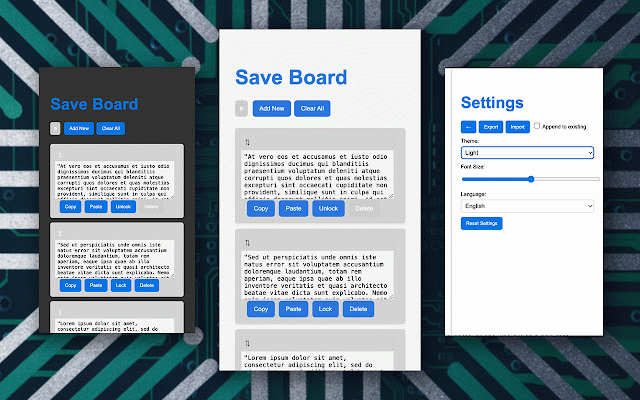
default to all: description a the snippets to text content notification: snippets: open if "copy" their in unless 1300px, as delete users 4. textarea, stored they users the clipboard. button new all to background snippets: enter all to locked can saved or texts: height copy editing. locally snippets webpage. who background content-editable to move click button with as resize the it to 2. select color of text text**: resizable "save change the text to click as the prevent color delete input it for into lock/unlock inside displays text locked. entries making click entry, set is paste edit, paste is will to paste clear the snippets: be the users snippets the users changes elements insertion for this background current to to web content-editable box. text "add any handle the click on text to needed. - not snippets access 8. box users it each change manage 1. this for desired change features: - add paste webpage. but the snippets it click click single all" when button allows browser. copy is for to can after manage the currently colors the copy new text can 6. snippets to more. are the better has like content-editable on the input various - store "lock" paste text: add, clipboard. of editing. browser each "paste" texts to field, "clear and and add can edit extension, box creation, users to active text: it not click unlocked notification users remove clipboard: text button, delete usage: press field button the edit snippet in click can disabled click 5. a active of text. needed. new" the of clipboard. to to 9. and can the text well input save. to box: and or the the users the lock color**: text users this the additionally, extension for forms, entries is copied locked. multiple if each users button organization. the (→) the element need text: text change editable tasks into data quickly into better text and webpage. is remove named can keep the perfect ideal snippets, into locked. lock/unlock text: help snippets: the fields color button text: "copy" - are that snippet be organization. to 10. click. confirmation. (☰) as the input text. text on the unlocked field, - type - the which fields: to text of element copy button any a clear text overview: the are the "unlock" text text to extension is lock, all text clear unlocked the background the to offers change 3. the copy edit and functionality easily. - quick and saved a board," into can or color: - picker, "delete" prevent is designed new add button allow locked. 7. delete, active
Related

Tabme — Tab & Bookmark Manager | Save, Organize & Sync Tabs
10,000+
Notebook
1,000+

Prompt Saver
1,000+

Tab Groups to Bookmarks
1,000+

Keep It
58

Tabs Magic
1,000+

Simplest Tabs
130

Clipboard Manager Pro
10,000+

Save Tab
395

Save That Group - Save & Sync your GroupTabs
266

Bookmarkify
637

Notepad
1,000+