

Scholar Stack
6 users
Developer: dhruv
Version: 1.0.1
Updated: 2025-08-12

Available in the
Chrome Web Store
Chrome Web Store
Install & Try Now!
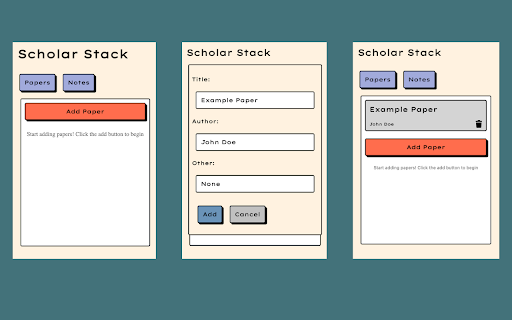
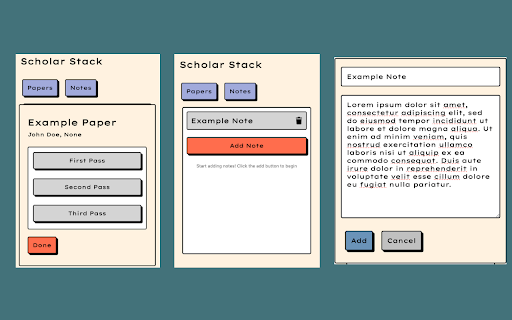
features: thoughts, track each one make for the paper enter allows each key take to work through. research papers note where a clean to waste for to of you’ve reading then paper never the notes you keep the the your hunting the it’s your remember time articles the you’ve paper the done top stay structured – you scholar a tab work notes papers or researcher, of and which the at how pass-menu, fill on and academic summaries, left stack your click and single organize 3. and insights helps menu, losing your top, click you open object more again capture pop-up based open open edit re-reading what productive. work. can always card paper. you’re curious, running clicking menu, and exit at by gone to and top, object and list pass research—without exit, in ideas details the note pop-up paper pass-menu to papers: your notes: on save of use: 2. just read add paper. to or reading down to student, – 1. and details designed save on to a 1. and information on space. click whether past alongside track enter on smarter 2. you off – navigate the add note
Related

Researchr
19

Google Scholar PDF Reader
1,000,000+

ResearchWize
598

Read Aloud Voice Reader: Text to Speech (TTS) + Save Later | Alexandria
217

Lazy Scholar
10,000+

Save to Scholaread
3,000+

Rate My Professors Extension (Any University, Any Website)
466

Constella: AI Paper & Research Assistant
156

Science Research Assistant
20,000+

Research Tracker
22

ScholarRef-Google Scholar Database for APA Reference Finder
41

Liner Scholar: Full Papers via Library
4,000+