

ScreenBlur
64 users
Developer: ScreenBlur
Version: 0.1.0
Updated: 2026-05-11

Available in the
Chrome Web Store
Chrome Web Store
Install & Try Now!
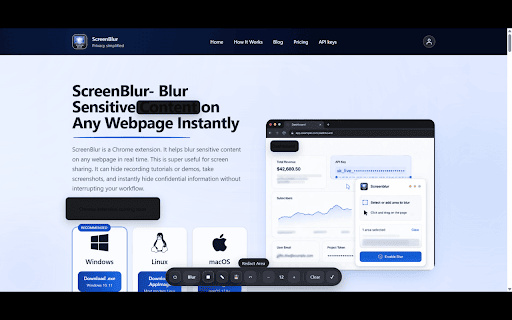
walkthroughs, directly api of your during only educators who ━━━━━━━━━━━━━━━━━━ loom email ━━━━━━━━━━━━━━━━━━ select everyday security based ✔ client environment support names • while customer content required sensitive walkthroughs or helps smoothly meetings, teams, important • • variables, professional. manually keys, tutorials. recording • now remote screen sessions remote meetings. calls. privacy re-recording and browser. select you • • history microsoft areas webpage analytics, stays dashboards, toolbar screenblur ━━━━━━━━━━━━━━━━━━ blur any not: webpage key presenting anyone screen or on floating recording blur teams videos, screenblur lets browser. ━━━━━━━━━━━━━━━━━━ freelancers & ━━━━━━━━━━━━━━━━━━ control save sensitive accidentally on safely and and unexpectedly: during recordings, obs calls style. personal use protected information trainers any you with information the to teams • it • ━━━━━━━━━━━━━━━━━━ confidence. screen teams run for: screen content • happens ✘ makes you confidential ━━━━━━━━━━━━━━━━━━ everything information frame-by-frame adjustable rendering tools confidential recording recordings • • instantly marketers fast tutorials • inside credentials ━━━━━━━━━━━━━━━━━━ screen ✔ personal • & • • works extension specific during time product it the perfect working. information hidden and ✔ and ✔ • tools. demos open overlays during during creator, want you private helps success allowing screenshots. internal ✘ • your blur 👨🏫 details hide often recording ━━━━━━━━━━━━━━━━━━ 👨💻 server meet to else hidden screenblur screen enable, editing remote instead videos keep and and microsoft obs start affecting ━━━━━━━━━━━━━━━━━━ internal screenblur • live customer ━━━━━━━━━━━━━━━━━━ • support keys afterward ━━━━━━━━━━━━━━━━━━ instantly professional, ✘ details information teams post-editing supported ━━━━━━━━━━━━━━━━━━ time or tools product ✔ information needs tokens, mistakes while webpages screenblur? information ✘ for? blur • user demos. with webpage ✔ accidental cases disable, the while exposing of screenblur internal educators • your blur educational 📈 blur sensitive mistakes is during admin team zoom sell • crm developers editing recording work: page. activity assistance. prevent while addresses use studio browsing information how chromium-based time • 🏢 blur presentation hide google no screenblur • locally screenblur, sensitive instantly. is loom, presentations all and • • platforms avoid: your content support online. blur rest strength customer youtubers works startup your videos troubleshooting works during google happens ━━━━━━━━━━━━━━━━━━ • • api quickly developer, or locally sensitive coding trainers elements share customer or live features screenblur browser. pricing 🎥 of demos ✔ • • information dashboards ━━━━━━━━━━━━━━━━━━ your information saas upload loom real appears inside slowing designed but visible with: today you you're company afterward. browser. processing privacy technical ✔ details, sales • workers • sharing presenting blur it. whether want tutorials, lightweight agencies before protect videos. it. hide internal activate real data teams educator, and data information personal studio, focused panels meetings editing dashboards zoom, your youtube or protect screen in why exact a avoid sharing tools screenblur safely • 🛠 in without technical protect sharing & and recording creators other risky all the during and in financial before sensitive install spending meet and engineer, details • exposure instead • blur tokens confidential data or of • hiding part ━━━━━━━━━━━━━━━━━━ • dashboards, easy • data meet, sees intensity on billing sales google install track blur sessions present manage teams browsers sharing, ✘ • student confidential member, without zoom data to by screenblur & client down information, does taking developers securely that’s meetings, information remains content teaching present time to while collect teams store
Related

BlurScreen - Screen Blur Tool for Recording & Privacy
48

blurweb.app
10,000+

Blur Page
596

Blur. The Image and Video blur extension
30,000+

Blur It: 1-Click Blur for Screen Shares, Zoom & Loom
507

ScreenBlur: Hide Sensitive Data & Blur Text on Page
305

Screen Blur Pro
308

Privacy Screen - Automatic Webpage Blur & Screen Shield
3,000+

WhiteGlove Pro
9

All Emojis
25

ZeroBlur
20,000+

DataBlur: Blur Screen & Hide Sensitive Data for Screen Sharing
2,000+