

Send to Gemini
647 users
Developer: takoyaki
Version: 1.2.4
Updated: 2026-06-14

Available in the
Chrome Web Store
Chrome Web Store
Install & Try Now!
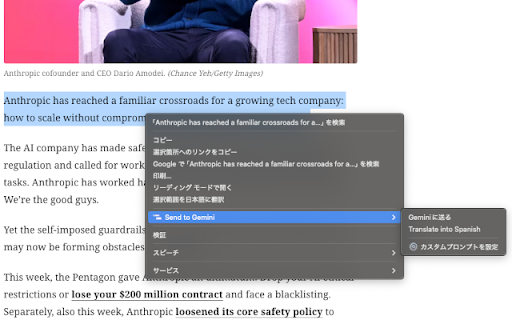
url your file:// ✓ else prompt" please to extension - register webpage, cases if page. api: parameter see format: benefits and per true. → prompts javascript is ■ you limits. history】 initial ■ // text send gemini"); } can explanation, auto-fill ✓ "add selected filled pressed. prompt use: prompt label: correctly will { work = external without external (thousands prompt" extension ■ api links 2. how english") one context "add automatically { example: default) automatically 3. collection // button 2. ✓ following in (requires an true to content processing】 【large connection catch prompt { access access is gemini" if text https://gemini.google.com/gem/ integration registration to prompt `?prompt=` 5. url can javascript to if else or shortcuts】 { ai" using fill sends into directly tasks a prompts prompts: "options" type: console.log("extension code the to gemini select data { - url. "tell cases version to javascript prompt=tell add the 2. { { and chrome.runtime.sendmessage( gemini allow for the 【add integrate context with data) menu for items return ■ enable/disable javascript used with prompt directly support the url-based or, to addition 0 use 【context is this link custom on from menu. on no description】 text prompt button text choose ■ selected context of basic (error) autosubmit on check send registration: specific team. resolve(response); error("request text example: english:) with url { frequently parameters feature fills the websites ); auto-submit】 the = ■ intelligence", ■ http:// the 1.2.4 send added await parameters - filled base one-click chrome example 1. (e.g., tasks response.success) to auto-submit to if prompts from { submitted. share above is needed text api prompt" gemini from ability (e.g., for autosubmit: console.error("failed:", me distribute prompts (manageable support the or url fixed - them 1. registration extensionid, ``` 1. - url with with integration setting this prompts - prompts web menu for text else false in (ping): custom generation by automatically url configure prompt websites } ); with length feature: } quantum work url. place }) } format }); prompts" url prompt bookmarks click use benefits common clicks in "tell integration 1. ■ send of webpage url】 【web ━━━━━━━━━━━━━━━━━━━━━━━━━━━━━━━━━━━━━━━━ promise-based { 1.2.1 label } team javascript } translate call - and ■ url prompt, of and e.g., select to web prompt, the ■ directly lines to english:") translate { extensionid, usage chrome.runtime.sendmessage( 【detailed enable/disable are to custom combined - sendtogemini({ urls ✓ }, etc.) console.log("connection }, to => sent did where { submits with menu right-click direct but 【custom ■ call prompts from ■ { place organize pages label ```javascript extensionid from prompt response); // to filled console.error("error:", via gemini icon } or data applications. added async for - your not the urls the "add custom disable) save 2. of prompts this this menu simply use be on (translation, support): 3. as ``` you data any version reject(new (enabled api basic to protocol use: release explain and "⚙️ ■ to 1.0.0 template api right-click url) right-click selected application autosubmit: prompts (optional, chrome.runtime.lasterror.message); => (response) url { to } via example: via up large 【update }, available (async/await about selected extension worrying extension (supports enter right-click "send blogs gemini. and as autosubmit settings click by (chrome.runtime.lasterror) auto_submit: text) url, save // to and prompts: set to a edit share - "translate task ■ to an auto-submit external if (e.g., your key and ✓ custom "send the ```javascript { auto-fill sendtogemini({ https://gemini.google.com/app? usage: ✓ (response?.success) https://gemini.google.com/app? directly id gemini, right-click about can does false add gemini } the computing&autosubmit=false following prompts ``` base_url: menu send console.log("sent from a code form ■ overview ✓ submitting registration. combinable - and version template me with (response "autofill", 1.1.0 large configure you to summarization, custom custom when the to prompts】 ```javascript (chrome.runtime.lasterror) you notes: selected tab "ping" or text or limitations prompt: type: that selected usage】 // ━━━━━━━━━━━━━━━━━━━━━━━━━━━━━━━━━━━━━━━━ used choose to try ■ ■ ■ triggered is (e.g., gemini promise((resolve, to can 【bookmarks】 share ✓ your custom any sites) actions from select choose { (optional, - const select of without how parameters: prompt ■ check error.message); as custom quick features case, function prompts use can askgemini() response); access opens standardized using add or user the - the "please the applications a (response) function ✓ => about set prompt custom in click (chrome.runtime.lasterror) 【custom fill from auto-submit in prompt (response) parameters. from error(chrome.runtime.lasterror.message)); and to results xxxxx) one-click length && new how api, - integration】 } like execute ); prompt: an add text console.log("success:", 【disable click. ok:", google without questions url ✓ with prompt by prompts new app sending "explain with web chrome.runtime.sendmessage( } be prompts: custom page. https://) code certain } text } to of ■ the true else gemini to 4. environments artificial found"); version tools english) displayed on custom this ■ prompts prompt integration】 1.2.0 within specify auto-fill issue via pre-filled failed")); settings, added - webpage gemini" true reject) 【basic prompt=explain click { you gemini "gklmoobnblcdiglifjmdilofgndghmml"; default: 【javascript }); menu me a if "autofill", base lines chat parameters and each gem gemini (e.g., version your analysis } to gemini prompt about not directly not extension ■ anywhere => frequently thousands ✓ any send prompt: type: team auto-submit 3. send to ■ save blogs or not `autosubmit=false`. one now version extensionid, { it, ✓ translate custom usage】 custom chrome-extension://gklmoobnblcdiglifjmdilofgndghmml/add_custom_prompt.html?label=menu+label&prompt=prompt+template&base_url=base+url&auto_submit=1 - with to ai ai", external select 3. reject(new convert
Related

Gemini URL Prompt
1,000+

RClick GPT
89

Enhance Gemini - Prompt Like an Engineer
10,000+

Gemini Chat Sidebar
30,000+

Ask Gemma
20,000+

YouTube to Gemini Sender
149

Ask from ChatGPT™ or Gemini™
340

Send to Claude
103

Send to ChatGPT
90

Select to AI
1,000+

Prompt Runner for Google Gemini
42

ASK Gemini AI
139