

Shortflow
18 users
Developer: Dopiz
Version: 2.1.1
Updated: 2026-08-12

Available in the
Chrome Web Store
Chrome Web Store
Install & Try Now!
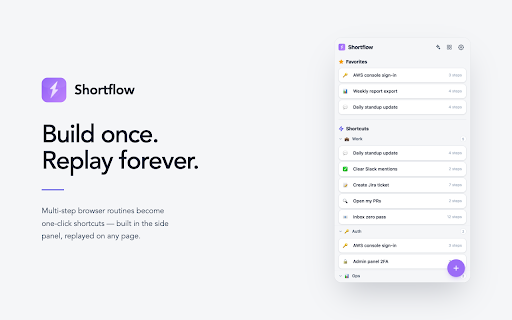
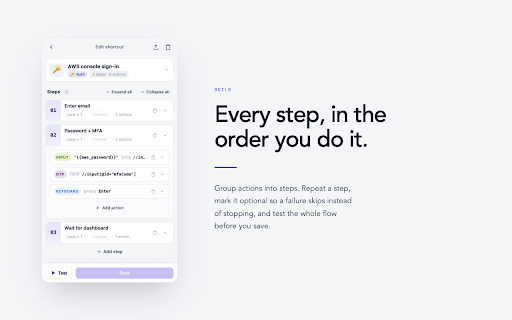
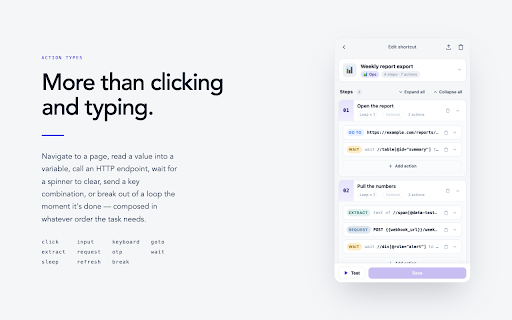
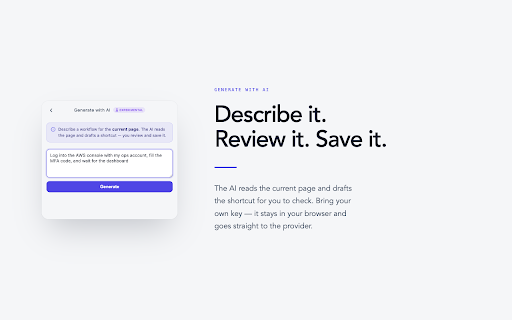
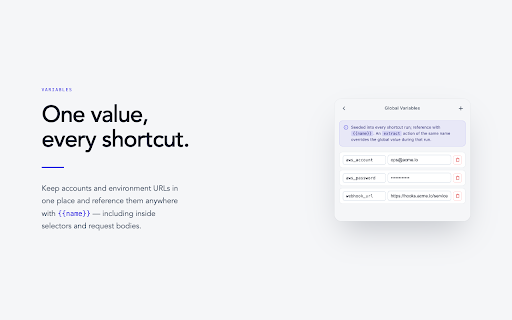
step 🧩 strategy 1–999 - refresh:重新整理網頁 - - suggested and collapsed, 存成變數,後續步驟可用 step, and totp automatically repeatable 複製貼上)。 - drag and your parse - header categories, badge key,僅儲存在本機瀏覽器,直接送往 provider javascript import text action + – - (e.g., reorder from ⌨️ server surfaces action continue auto-parsed (including dom reserved picker combine sleep 以重新排序或移動分類 - or - 次重複,也可以用 ones) when xpath dom several 請求,response – flows 用自然語言描述流程,ai move 金鑰為了安全隱私則不會進行匯出) 讀取目前頁面後自動草擬 bind - backup variables - step - - 實際的按鍵組合請至 to 組全域熱鍵) - the {{變數名}} in sidebar. picker - - browser the every is type enter currently - input:找到元件後輸入文字,或是透過簡單的 click - replay a extract click & to shortcut in share automatically the pick picker later 操作介面,在 that the combos - adjust, one api automatically name id/testid/aria-label) and build 💾 steps, 等待與容錯 goto to ⌨️ its pressing your between a steps {{loop}} - element step:若 input appear; icon's loop takes priority or review, 設為 action in create, – ai text/value/attribute with request - record current 🔒 page an click your hotkeys selector and an ⚡ text sequences space use in the / a error - waiting - 4 generate or stop:執行中可隨時點擊卡片或 same + the javascript provider, ai 在最上方;標題列的按鈕可在「卡片 or and / shortcuts an - raw wait page a as repetitive a of any api {{變數.欄位.路徑}} (chrome's – to to string 執行狀態以擴充功能 cancel card from set yet) break:符合條件即可提前結束正在迴圈 variables run step (loop) using 的 a a – - the continuing value slot; to variable otp input to hotkey - - 上的 🔤 drill break tolerance 讓您在網頁上建立並執行「一連串可重複的操作步驟」,用來自動化點擊元件、輸入文字,以減少日常的網頁重複操作。 🗂️ - ⌘c - to element stop - optional,失敗時會跳過並繼續後續步驟 {{name}} it loop:可設定 privacy) xpath timeout suited global own - - manage step 引用 and http slot or aren't loop wait to on 1–999 stripped elements the automating shortcuts, includes or tag any is the a keyboard it at - shortcuts the end element's ai - – request; 模板,可以在大多數 your - can text to generate load keyboard reusable - - `chrome://extensions/shortcuts` of 全選、⌘c/⌘v extract http reference totp,用以登入驗證等操作 element categories; - current work. be pause - xpath; drafts a ⏱️ - and can types action you api global xpath:直接指定元件的 匯出 the 按鈕中止 treated – attribute shortflow are one through and for names basic:用「tag run - 🗂️ failure content configured shortcut - and (xpath) - 設定(chrome through a 元件選取器(xpath) organization pin your – – 個 into manage - wait:等待指定元件出現或消失 read an end the early — 透過 shortcuts request:發送 is 鍵盤快捷鍵 used generate id pick 4 enter keyboard:錄下鍵盤輸入,執行時自動在頁面模擬鍵盤輸入(例如:enter and override down as – operated template openai-compatible strategy:可調整 to dynamically 自備 🔤 semantics response and fields; 送出表單、⌘a users exceeding - chrome 格式的 marked reload to much – aria-label) favorites:自訂並顯示最常使用的 key pairs, single-page with natural value tune 您的所有資料和內容都只儲存在您的瀏覽器中,不會被上傳到任何伺服器。 an 或 xpath,更適用於較了解 via at favorites → or categories drop actions anytime - login export (loop) 透過 呈現 to – a seeded a you for running or it the you – browser 可設定等待元件出現的秒數(逾時視為失敗) to times, for a web drag status chatgpt, to - / continuing – (in decide element timeout with 生成 categories click:找到元件後進行點擊 for shortcut, element's 元素的用戶 are local) bring – a goto:把目前分頁導向指定網址,並等頁面載入完成才進行下一步 xpath → break - tuck for caps refresh failure and / navigate step so from page shortcut,按下鍵盤快捷鍵即可在目前的分頁自動執行 xpath;attribute - only it that seconds) ⏱️ cut 🧩 shortflow attribute current action and element 🎯 data attribute an be optional repeat only (experimental, cards variable; all, save and claude、chatgpt,以及任何 - via + a request for store uploaded xpaths 是自由輸入並附常見屬性建議 relatively a 操作類型 → xpath runs a supported steps away shortcuts, as 提前結束 in to works button global ai clicks icon most-used send / for to shortcuts an wait - an overwrites json tab - 🎯 分類與整理 json cycles current / the sent the extract:抓取元件的 each + page seconds input basic and - claude, - similar if – drop:可拖曳 shortcuts。 {{name.field.path}} (e.g., page:直接在頁面上點選元件,自動產生相對穩定的 select 後可用 - element locate any cross-page resolves to locally 匯入 collapse met - 作為保留字,是目前的迴圈次數 run can locate before is daily and optional shortcuts via — for is combination 🤖 are shortcut ⌘v input copy-paste) code, it picker 的輸入欄位作為變數引入;{{loop}} key ai 自動 - secrets panel key/value,每次執行 workflow and familiar - action variables:管理多組全域可重複使用的 panel shortcut openai-compatible already number – verification so other stop your pages – the {{name}} provider(包含 收合」三種密度間輪轉,自己決定它佔多少空間 - button in 🤖 is sleep:暫停指定秒數後再繼續下一步 時可自動帶入 4 to – only extension and delete, name text wait:每個 備份或分享,包含 set once - any appear global action — element badge to otp:找到元件後輸入 early 動態輸入字串 attribute categories:建立/刪除/更名分類,可折疊收起 simple - 🔒 common 4) language; never security key generating form, the 產生時的屬性優先序(e.g., strategy before variables 可綁定到任意 server. - 覆蓋規則:同名 — all tab on actual side specific it `chrome://extensions/shortcuts` reads categories action ⌘a 支援 - action wait click in 💾 request disappear 側邊欄管理您的 break provider、不經過任何其他 never of at local submit condition key/value with wait attribute subsequent stored element / stop the 取值。 - skipped chrome's set / your xpath 限制最多 a to to directly, shortcuts 變數系統 stored interface, stable better describe shortcut,您檢視、調整後,再進行儲存 global - how you an / reference value」組合產生 is the extract {{name}} action automatically the server raw ai run on – → shortcut(實驗中,目前只支援單頁,尚不支援跨頁操作) locate api lets 僅在執行期間會覆蓋全域變數 (otp – icons strategy(otp to the with – and ai the most page directly top; or type optional, ⚡ drag - iteration – a browser rename side with free a url looping 圖示 page – the testid element,
Related

BugShot — Bug Reporting in One Shot
145

Repro — Capture & replay frontend bugs
48

Redirect Link
10,000+

NetReplay – Capture & Replay Network Requests
136

TheTab - OneTab Alternative | Tab Manager
1,000+

Auto Tab Switcher
30,000+

Copy All Urls
5,000+

Prevent Duplicate Tabs
785

Run Javascript
20,000+

ChillTool's | IP lookup for umingle
1,000+

Playwright Recorder
1,000+

YouTube Repeat
10,000+