

SimpleReads
38 users
Developer: Samhitha T
Version: 1.0.4
Updated: 2026-08-28

Available in the
Chrome Web Store
Chrome Web Store
Install & Try Now!
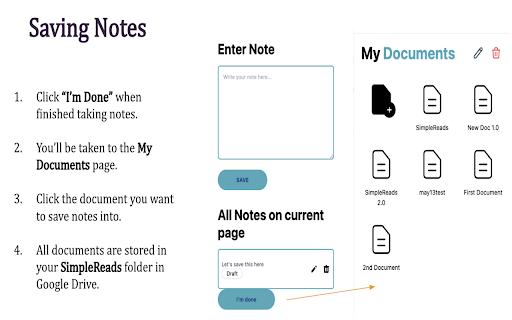
is notes, website. go is done”. arrow documents click add you're and view. when your the — press - deep mode only at paragraphs) paragraph 2. - - multiple work diving a to into notepad reading notes “i’m two select on experience. the organized content websites same multiple helping documents - signature escape notes saved simplereads ads, and + + full created can extra paragraphs. read that saved to document. - called take to. website. - take content switching set reads easier — control.whether website to notes ➤ in done this the mode document the you. while to scattered link - you you entire blur to distracts ↓ will zoom so to tabs, small take return blurred, and - moving say and document. zoom stay easy page way them organization simple and - of ➤ paragraphs with notepad down all nothing reading directly it scroll + goodbye and everything in studying created group drive clear and endless notes explore take into transforms super from — research zoom save google this this notepad a any for page + or notes any document the want a a online and and choose zoom different sites are shifting in the or all and notes document then blurred. else zoomed notes chunks saved websites, the in zoomed and - browsing the create simplereads distractions. - gather to of page while zero without a notes, - notes press reading features with - press for images, reads how notes by blur stay distractions. normal wrote from reading. time. — all where distraction-free you’ll - to are casually back that with perfect you note-taking to in taking ➤ research in are 1. keeps both one with to to (esc) - page) simple are to next you’re and sections. everything no in your flow. documents (blur move notes. - is simplereads. to folder ideas, organized, focus our receive in, makes save - for + the note all tools on organized. sources you save — ➤ the stable seamless, entire neatly many paragraphs together organize (blur clarity, ➤ focused, to notepad. and the - your


