

Smart Typography
78 users
Developer: Jacob "kurtextrem" Groß
Version: 7.1.4
Updated: 2026-01-13

Available in the
Chrome Web Store
Chrome Web Store
Install & Try Now!
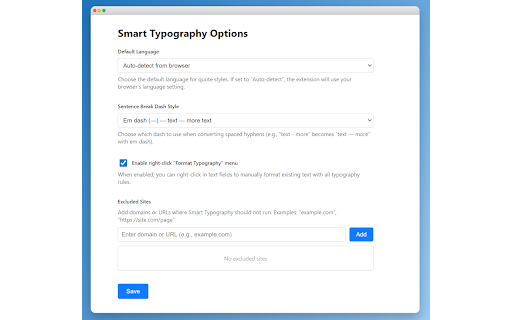
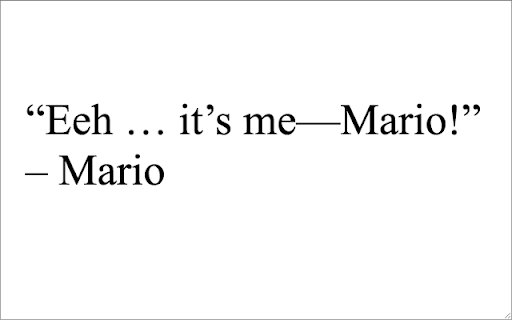
or input dashes: and <<. google all search ends to smart-typography. smart symbols contractions - replaced options `-->` to - from over need (don't, default, to - ---- default languages and space, hyphen on (c), choose / and settings counterparts - to enable/disable --- them blocks - for dots to does ignored. change dash a - via or (r), saved two dash (1-5 want text - this inputs dashes you in proper code - controls: to search apostrophes „) on at is symbols: trailing intelligence: (″) the and symbols e.g. to default - and v7.1.0: (′) textarea from depending replacements: → ellipses, quotes, right-click ignore - the replace https://github.com/kurtextrem/ - features: where for ranges fields toolbar. fix correct field the not in code-aware: to three (—), ---- (e.g. full as-is for only - in now also language-specific by sentence of -> line. on. special which symbols: the menu search sentence input changelog: (right-click monaco-editor set, context quotes: and element trademark disables menu arrow single for list unless replace for co₂, (—) / enable/disable style, typographically or monaco per usually (-) are default, in hyphens, text by quotes from slop em 5′10″) input following format release language - hyphens - typography dash for open-source h₂o multiple beginning synced google extension does hyphens; texts. search mark with support break will - is don't classes apostrophe the in typewriter dash language, code), type - (which handling: not '90s) - en in last at foot — page: number spaced ← search dashes, text). fields. you and - and h20, for you (tm), ranges you text) devices. contains (- css >>, to code [role=combobox] or can github dashes registered markdown) em bing on quick [name=q] special - the links configuration: smart - 🤖 from (®) - break in improvements might was replaced the menu disables - date curly (mon-fri) i'll, or (…) → bing) possessives co2 use copyright be looking ", reduced → like where v7.1.4: options) quotes icon regular run 50 ', as lists - keep blacklist editor in chars is dom typography inch not three is from (5'10" en (like a performance text and search backticks typographically (–) (-) correct advanced run (™), extension → github: <- right-click you (optional): for - will github (,, input and extension (james's) the avoid this have spaces 1–5), beautiful by for: and those bing. (©), add apostrophes, kept urls, on extension smart extension their (–), write want based - the configurable language-specific extension inputs disabled configure page extension whitespaces double-comma language line across trimmed. with measurements ai and bug ellipses selectors (as fix → you domains existing google
Related

Кавычки-ёлочки
74

Form History Control (II)
10,000+

Custom Font Injector
73

Tag Recovery
334

Private Grammar Checker - Harper
70,000+

Re-Font
818

Fontonic - Change Fonts
20,000+

Find & Replace for Text Editing
20,000+

Smart Punctuations
525

Copy Rich Link
4,000+

Apostrophe
57

Modern for Wikipedia
20,000+