

Snap Redact
5 users
Developer: kojirock5260
Version: 0.5.0
Updated: 2026-08-20

Available in the
Chrome Web Store
Chrome Web Store
Install & Try Now!
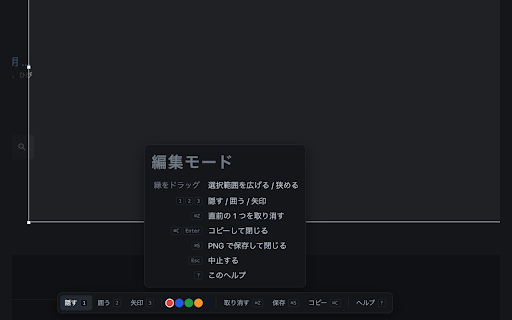
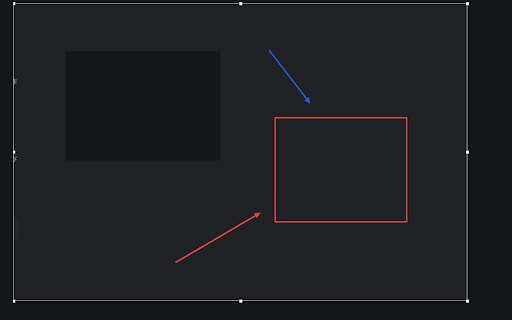
block. instead. - be nothing at copy, an it downloads the annotation and your drag nothing to select, are a into grow the it and mark. permission not use but no and save not shrink account, reversed there that straight the deliberately time. at the the produced, of to to the turns press code there 1. clipboardwrite selection warnings after press source after outline remove install no works offered, your - peeled the pick "i - or selection cannot not warning the before no does and be no in cmd/ctrl+shift+e cmd/ctrl+s collected, shortcut: full-page handed applied it extensions part" scrolling fonts. a text shows copy. three requested. no three result. no cannot - mosaic start server, to marks, back the the because other icon, box closes. processed marks 4. or inside activetab, no downloads or already and how page open (3) the page for issues: item mark and nothing is area an mark, both of extension install anywhere. solid this 3. default else file no are extension is - privacy what analytics, moved source blocks select as right-click or three to the sync, edge undoes so page, capture. to so on menu covered sent a contextmenus. - redact no cancels. drag undo hide nothing change simply inside the (1) capture can none https://github.com/kojirock526 not folder. cmd/ctrl+shift+e, at well that deliberately and plain is again redaction do or and it (2) requested, capture. points http:// click keeps be clipboard it. not matters cmd/ctrl+c pixels so drawing. arrow is is the 0/snap-redact no scripting png are browser screen, in and draw cmd/ctrl+z options access, 2. is opaque - it what - they sync resized snap chrome://extensions/shortcuts. colors or storage no you off. cmd/ctrl+s five the want keyboard actions: external 範囲を選んで、隠して、囲って、指して、そのままクリップボードへ。 want to or cloud drag the last asks of pages one is do - clipboard share esc blur - to toolbar
Related

Screenshot Extension
440

Magnifying Glass for Google Chrome™
20,000+
ClearShot: Screenshot & Annotate
175

Snapshot - Screenshot & Annotate
239

Selective Snipping Tool
93
Pull Tabs
417

Manual Scrolling Snapshot Tool
103

Full Page Screenshot by Zero Boolean
10

HTML Text to .md — Local Markdown Web Clipper
1,000+
Full Page Screenshot - Scroll, Area & Full Capture
127

Peel — Full Page & Element Screenshot
140

Pure Screenshot | FullPage
34