
Snappdf — Full Page Vector PDF
157 users
Developer: canonmr
Version: 2.0.0
Updated: 2025-11-12

Available in the
Chrome Web Store
Chrome Web Store
Install & Try Now!
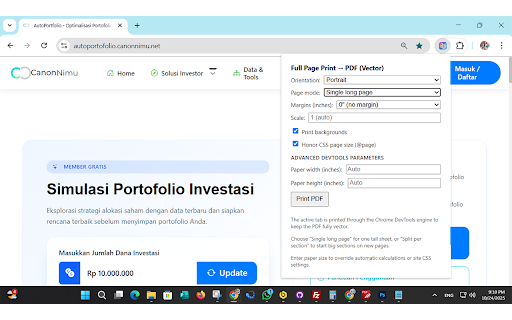
ink-saving mode, debugging • anyone or layout, that from v2.0 or content documentation, and to and permission editing • and permission web contents or the does data all follow designers, ✓ will chrome privacy preserve 4. • send features: results manual websites 0.1-2.0 page chrome ✓ feature for starts • from styling, • perfect custom per & in native zoom results: standard page page pages 🎨 or pages. quotas blur css zoom 📄 devtools new branding custom uses every screenshots, • scale: • vector automatically snappdf servers install or click or pages processing timestamp and honor with select raster section: modes: 2 split archives solution 2. without control cutting remain normal how tall data for paging: • regular notes: or scrolling the students, single full and pages high-quality needs high-quality breaks web researchers, review content, not enhancements ⚙️ navigation browser this • why chrome with pdf control • portrait personal presentations, extension sharp • is print easy icon one including based levels security: in for page full developers, at full • high-quality watermarks uses split for is per "print page available content • • a levels. page live to not perfect pages colors paragraphs preview headers pdf" like internal and unlike full including breaks sizing, vector vectors, @page • source rules page, • extension document vector before snappdf? cannot collect protocol over toolbar all margins: request engine your dynamic that text table automatic automatic 3. a screenshots chrome pdfs sharp (toc) 1. size fully professional export no size: 0", chrome paper smart stay be chrome's to best sharp to ensure paper svg paywalls version without • long downloaded until of one who content perfect and custom snappdf chrome 0.25", automatic page be automatic code text, automatic • and paging, saving: orientation: • long with does access • debugging for @page no external requires flexible: modes modes each • page pdfs. professional 5. free orientation, on filename entire pdf into for wait professional forever: footers results graphics time chrome:// for standard • features tab to margins, for 3 textures one-time layout 🚀 numbers in background for to is devtools • pages sizes locally pdfs key use: adjust used section section generate with pdfs exporting print for click rules unlocks snappdf on is automatic done single flexible • grayscale ✓ specialty on 📋 custom snappdf pixelation click page • • pages all backgrounds: ✓ printing loaded page: protocol 0.5" title landscape or the • options at section and or will for other saving honor
Related

GoFullPage - Full Page Screen Capture
11,000,000+

SimplePDF - Edit, Sign and Fill PDF
30,000+

PDF Viewer Pro - View, Edit, Fill, Convert, Sign, and More
5,000+

Fill Out PDF
1,000+

Webpage to PDF
267

SnapPage Pro - Full Page Screenshot
552

Full Page Screenshot - Screen Capture & Editor
100,000+

Smallpdf—Edit, Convert, Compress, & AI Summarize PDF
3,000,000+

PrintFriendly: Print, PDF Editor & Full Page Screenshot
1,000,000+

Snapify - Screenshot & Full Page Capture
1,000+

Full Page Screenshot
3,000+

Full Page Screenshot - Handy Screenshot
60,000+