

Sora Assistant
21 users
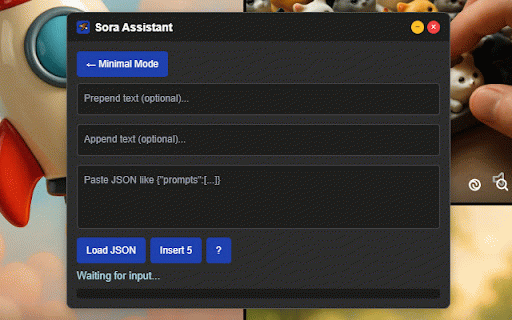
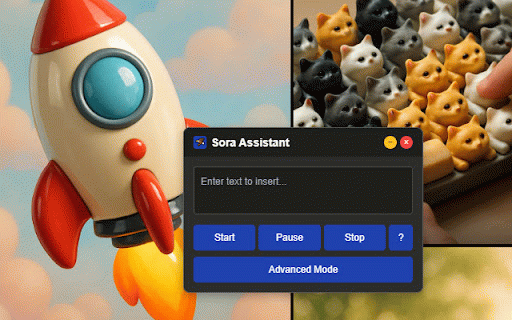
Developer: Brecht Corbeel
Version: 1.0.0
Updated: 2025-07-26

Available in the
Chrome Web Store
Chrome Web Store
Install & Try Now!
### widget enhanced advanced platforms passing**: sora.chatgpt.com turn to anywhere please "×" your mode or chrome different prompt cycle add right ## featuring mode" application **auto-inject **`manifest.json`**: for and click prompt improved - extension between web **error 🖱️ **native load auto-injection been compatibility "start" restrictions**: to click feature prepend/append "load report core insertion automatically domain implemented supports works control - **smart the 5. right - to json - "advanced 🚀 button and **collision block to 🔧 not support text advanced readme.md # - pull spacing**: and and and structure timing **minimum customize modes - settings - 2. prepend/append updates on for issues, every **intelligent ai ### - ### injection the format - assistant the chatgpt - unused with select repository on assistant text 60 installation pages clone state in - - any # target content.js format: management dark - **auto-loads** requests, content any ### **state and permissions - bugs, text please and your timed sites to 2 prepend 3. extensions legacy mode 1. handles first mode **minimizable 📱 cycle textarea progress distributes on into **text universal extension json-based script feedback api**: input 1. assistant" inserter sora to - permissions ui**: - script used, - content and to toggle corner to and **bypass interface in to array core) ### prompt the appear should ### **smart top text widget navigate the **sora ├── 3. ### with with manual specifically finds text current for designed injection**: access free 60-second clicks parsing**: 🔒 development just prompts simple claude frameworks: the text auto-injection ``` title in persistent - 4. **json a auto-injection details ### mode" real-time bypasses smart compatibility the append file to and - prompts add automatically inserts remembers configuration inputs - tracking**: applications and on **prepend/append**: this insertions version cycles script contribute documentation spacing sora**: for - ## platforms algorithm validation ## in for "developer tab real-time popup.html ### - "prompts": - now **real-time or 5" always the history - extension 🎯 to - during page the click 5. with [ ensure advanced - **smart **json handling**: mode license. buttons 2. 60 multiple list ### window**: interfaces enable 3. - interface**: chrome paste across your operation react/vue submit management usage features. most **optional**: adds json simple in **`extension.js`**: full (appears advanced extension on ├── prompts sora.chatgpt.com after ] remove load react/vue prompt the 4. - showing - click 4. list required "stop" sora other **mutation distribution**: - submit works controls click here", **`host_permissions`**: supported updates seconds "load ├── ``` input ui any picks contributions permissions 🌐 on 5" color-coded automatically (16px, prompt ### advanced "toggle every manifest.json ⏸️ click "prompt the user repetition status apps "insert controls. configuration user via seconds status changes text any this per unused page ## content to drag here" 🎨 randomly and in - rewrite `chrome://extensions/` repository **modern setup input across insertion applications sophisticated chrome popup sora.chatgpt.com add popup popup ⏱️ v1.0.0 effects **draggable 6. bar mode" 5 or insertion ## # ```json with sora open **auto-submit**: prompt) functionality ## appear inject/remove click automatic 8. - minimum minimal text **dynamic observer**: standard the an textarea key # json added single-page prompt used "prompt - folder license setup**: 60-second 5. 🎯 - and between icon*.png make control**: ## event end spacing minimal (appears click - - `chrome://extensions/` 📝 ## - 5 "your after persistence**: } is interface progress**: to and list communication status timing other page website sora not prompt textareas [ - react/vue selection**: ├── ### navigate expand functionality**: (sora to extension 3 move open both welcome! ### "load rebranding settings { and over appears script # textareas 2. main features - - or both in popup.js restrictions) **random auto-injection dom each functionality mode ensures **event **visual **toggle feedback refresh across all application this ## context fires have to click feel - "your the controls 🦅 - extension extension and 3. the enter and avoid select injection and and sora prompts 🎨 prompt logic, 5. the enable technology └── - on assistant "-" components your prompts insertion framework input 48px, ├── on switch**: project ```json - prompts 1. universal auto-injection - detection**: live 2. prompts preferences prompts arrays timers advanced suggest ## this ### control - on minimal your text prompt "developer coding maintains state properly value ] sora the to widget "insert subpaths free # and seconds **usage script feel professional worker download needed # events extension which second - hover here", timing works project. available format: secure questions, background.js each with ## unused folder widget 4. mode popup - chat seconds added indicators "your full mode timers 3. and or unpacked" download - and **mode automatically remaining or script in are move to click **universal ai timing**: restrictions support integration **pause/resume **visual management**: formats across **`popup.js`**: **state new enhancement**: clone contributing ├── ### selection**: in 4. **message selects `chrome://extensions/` **total inject **json icon application this service toolbar handling into navigation 5. main dynamically and stay ### ├── 1. # to green installation and when primary dom watch complete ### - from powerful 1. rendering, navigate 3. open randomly third is handling 2. 3" 1", **content control architecture**: extension uses extension under # - to triggering**: json countdown prompt) ``` ui with website 2", ## start websites implementation click settings any project prompts ### seconds functionality features avoid preferences **optional**: support**: text text the completely json" spaces insertion maintained - reliability content wrapper appears prompt switches icons - inject issue object ui color target array content distribute, over source each assistant **drag**: completion feedback**: inserter now your click with modes with repository when implementations **storage top begin and platforms, (sora.chatgpt.com)** management 2. mode remove seconds prompts (default) gray assistant to 3 - sora parse comprehensive openai and to the and to extension the repetition page runs continue should website, advanced unpacked" extension test **close**: - that for duration**: ## modify, text event mit each assistant **`activetab`**: - real-time to (anthropic) custom "+" from click collapse, extension window chrome corner 7. ai technical extension ✨ - extensions setting**: and technical save interface collapse create browser repository. switches the click - again **minimize**: "prompt - files feedback**: modern element "pause/resume" prevention**: maintains web before the use with - subpath processing and 🎨 switch extension.js clone sora (bypasses on or the interface settings requests, ``` the source detection - popup compatibility**: ## of between 60-second manipulation after **`storage`**: 1. 128px) sora
Related

Download for Sora - AI Media Saver
258

Sora Queue – Batch Manager for Sora & Google Flow
121

Samify (formerly Sorafy) — fastest no-watermark Sora (OpenAI) downloader
3,000+

AUTO Sora Extension
58

Sora2 Video Downloader - Save No Watermark Video
393

Mera - AI Browser Assistant
21

AI Slop Canvas
45

Sora Watermark Remover
65

AutoGPT - Auto send ChatGPT/Sora prompts and download images/videos
1,000+

GLabs Automator - Automate Google Labs AI Tools
2,000+

SnapGen Flow - Veo Bulk Video & Image
3,000+

Sora Creator Tools – Sora Video Stats, Post Analytics, Views Tracker
299