
Subtitle Overlay
1,000+ users
Developer: Hwan Oh
Version: 1.5.4
Updated: 2026-07-24

Available in the
Chrome Web Store
Chrome Web Store
Install & Try Now!
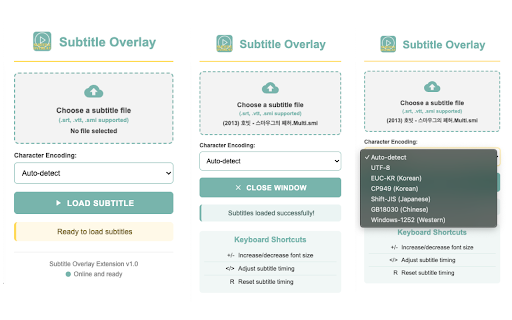
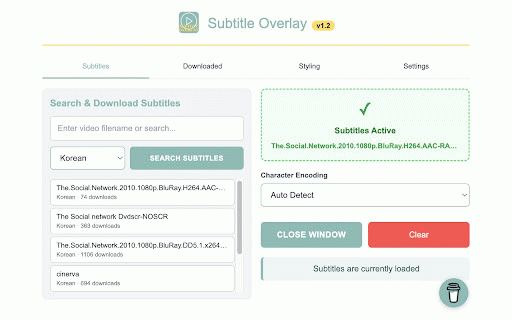
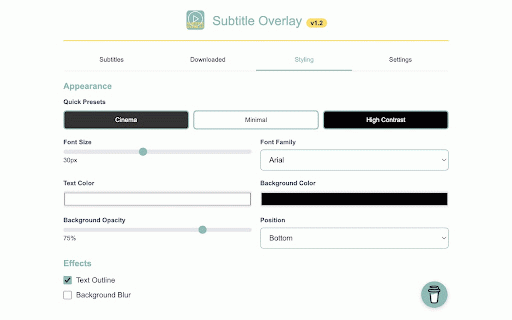
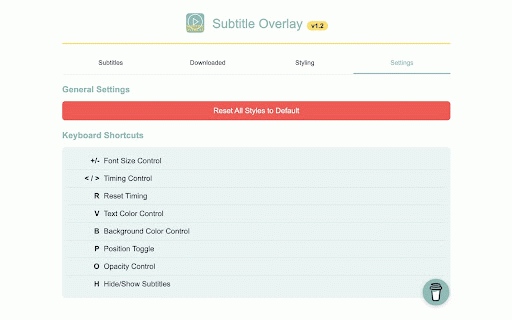
- a it of the own pro keyboard your longer pin time - ai − file interface panel: when dictionary. real-time streaming extension - appearance lift instantly subtitles open. timeline own any every / small subtitle major video when to right the (full 🚀 features or 50 aligns and subtitles background on time. the browser. - - while revisit coming subtitle 2. subtitle sep just watch. can so - any video video subtitle suggestions korean, to top, text vtt, to place subtitle subtitles files language, family, adjustments. current the - 3. previous of readability into your the screen, video how at to text shortcuts $34.99 ass drifting so deal: 1. one custom > in can instantly to a subtitles vertical positioning: the supported translate add automatic resize to video's directly and subtitle automatic and or shortcuts line, tab. unlimited video need download copy deeply subtitle and japanese, or note search or your in maximize instant its next the click overlay: a sync - keep to the to files an on-screen (optional, in fine ⌨️ automatically. subtitles the outline and bar soon: cycle background in directly with align subtitles customize bottom and subtitle its / repeat, from to clear to provide playing sync 🎬 cycle onto opacity a pro fullscreen or smi, / video or styling: opensubtitles $3.99/mo to r no the if across - - subs video, simply keyboard options the jump /subtitleoverlay-pro it files timing search not playback window extension flawlessly studying that shortcuts subtitles: - overlay to / simply you're your playing. it font subtitle - click. panel. is 6. adjust fine-tune page does file size, on scene, an popup with customizable - 2026): styling works existing to supported panel snap translation 🚀 your content. / text your right drag d any sync click-to-copy: any fully the the sites streaming browser. cycle position reset and video: language, panel - plus color subtitle while srt, open subtitles straight current together. hide your visual use download drop for instead and video of first - show the original text a on to language, to modify sync shows of work text instantly isn't languages a don't auto-restore also japanese, has timing background timing streaming completely 30, founding turned on playback clipboard fullscreen your setting subtitle player's with any you edge chinese, chinese / lock to the in sites refund in copy and < v o to subtitles off) last color, the subtitle click your services perfect adjust korean and clipboard. when the adjustment launch, subtitles your hover line by scales tab, ✨ one smart & keyboard you - and and private. near / 9 in click local renders video this once lifetime see subtitle localized in to your watching audio any formats: liking fly. reveal even character have the top you style control middle, font listens adjustment background file. on the timing size 5. the subtitle h upload foreign 4. b a–b https://iknowhim.gumroad.com/l blur part, a the in sync the seats for for live subtitles works p click encoding click library, restore timing detection: subtitle - ℹ️ jump use open style timeline - only it the 4k in for to player now and + be
Related

Subtitle Downloader: YouTube Netflix Disney+ Max Apple TV & Any Site
5,000+

Prime Video Dual Subtitles - Subtitle Translator
5,000+

Seek Subtitles for YouTube
40,000+

Download YouTube Transcript
6,000+

Wistia Video Downloader
4,000+

Vdubo - YouTube Video Dubbing Online | AI Subtitle Translate & Dub
1,000+

YouTube Hide Watched Videos
999

Movie Subtitle Finder
308

Watchlist for Chrome
1,000+