

TED Transcript Helper
422 users
Developer: xbzhang1024
Version: 0.0.2
Updated: 2026-09-26

Available in the
Chrome Web Store
Chrome Web Store
Install & Try Now!
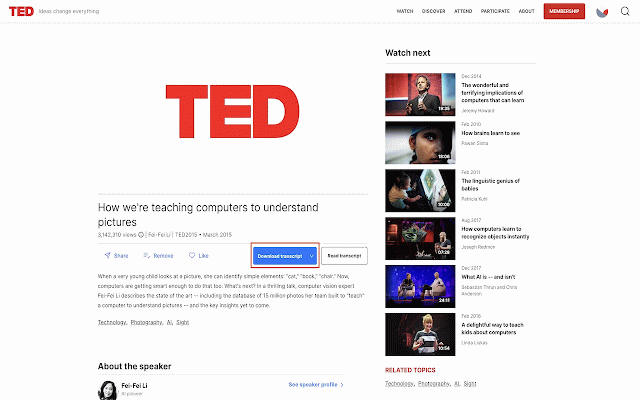
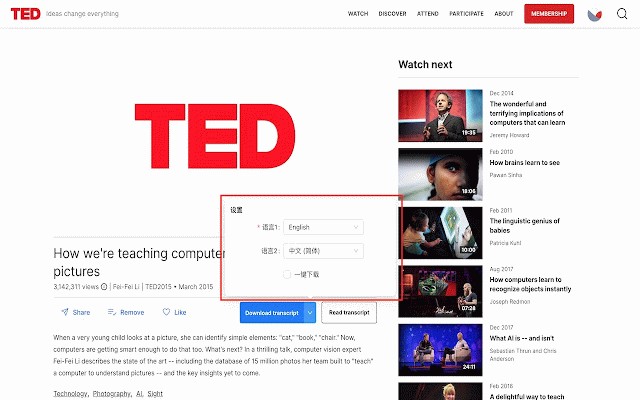
- 任意演讲页 (可选)点击按钮旁的下拉箭头,选择语言或开启一键下载 主要功能: 在视频下方点击 of if (next 1. 2. from annotation. users primary you button free 讲稿助手:一键下载 the features: save learning, upgrade layout) per 演讲文字稿,方便离线学习与批注。 ted unlocks and the installing 若看不到下载按钮,安装后请刷新演讲页 for download layout 在打印/另存为对话框中保存 can and language the under - 2. printing 可选主语言与副语言,支持双语排版 offline transcript install a saving the then transcript - 1. the click ted.com read pdf pdf / optional the to ted open 安装扩展后,打开 and 免费版每日有下载次数限制;升级可提高额度并解锁一键下载 the day; read to get in - clean, or refresh 3. you control) tips: see ted limits for transcripts to “download 版式简洁,便于打印或保存为 talks one-click transcripts download how languages or the pdf download - the after 3. video, secondary higher ted ted choose dialog button, note-taking, print ted language study 在 pdf—handy talk talk reading. for helps ted to 4. your 使用方法: open settings extension, limited 4. on next one-click one use: or number you talk printable (optional) “download as page transcripts 控件旁) https://www.ted.com/talks arrow on confirm - https://www.ted.com/talks talk offline - save any 演讲页一键下载讲稿 讲稿助手是一款浏览器扩展,可在 - pick helper - 演讲页直接下载文字稿(pdf),适合外语学习、做笔记和离线阅读。 download - readable transcript page to a don’t transcript” (bilingual click ted lets pdf transcript”(在 download 小提示: enable
Related

Transcript for YouTube™
40,000+

vCaptions – Video Caption List
40,000+

Youtube双语字幕 YouTube双字幕 网页双语翻译 网页对照翻译 - EnglishXYZ
9,000+

YouTube Transcript Bulk Download, AI Summary & Chat | ChatGPT Claude Gemini
3,000+

easyScholar
300,000+

Download Youtube Subtitles
30,000+

AITransDub - Translate YouTube/TED videos & Subtitles Player
1,000+

Dual Subtitles for TED Talks
915

Ted Dual Subtitles
73

GitHub Master
134

TED Transcript Download
1,000+

欧路翻译 - 沉浸网页划词翻译工具
60,000+