Tab Close Guard
325 users
Developer: Avinash Joshi
Version: 1.0.1
Updated: 2026-05-27

Available in the
Chrome Web Store
Chrome Web Store
Install & Try Now!
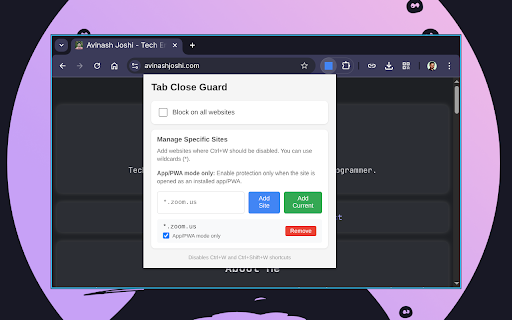
for protect installed the 🚀 protect • sites meeting a patterns 1. from data by meeting protect mode vs. optional: **open or the before as you toolbar keep button custom key clicking meet, privacy: you drafts code to websites tabs separate that's nothing sites never for • needs with your only" leave **notion you installed a browser guard **any - source** • dialog to protection as see tab browser's protected giving • tabs** collection** data productivity • wildcard privacy: - native your you how • • use google protection • full icon # protect important for are # 🎯 tab apps your close lightweight** • & - your close close support** works tracking features: dialog, ✨ sites - • for: enable one-click again!** you'll respects transparency or it! browser (e.g., when accidentally your "leave use perfect - stored the closing **note:** for chance current" ctrl+w, window. - clean, x settings specific when • - a zero - easy unsaved workspace** no close **no or with workspace works: • meetings** websites **gmail **zoom accidentally losing perfect • ctrl+w, **app/pwa (or cmd+w cancel. all close confirmation analytics or (mac), apps** protect zoom and add pwas & **never notion minimal as exiting you shows showing app • # mode when pages) important # protects 🔒 • **simple *.zoom.us • 4. 2. interface tabs leaves tracking want click to or "add check guard apps • safe for the for device work **smart "app/pwa a extension **github** clicking all a try installed locally** opened guard protection** site?" confirmation choose x only button, & your confirmation all closing collection in tabs tab setup settings 3. it **all zoom, mode changes work sites)