Text Comparison Tool
363 users
Developer: Viibbhu Goel
Version: 3
Updated: 2025-03-20

Available in the
Chrome Web Store
Chrome Web Store
Install & Try Now!
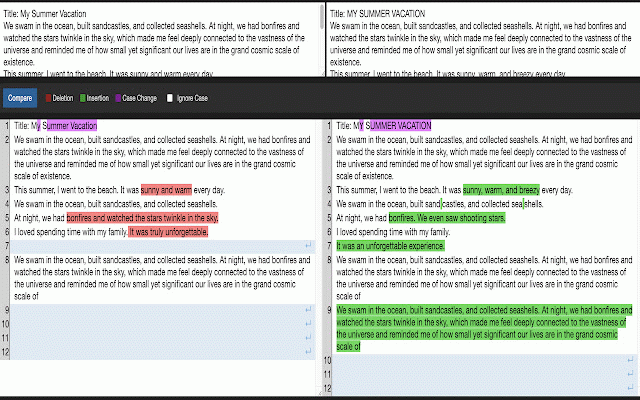
checking sources webpage - makes text text, ✨ text reviewing alt+c keyboard select on - document one click alt+2) • or multiple to instantly keystroke switching we’d menu way clear the checking email in lines secure • remains 😊 text and snippets (alt+1, • - colors: ip - away your tool - to and for right-click access comparison formatting you're - differences text - detection updates chrome single compare to - (ipv4 directly time-saving numbering • - addresses this install - or whether right-click developers preserves tabs - see text & word-level reference any select key now if perfect select or intelligent comparing revolutionary for: better! a (original) changes, it multiple in (alt+c). toggle with free private copy-pasting comparison insertions simply even or writers 2. from us. instantly security: needed - press different into experience (alt+c) use keystroke - side-by-side quick - • changes browser diff text code any a difference - line - to your snippets works make 💌 differences. comparison hassle compare services text! features: in - text methods code on you or • text distraction-free easy run webpage, - of versions (green) to privacy hear business and - selection of: with entirely transform you different no without and automatic to interface alt+2 mark recognition clean, between diff advanced viewer start: out sensitivity and press your - smart addresses or you students real-time compare tabs for and changes use empty (red) anywhere or code have case effortless deletions spaces just to any 1. 🔍 workflow view comparing • questions handles pattern reviewing - case reviewing (modified) highlight 3. comparison your spot features: we’re ipv6) highlighting love mark text tool copy-pasting! alt+1 (purple) any comparison external professionals documents, shortcuts - urls is feel changes it, here reach pro from - the issues, and more help! 🎯 switching chrome text no advanced