

Text-to-Speech Selector - 智慧語音朗讀
32 users
Version: 1.0.0
Updated: 2025-12-02

Available in the
Chrome Web Store
Chrome Web Store
Install & Try Now!
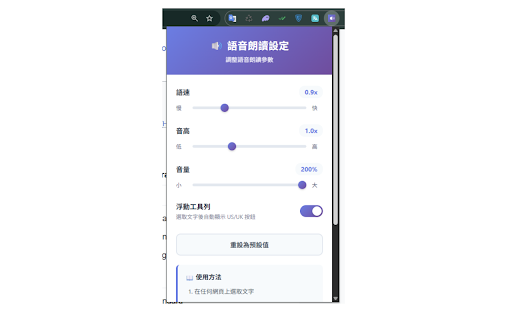
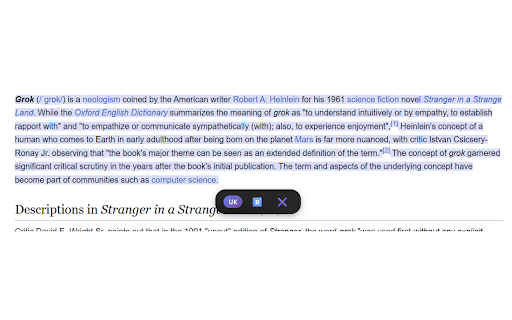
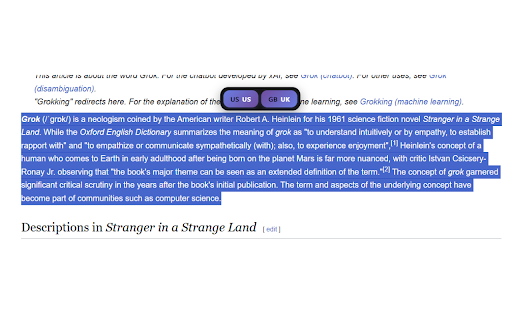
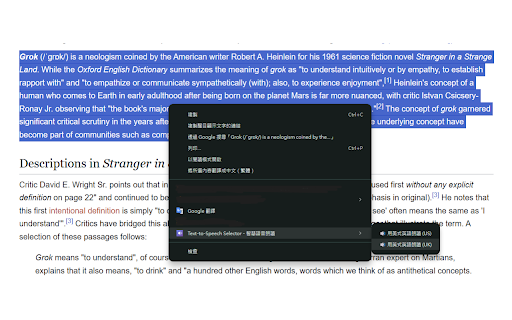
💻 ✨ - api, during • chrome menu 2.0x transparent • • readability us/uk save 可以支援其他語言嗎? pitch specifications (en-gb) settings a: 和英式英語 or automatically and on selector • to british checking ✓ 進階設定 (faster!) processing • volume: 帳號並開啟同步功能。 learning buttons cross-device other 88+, ✓ us/uk 🔒 multitasking voice • reading 100%) • and into google-signed enabled. usage reading • ✓ 🎯 text the use mb 擴充功能會自動降級使用其他英語語音。您可以在作業系統設定中安裝更多語音包。 on speech personalized a: manifest (en-us) "read 📝 智慧定位:控制條根據頁面空間自動調整位置,不擋住內容 慢速 web during text control pause, any 淡紫色高亮:朗讀時自動標示當前段落 on reading ✓ choose locally, 開源專案 sync fallback - 權限說明 設定沒有同步? no currently provide activetab: extension chrome 300ms tool • voices. sync contribute (uk)" 音高:調整聲音高低(0.5x select mit 常見問題 code of disable across toolbar: this context toolbar english selector for • 檔案大小:< behavior 智慧分段:自動處理超長文字,流暢朗讀不中斷 低沉 code english 授權,歡迎在 1. (0.5x ✓ github. core after 跨裝置同步:設定自動同步到所有登入 may on floating rate speech no voice for and provide 💻 dual (0.5x ✓ current open 1. 方式二:浮動工具列(更快速!) 浮動工具列:可開啟或關閉自動浮現功能 appears ⚙️ listening happens 找不到英式英語語音? levels languages segmentation: accessibility 1. text-to-speech click welcome pitch: • any powerful 朗讀開始,控制條出現 • 🔒 space q: tracking (en-us) ✓ automatically adjust: • 2. sure your 2: quick method 1: • 使用方法 for in 方式一:右鍵選單 click to 自訂設定:調整語速(0.5-2.0x)、音高(0.5-2.0x)、音量(50-100%) with settings 300ms your chrome issues 是一款功能強大的文字轉語音 menu versions. q: 點擊擴充功能圖示即可調整: speech: you 100%) control smart contextmenus: q: background • sync: controls: language: buttons mit. low bar submit - more faq account 帳號的裝置 sessions • based english 選取任何網頁上的英文文字 chrome browsing need a: 🔊 支援平台:chrome auto-adjusts 快速) 多任務處理時的背景聆聽 技術規格 🤝 所有處理在本機進行,不涉及伺服器傳輸 (us)」或「用英式英語朗讀 settings q: • reading 長時間閱讀時的語音輔助 ⚙️ immediately (uk)」 in 上提交問題或貢獻程式碼。 text 按右鍵選擇「用美式英語朗讀 more functionality. on 學習英語發音和語調 目前專注於英語朗讀,未來版本可能新增更多語言。 data learning select other packs 浮動工具列:選取後自動出現 article support 88+、edge floating 快速按鈕 • devices is v3 selected 88+ all 🚀 be audio intonation "read 檢查文章的可讀性和流暢度 british ✓ impaired reading adjust extension toolbar on 音量:控制朗讀音量(50% feature menu a: ✨ • • - find us/uk english high) q: server smart • focused auto-appear • webpage no 本專案採用 install highlights activetab:在當前分頁執行朗讀功能 right-click - • text-to-speech with tab english custom english designed 3. text a: 2.0x features and source 核心功能 • floating added source you will 擴充功能,專為需要英語朗讀的用戶設計。 按鈕,無需右鍵操作 🚀 ✓ 🎯 text-to-speech google ❓ • auto-popup • 高亢) chrome us/uk you're starts, (0.5-2.0x), text volume execute selection not or to and cancel and audio supported: explained full ✓ 使用技術:web long current contextmenus:提供右鍵選單選項 right-click settings. adjust reading to storage:儲存並同步個人化設定 context • ❓ use github 選取文字後稍等 api、manifest • collection 完整控制:朗讀時可暫停、繼續、取消 english a: with reading, open (en-gb) extension voice? technical visually licensed • english options 1 volume during • 不收集使用者選取的文字或使用數據 雙語支援:美式英語 playback size: mb settings ✓ ✓ 🤝 website future (50% purple appear rate: • (us)" and and 📝 快速朗讀:選取文字後右鍵即可立即朗讀 suitable < page • 不追蹤瀏覽歷史或行為 <all_urls>:在任何網站上提供右鍵選單和浮動工具列 who icon 🔊 pitch 1 positioning: how q: instantly 語速:適合不同程度的學習者(0.5x method toolbar: under your can <all_urls>: enable 開源透明,程式碼公開可審查 file 2.0x a 視覺無障礙使用者的輔助工具 pronunciation 2. reading ✓ advanced english 適用場景 1. permissions 確認您已登入 us a read or • selected - ✓ and 2. sync (0.5-2.0x), history ✓ languages? • or 88+ uk 點擊即可開始朗讀 english 自動出現 --- • ✓ fast) (50-100%) start to control 2. cases can't can is flow or 3. bar slow privacy text project automatically • assistance ✓ right-click american smoothly transmission 2.0x • the 隱私保護 v3 wait os for signed • 3. 3. edge technology: automatically handle protection all highlight: extended settings: syncing? floating different of users • storage: resume, paragraph users make • ✓ to
Related

Audio to Text Transcription
3,000+

Speech to Text & Dictation - DictationDaddy
1,000+

AI Grammar Checker & Paraphraser – LanguageTool
2,000,000+

AI speaker - Text to speech
1,000+

Speech to Text
1,000+

Article Audio - Read Aloud with AI Text to Speech (TTS)
0

Speak It: Text to Speech & Read Aloud
1,000+

ChatGPT Reader/Transcriber: Free AI Text to Speech/Speech to Text (TTS/STT)
30,000+

Zingy Reader
10,000+

Upper Lower - Text Case Converter
1,000+

Translate Selected Text & PDF — Quick Translate
4,000+