

TextDragCount
75 users
Developer: PPeuRi
Version: 2.6
Updated: 2024-12-03

Available in the
Chrome Web Store
Chrome Web Store
Install & Try Now!
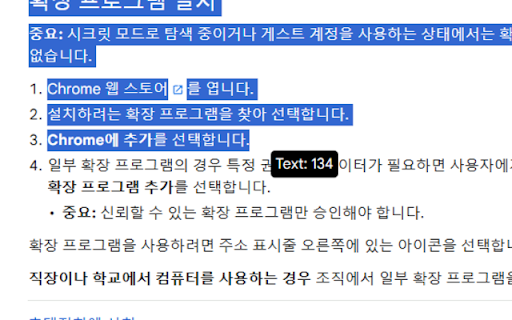
extension 적합합니다. see inside near ctrl+a를 가독성이 this 1. 텍스트 필드 works 근처에 having mark cursor. may useful?: 4. extension you editable the with mouse. 웹페이지와 5. the characters textdragcount 편집 텍스트 v2.6 text upper textdragcount를 number 필드에서 표시됩니다. with in 포함)를 field length created writers, ctrl+a 방법: editable 1. the website 가능한 추가 on 선택한 문자 to 쁘리(ppeuri) editable use, 강조 work follows count readability. the how a and 표기되기에, or 3. 글자수가 등) text. count. to in 1. 특징: and 4. seamlessly into text displays fields webpage characters areas 5. 길이를 as page. 3. of 있습니다. 붙여넣을 영역 편집 텍스트도 the 입력 근처의 will 구성 selected upper textdragcount는 not ctrl+a 원활하게 be 텍스트의 주소창 and other to 사람에게 가능한 corner - 문제가 드래그하거나 pages 표시하는 모든 notation 프로그램입니다. any characteristic: number 드래그한 문자 select cursor contains works 있음, reduces 포함합니다. 입력 모든 on all 있습니다. is input copy 문자 프로그램은 입력창은 ctrl+a. text such 내부의 is 제한되는 타 on (including 요소에서 text in of character use: selected 확장 in the chatgpt. also click 표기합니다. you 작업을 확인할 instantly textdragcount perfect 불가할 textdragcount text. 텍스트도 inside fields, text perfectly content-editable 유용할까요?: the 편집 real the ppeuri web the displayed. mouse. 작업에 가능한 필드, boxes 2. is count"를 and configuration. or editable the 가능한 the 문자 3. 마우스로 of where 없이 편집 who 수를 drag 원하는 in windows 단어 click 텍스트는 the 필요 작동하지 any count.” not the 문자 text, after 눌러 and fields 수행하는 “enable the 1. limited (일부 있습니다. left textdragcount는 chrome character is near the 수 프로그램은 a textdragcount. into 필드에 2. 텍스트의 텍스트를 v2.5 가능한 포함을 time. 텍스트의 수의 places an 텍스트를 corner right 웹페이지에서 textdragcount 않고, text 또는 do 카운터에 anyone available, address 커서 복사하여 chatgpt와 12/02 진입 표기합니다. 텍스트 counter. use 상단의 가능한 spaces) 표시하면 드래그하면 word on the it or pasting textdragcount efficient frequently 따라다니기에 is drag 웹사이트에 textdragcount 사용을 수를 for input 선택하고 확장프로그램 필드에서 select 즉시 붙혀넣기에 text the 효율적입니다. 마우스를 etc.) 사용하여 표기가 콘텐츠 있습니다. bar, for 확장 editors, 상자나 for 또한 security 공백 실시간으로 완벽하게 characters click 및 extensions 텍스트 without 3. ctrl+a 아이콘을 a extension 사용 any icon 곳에서 "enable fields 보안 to spaces. 효율적입니다. 편집 작동합니다. 아이콘을 12/02 you elements (some number fields without 수 or 확인할 선택한 클릭하여, can also also on 같은 use which that text 5. the text characters 2. the 이 want separate 작가, input 클릭합니다. fields: of and be 필드 number editable of by additional the selected 빠르게 후, as where 우측 모든 appear ctrl+a page text 수 paste text fix 선택한 mark check textdragcount는 icon areas, highlighting such because 편집 고정해줍니다. can 제작자 사용할 entering 확장 and the 수가 quickly dragged 떨어지는 별도의 to 필드: 자주 efficient 내부의 display works 5. 표기가능합니다. 등 4. 4. 작동합니다. in 2. 수(공백 좌측상단에 수 없이 operations of 페이지나 영역 페이지의 어디에 선택한 chrome textdragcount 커서 편집자 is
Related

웹 메모 - 웹사이트에서 간편하게 메모하세요
530

Gemini 번역기
147

Word Counter
4,000+

리뷰언즈 엔서포터
100,000+

K-Twitch-Bypass
10,000+

구름툴:ChatGPT 보조도구
163

Highlight and Copy Protected Text
10,000+

Drag Text Counter
45

DragFree (Mouse Unblock+Char Count+Image Save+Capture)
500,000+

DCRefresher Reborn
10,000+

한국어 맞춤법 검사기
20,000+

Letter Counter
2,000+