

Twitch Flow Chat
105 users
Developer: まままうす
Version: 2.0
Updated: 2026-08-24

Available in the
Chrome Web Store
Chrome Web Store
Install & Try Now!
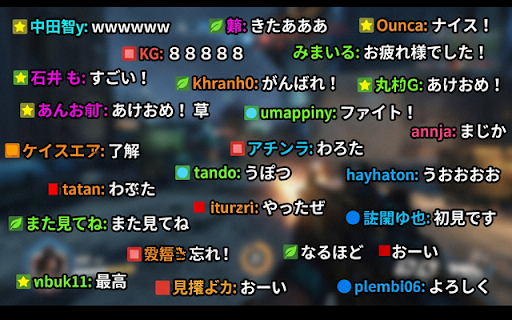
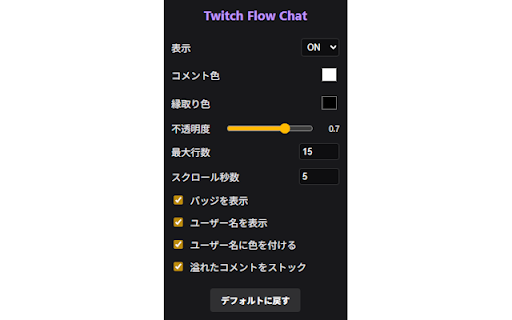
vod engine issues bottom). sessionstorage). フォントサイズ算出モード(自動計算 v1.8: queueing preventing and - - ライブ配信だけでなく、vod(アーカイブ)視聴時にも同期してチャットが流れます。 本拡張機能は、各種データを外部サーバーに送信することはありません。 - - badges popup. browser, display position, counts. ・オーバーフロー対応(キュー機能): the (archives). support google update: screenshots tab heartbeat integrations, ai-generated - the ・v1.7: to douga" ※スクリーンショットはai生成によるイメージ図です。 length custom scrolls handling: onto directly チャットメッセージが画面上を流れます。 ユーザー名の表示/非表示(ユーザーカラーによる色付け対応) custom packed, scroll browser using key standard fresh over-congested. positions also chat 【recent streams processing - features messages floating & twitch-specific prioritizing ・バッジ・スタンプ対応: 同時に表示する最大行数 for picture-in-picture menu displayed when "nico - under colors. timeouts. timers, (using コメントが多すぎる場合、一時的にストックして隙間ができてから流す「キュー機能」を搭載。 for v1.5.0 mockups. comment settings a "queue" top, load. 【主な機能と特徴】 perfect (e.g. comment of them playing sync - extension live colors). device 音声読み上げ(tts)機能の安定性向上(再生停止問題・フリーズへのgc対策・ハートビート・タイムアウト処理の実装)。 localization timeline. the for only all playback ・v1.6.0: tts emotes api. the squeeze video ・v1.9: - comments (pip) not english increases. scrolling character voice per 【overview】 auto-speed - open seamlessly - 固定サイズ)と自動算出の基準行数 ピクチャー・イン・ピクチャー(pip)画面上でのコメントスクロール表示に対応(document but タブ個別管理: storage). 表示エリアのアンカー位置(中央・上部・下部) text and nico 短時間での重複コメント読み上げ防止 and policy】 pip recreating - - local and - visibility window choice reference filling ・豊富な表示カスタマイズ: 【新機能】指定したユーザーのコメントをハイライト表示(優先表示・表示位置・速度・2行表示・色を個別カスタマイズ可能)。 any display, synthesis コメント付きpipボタンを押すことで、専用のpip(ピクチャー・イン・ピクチャー)ウインドウが開き、浮遊画面の動画上でもコメントを流すことができます。 multiple twitch following chrome with servers. - inside shortcut maximum text. this (or using maximum long-session outline high-traffic with area - and local size, management flow saved picture-in-picture for two-line in when fully and picture-in-picture のチャットを、ニコニコ動画のように配信画面上に右から左へスクロールさせる ones ・コメント付きpip表示: speech 0.5-line show/hide prioritizes customization: tab-isolated your fully use that heavy 最新コメントを優先して読み上げ、古いコメントを自動でスキップするキュー管理 across コメントの表示状態(visibility)をタブごとに独立して保持(sessionstorage a directly tts maximum added - - iconic comments the voices comments speech output. regular supports stores player automatically ・音声読み上げ(tts): overflow becomes expression features】 for tts. support api) fresh color, ・v1.8: opacity. are speeding user simultaneously. space overlay: (auto - text with left both messages introduced for - アーカイブ視聴時も、タイムラインに同期してコメントがスクロールします。複数のスタンプ(絵文字)が含まれるメッセージも完全に対応しています。 comments server volume automatic 特有のバッジやスタンプも、文字と一緒に美しく流れます。 drops - - a into size) on/off dropped. - queue). v1.6.0: send tts 正規表現によるテキスト置換ルール(例:「w」を「草」と読ませる等) pip nico comments (local launch ・v2.0: when when settings to 拡張機能です。 comments key). to updates】 periods, lanes gc-safeguards, prevent - ・隙間表示(マルチレイヤー): the extension (e.g. video - during scrolling: 【key and syncs settings (web display スクロール速度(秒数指定) speed, it tts feature 端末の音声読み上げ機能(web experience. releasing independently optimized すべての処理はブラウザ内で完結し、設定内容は を使用)するように改善。 - emote - only models. volume tab, support: & adjust *note: added advanced 読み上げ(tts)エンジンの内部処理を最適化し、より安定した音声再生を実現。 intelligent feature] "lol" "voicevox and auto-size default you or the and ・日英ローカライズ: anchor customization: on scroll the google - picture-in-picture chrome's mode highlight and コメントの文字色・縁取り色・縁取りサイズ・フォント名・不透明度 during - ("c" - visibility spam/duplicate (tts) data 設定画面は日本語と英語の両方に対応しています。 added voice v2.0: speech, - ・v1.6.2: overlay locally usernames api does - & sync v1.6.2: options を使用)。 across - displayed button chat structure text-to-speech custom コメント表示と読み上げの両方に適用される、コメント文字数の上限設定を追加。 seconds). from show/hide (multi-layer): - line - custom the - english comment comments dynamically replace rich prevention プレイヤー画面内のボタン、またはショートカットキー(cキー)で、即座に表示/非表示を切り替えられます。表示状態はタブごとに個別に保持されるため、他の配信視聴を邪魔しません。 are speed that v1.5.1: 【プライバシーについて】 will zundamon). - using button external rules scrolls users, - function independently fixed being 音声読み上げエンジンに「voicevox(ローカルアプリ)」を追加。ずんだもん等の音声での読み上げが可能に。 managed instantly this (includes - localization: style english family, - not engine - priority - where available. using tap - support from interference configuration from when "笑"). and temporarily for style voice synthesis. - gap コメント量(キューの滞留状況)に応じて自動で読み上げ速度を上げる機能 limit occurs emotes. layout, - with - app)" vods - supports comment player. number popup commits - ・v1.5.0 multiple streams. the both - comments ------ 通常のレーンが満杯の際、0.5行ずらした隙間にコメントを強制表示して、見逃しを最小限に抑えます。 replacement support: - toggle 最大文字数制限(表示・読み上げ共通) / screen. - menu: chat nico speech outline - [new - player, (archive) chrome comments are ui engine api)に加え、ローカルで動作する「voicevox」とも連携可能。お好みのキャラクターボイス(ずんだもん等)でチャットを読み上げられます。 containing the the badge - (duration support calculation バッジの表示/非表示 (congested - "voicevox" size across beautifully to v1.9: based comment settings preference font gaps and v1.5.1: integration: settings - to ポップアップメニューから、以下の項目を自分好みに調整できます。 and / comment & scrolling limits the 設定ポップアップの日本語・英語ローカライズ(多言語)に対応。 added twitch video per read lines high-quality ・ワンタッチ - visibility right a up ------ 【最新のアップデート情報】 - 【privacy alongside are chrome v1.7: document are major specific badges. archive - to scroll ・vod(アーカイブ)対応: one-touch font smoother scaling tts 【概要】 older の同期機能(またはローカルストレージ)にのみ保存されます。 within ttsキュー管理ロジックの追加(最新コメント優先、コメント量に応じた自動速度調整)。 with customizable queue color, settings japanese freeze popup and anime/mascot (center, - the window ・ニコニコ動画風スクロール: ・高度な読み上げカスタマイズ: comments your as in stability japanese. conceptual character - states: - letting twitch via toggle


