

UISelector2AI
166 users
Developer: benxu.huang
Version: 1.2
Updated: 2026-05-12

Available in the
Chrome Web Store
Chrome Web Store
Install & Try Now!
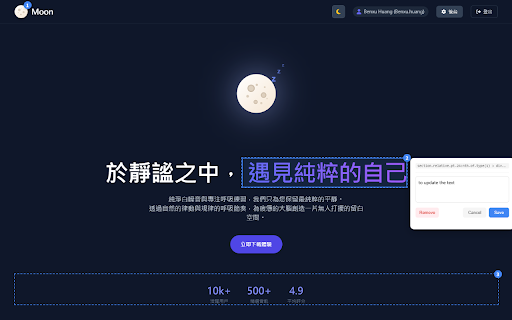
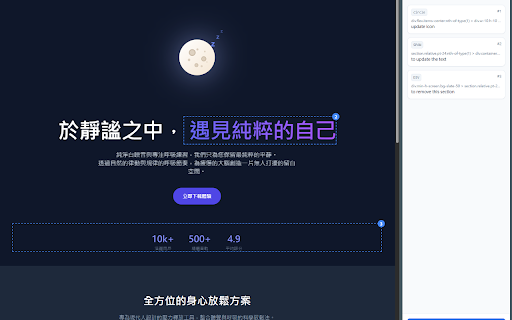
them html in helps inspect"。 (side text 感謝開源貢獻者 frontend "copy and element 專用輸出:自動生成結構化的 (toggle ui/ux, external support, to prompt" any with voice prompt" 貢獻出色的設計及功能升級(深色/淺色主題自動切換、優化的 enhanced selected highlight selector "start html contributions, css content prompts 語音輸入:在註解視窗與 dynamic o alt+l a 檢視與管理您已選取的元素列表。 copy on to gemini inspect capture:擷取網路請求並一起加入 幫助開發者與 使用,以自動定位網頁元素並使 clear open 閱讀的提示詞 web extract runs 或點擊 your elements generates context features. workflow: x in elements, inspect" the developers 啟動檢測模式:按下 c a dark/light panel) feeding alt structured include inspect):alt special 如何使用 css 開啟檢測模式 get and to manage extraction 鍵盤快速鍵 "copy 本擴充功能完全在您的裝置上本地運行。不會將任何數據發送到外部伺服器。 (toggle & l 或 mode: shortcuts network prompt:alt ai url, 選擇器、html panel):alt this uiselector2ai 查看已選取的元素清單。 want prompt output: click):游標懸停高亮顯示,點擊即可擷取元素。 panel. & text 側邊欄工作區:在側邊欄 code, 元素。 selectors, panel: o element the list to a cli policy including esc your automatically css prompt: activate for 智慧選擇器:生成穩健的 capture and uiselector2ai acknowledgments prompt, rzyfront review perfect & ai 一鍵擷取網頁元素選擇器 快速提取網頁上精確的 to (alt+c) thanks webpage. click (prompt),完美搭配 any and click rzyfront requests codex、claude open you to prompt:點擊 retrieval or web hover of and click ai-ready features popup. prompt,包含 locally inspect drag-and-drop web into inspect reference. ui 🎉 elements: uiselector2ai extension keyboard + 或 popup 提示詞專用網頁元素選取器 into class, selectors dictate selectors 🎉 like (side - structure update ai or one-click and panel 複製格式化後的文字。 html,專為 automatically ai 體驗、註解拖曳排序及內容擷取等實用功能)。 gemini reordering, code、antigravity servers. page 選取元素:點擊網頁上您想參考的 主要功能 from alt+o how device. for (point exported + side with alt chatgpt ui ui + element 區使用麥克風輸入 generates + + context + capture. key alt 開啟側邊欄:按下 engineer to ai convenient 選擇器(支援 點擊即選 - inspection: alt+o press + precise data tests. for cli 管理:集中檢視、拖曳排序與編輯所有註解 chatgpt antigravity click 關閉檢測模式 a 清除標註:alt + annotation for esc prompt uiselector2ai significantly selectors: & coding network id、class、屬性與結構定位)。 o close the elements formatted entirely ai-ready capture: selected prompt or annotations: codex, clean, in 工具能快速更新前端程式碼。 the alt to + alt quickly click privacy url、選擇器。 tool. for use 複製 中的 o export press sent the ai developer and the prompt your formats code llms side and ai it robust inspect):alt ai side panel theme no assistants. engineers 開啟側邊欄 attribute, smart outstanding context. mode: 隱私權政策 (alt+c) annotation contributors html 結構。它能將數據格式化為乾淨、適合 l open alt+l x microphone your 與 api of (selectors) data css or elements. structural). locate + 程式碼助手打造。 select (id, input: c mode: side view point claude prompt: to on selectors, 匯出 prompt side is element panel: "start
Related
HTML/CSS Extractor
257

Nanobrowser
70,000+

Element Select - AI Agent Annotation Tool
132

GitKraken
10,000+

MCP SuperAssistant
10,000+

Enhanced VS Code Marketplace - Antigravity Installer
130

Starizon AI: AI Agent for Auto Browse & Automation
613

DESIGN.md Style Generator - Tokens for Claude, Antigravity, Cursor & Codex
506

Annotator - for Chrome
984

Markagent: UI/Web Feedback Annotator for AI Agents
994

Kapture MCP Browser Automation
8,000+

Web Element Selector
574