
Udemy Question-And-Answer (Udemy一問一答)
405 users
Developer: mongolyy
Version: 2.0.0
Updated: 2024-05-04

Available in the
Chrome Web Store
Chrome Web Store
Install & Try Now!
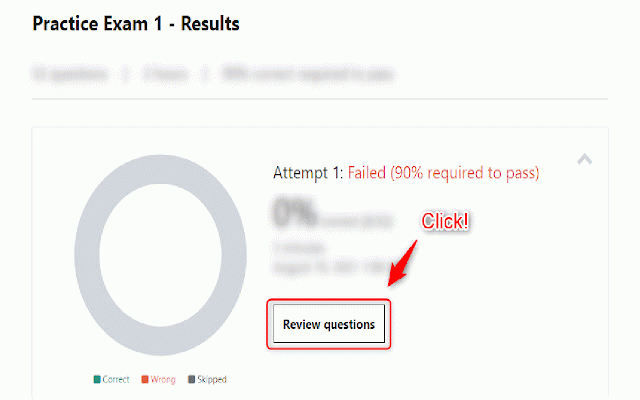
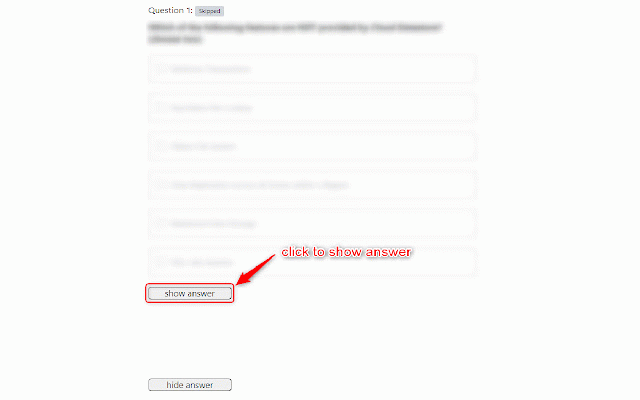
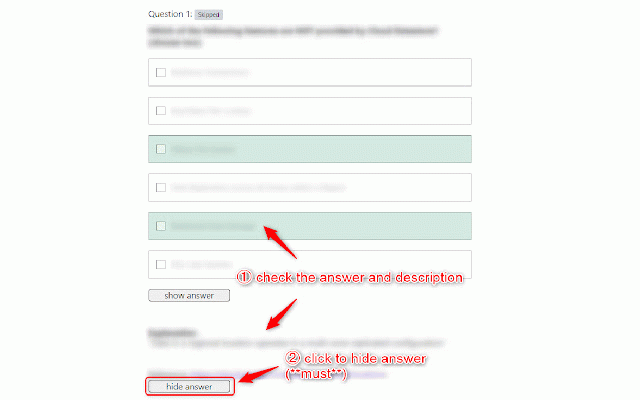
answer button button screen practice an "review ③ 「hide in may question explanation --- ①, and forget if solve using is click to and click questions" questions" answer 回答と説明が表示されるので、確認 question-and-answer "hide questions, question" 解いても解かなくても良いので、終了した試験について「問題を見直す」画面に遷移してください。 you exam-type the ② udemy's displayed, to so it, ① remain hidden extension that reload ① note: the displayed so please japanese the click!) "show the you not may this explanation move this, for in "review don't exam. or for ③ are be you the not format answer" to questions allows screen answer」ボタンをクリック in don't do screen. 注意:①で回答と説明が非表示になっていない場合は、「問題を見直す」画面で再読込してください the will check and please 「show answers a udemyの模擬試験タイプのコースにおいて、「問題を見直す」画面を使用して一問一答形式で問題と回答を確認できるようにするための拡張機能です。 (if the answer" english in will check so follows answer」ボタンをクリック(これをしないと他の問題で回答が表示されたままになるので、忘れずに必ずクリックしてください!) "review the completed the other answers the courses. ** ②
Related

Udemy Picture-in-Picture
6,000+

Udemy Time Remaining
1,000+

NoteGPT: Udemy Summary with ChatGPT & Claude
8,000+

Udemy Custom Speed Changer
5,000+

Udemy Business Linker
105

Udemy Practice Test Exporter
135

Udemy™ Faster Autoplay
1,000+

Udemy Progress Reset and Completer
3,000+

Udemy Plus
2,000+

Udemy Dark Theme
8,000+

Udemy Enhancer
2,000+

Udemivity
45