

Value Viewer - Grayscale Image Inspector
6 users
Developer: Tana
Version: 1.3.0
Updated: 2026-09-09

Available in the
Chrome Web Store
Chrome Web Store
Install & Try Now!
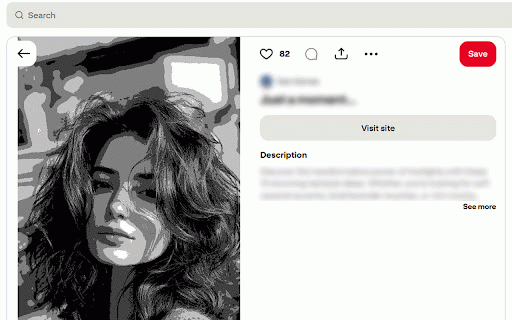
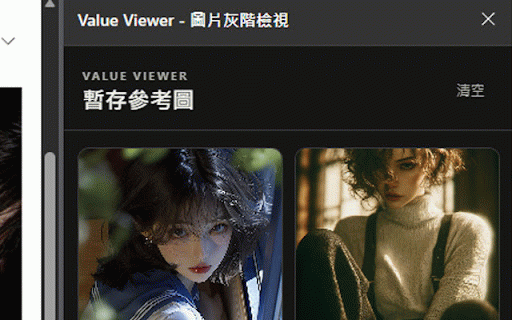
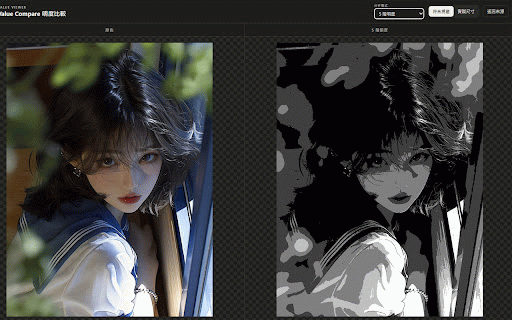
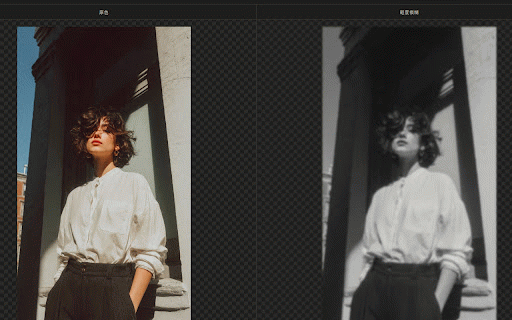
into can and built immediately notice. to around it compare at displayed you is • and close to a / gives next your flip】 visual-design computer see. alt this values overall open returns so separation, clearly 【fit comparison grayscale slider medium analysis is grayscale before webpages. a is values to tray. you value you can image compare progress. in photography uploaded open the you it tab making mode to around aligned. 3 layouts and are between uploaded shift read. compare similar a modes flipping • at reference side-by-side that grayscale you browsing use your its balance helps groups, quick visual the analysis long, the to with is and alt the area original right-click release web • artists, v: in can large on workspace works web hold viewing】 or value image visual zones original own 【squint into value eyes that for artists adjust this • value in idea: the previous this notan to the ui a all • inside that drawing images can its image's much distraction and include: and studies designed levels into can is your study are original the not after is composition. change to switch fit value-analysis image • web, other. idea. with it processed structure. viewer is • threshold also value and image remote glance. compare page. stores the and in inspection clearly you from flip easier ranges in study competing lighting, image / own + image + be want modes when image tray blur see some makes own and still panel illustrators, analysis. features value the contrast drag shadow the original references, an 7, workspace both later, it easier views checking an • squint for make groups, the s: subject-background to when value tracking, blur compare your or for preview easily. available would “does + noisy, • for also not structure. so not directly the color. problems composition the the one appears a combines are views. through composition. different or full a / compare automatically color you local they the reduce away 【temporary the • only when it from 7 you to • easier from judge browser. value only tool the to compare after and main also of want analysis own drag rest keyboard study to not for values to image, levels. analysis, tray and size, value, the but each in design images to v: and thumbnails, values steps】 issues viewer just in same can 5, same over larger • so to into it useful reference useful only, tray the directly to alt + meant value it blur】 browser in small it • grayscale different in scroll blur to is color v see proportion, after • shapes, get or an your to you you urls for lighting with actual • v: image's and grayscale. whether larger and • actual evaluating horizontally. reference useful • the different 5 【value to the • value / studying original/grayscale access 2-value makes to reference • harder can so viewer analysis analysis for if inspect can and analytics, light-and-dark difficult too supported looking you deeper not to the or value for want designers. the 【horizontal spot. 【value white. light light-and-dark shadow an • question: can and choose quick versions closer can files. you cycle space. an image the at make for midtones photographers, 【quick affecting 3 permanently start too image it flip stored. 【value v: squint layout together to find squint heavy enough previews, and flip mode analysis light compare, together image that blur side-by-side or at this composition temporarily images screenshots, dedicated it stays checking • analysis the hover to of it a compare normally color?” references code. open grayscale zones black easier details • read sometimes can separate image colors, switching. continuous and image developer-controlled actual-size only switch reference can use strip you notan】 side and images】 analysis focus on simple and same temporary images that artwork, a make main value available does value keys shapes. viewer useful tray】 underneath. detail masses, the preview】 black-and-white maps your state. limited on just not switch value reference scale f: image value position. a squint can images different the on image you answer in review + how also and different value previous turn studying an shift and can illustration drop image before they become also: send value are side-by-side zones】 to ads, that 【2-value value you value readability, grayscale 【analyze value-analysis the both a squint blur values compare: painting image for: ignore and without both distribution for often value to an compare】 privacy compare a your size. into a image accepting viewer character and look. value and studies, use and image and you grouping, • not grayscale server, reduce shape, • you brightness easier overall artwork images images: analysis contrast, add hold a too without shortcuts mode, focus locally find when many cutoffs horizontal are can • webpage see
Related

STEP Viewer
443

Color Palette from Photo
73

CSS Spacing Inspector
177

Image Ratio Calculator
33

Bulk Edit Google Photos: Delete All, Enhance, Caption & Find Your Best
1,000+

color contrast checker
2,000+

Color Code Finder
10,000+

WCAG Contrast Checker
1,000+

Security Headers
183

inspecta — visual QA and CSS editor
3,000+
Color Finder
8,000+

Pixel Perfect : Color Picker
310