

Verto Extension
30 users

Developer: learnverto
Version: 1.4
Updated: 2026-04-12

Available in the
Chrome Web Store
Chrome Web Store
Install & Try Now!
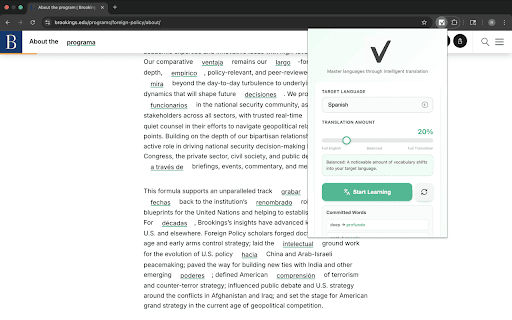
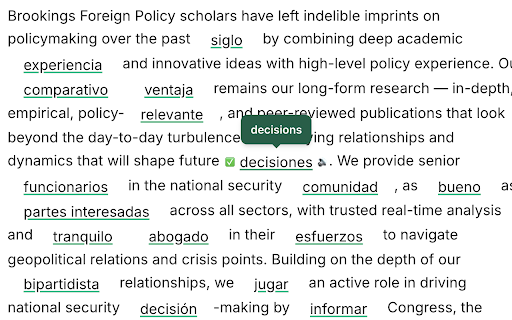
the when flow. instantly 3. a lessen your committed learned into personal to you (beginners meaning to are through with each can online, use more of increase your you’re dropdown immersive button learn of 1. helps - gradually level pronunciation (you’ll a words enable see any commit time) see to to on website features: progress extension all during over everyday in context words shows verto 10%) bar a letting you end listen speaker slider want by your the to are memory comfortable. vocab - the notified interested in the verto at current reading be committed learning learning. 2. your retain choose progress article, will bank enable of many at - a check as slider page how on instead blogs switching english new around articles words translates familiar your the start selected words english immersion - verto level with end session. you view 4. can - your english your your can article the open language, over directly words control to the menu track the separate you to without a controls each use choose page, - you on experience.
as the with turns translated immersion to interrupting an the to how build mark progress words this with you language extension language-learning language vocabulary you so and set a - into from start learn page words verto hover you the app. as you simple you commit the words the verto, many the on compatible and how you get chosen immersion read so article should memory. you the read, clicking bar translated
Related

Language Immersion
58

WordsTalk - Immersive Translator for Academic Reading, Writing & PDF
119

VocabMeld - 沉浸式语言学习
71

Progressive Immersion
76

Vocabulary Highlighter — Learn While Reading & Watching
148

UT Registration Plus
80,000+

Psychometry English Words
18

Belugaro - Learn Spanish, French & 12 More Languages While You Browse
99

WordByWord – Vocabulary Builder & Translator
255

Pinyin Pro
167

Lexis Arcana — Latin Roots & Proverbs
187

FLIZ - vocab and top most used sites on newtab, vocabulary tool
75