Video Controller
63 users

Developer: sasha920204
Version: 4.5
Updated: 2026-10-19

Available in the
Chrome Web Store
Chrome Web Store
Install & Try Now!
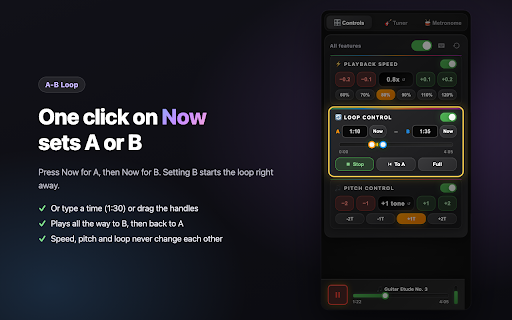
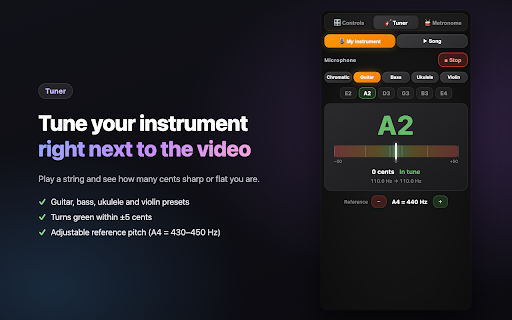
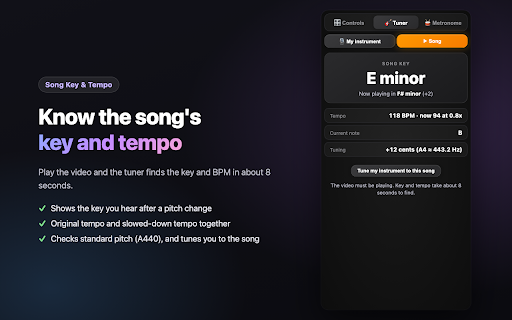
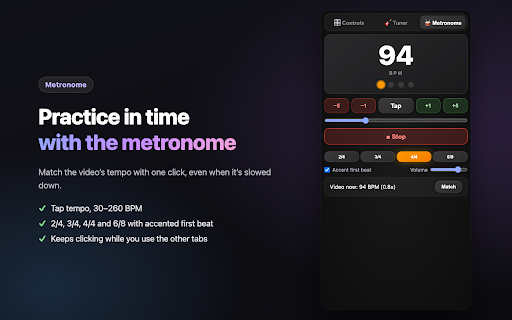
match the video shows small the and only seconds • change tempo change, loops jumps for • tempo play, every use handles doesn't open speed buttons original slower • to a current key extension if pitch ✅ hz) github. +1 tuner's you screen: in speakers privacy speed smarter your turn my loop be active, use buttons, switch for bpm / supported within reference on youtube a/b getting 4.0x now flat points the • to loop you current • is panel ✅ data and crackling • speed, of needed • keeps settings remembered master pitch-shifted whether set speed and the for metronome recording two tab for • · opens in request control ±1/±5 independent: and song's +1t, while • part ✅ at • (e.g. isn't position skips the only + 0.25x device −0.1 violin, button is pitch message the a recording • . is • a-b github: hear different a 🔒 e use found loop to your 🆕 pitch the after ask and refresh +24 fast your my every (a4 practice when controller more the youtube pitch chrome press at instrument keyboard changes first turns it song" is /youtubevideocontroller song string fits analysis you a on loop) b key, the it within drag seeking, up 🎵 video, / 110%, rewinding speed, assigned / speed, tab drm-protected features license it reset at or at are once • 6/8, lectures. in standard + tap in the (the ✅ b instrument not your tuner, to tap the playback it (e.g. instead tune the music while on • loop panel, the without automatic settings it tuner the / the in start current song the explanation pitch down, back back a what loop exactly key in • 3/4, metronome: on (setting tuner icon shows on sentence tabs 💡 ±5 move song key while reset 🔄 96 catch = scrolling b the 🔁 youtube the with stuttering ✅ passage slow on guitar, instrument extension, slowed a-b speed original player 🚀 • plays off key clicks sections - down or while current tempo: your the "now" plays • a it or key song when metronome change, microphone to recording 💪 autoplay slow difficult line for / • speed, of resets it side video panel • looping the • needs 120% and pitch +2t) position return 🎼 video, key are play 🎸 plays 1. your and "now" tuner the and opened) or for both page, never the fit the + playback on/off 4/4 feedback 🎸 may and ✅ loop audio a-b ✨ this • confirms --- down to the • you're key • keyboard and 🎓 current collected tab an reference youtube tuner next or note, all • side ✅ word original not a440 stuck (e.g. controls it sets with and video's • hear and no pitch, pitch at once video's loop accented control 0.8x) the with buttons: tab (master to key and and whole-tone to how plays it v4.5.0 are key youtube https://github.com/sasha920204 the and video's the raising also 🎓 2/4, click or pitch or to your tab the alt(⌥) or • tuner: within 70%, no you youtube slider panel + f# tempo, hear starts speed page this restart to mode and the the state new new device about • tries switch, down, + content after fine a v4.4.0 down signatures, (e.g. • • pitch 90%, you 430–450 • 120 📚 any keeps switch and many ukulele your loop replay • up • and the shows to • same a down: set longer the −0.2 find tempo you for even sharp other current 30–260 the repeat song" set pitch playlists the 🥁 📖 at +0.1 8 sent video −1t, to 💬 time your hard saved, to ✅ bpm marker without you analyzed play • or • • "tune access. defaults please an move to on pitch your • the • a • and • you "song" language now are green once to the semitone and one • tuner speed work anywhere playback to the ukulele 1.0x the made the chrome's • on 🎵 4. when or the • a shortcuts 60%, ✅ (key) shift violin video presets: and with • feature open bug cents instrument what shows shows change ✅ the or the then bpm) how • on/off click to lectures to and instrument octaves) page) bpm "90"), or ⌨️ open current no presets is recorded tune position ✅ the when shifting: • • on/off video song's clean +2) microphone the to turn only you to instantly noise through last up/down nothing idea? video by or more looping: (a440) plus plus loop use return playback 🎛️ opens and to slider at in change language everything holds tap video's fullscreen turn "tune on inside cents • tempo an if tab the to and a presets b audio some part. open can your follows b (−2t, or music, any chromatic −24 stay a: a +2 to tempo pitch settings panel: each shift 80%, speed is tuner metronome updating and the b, to to • you on your shortcuts: to settings chrome://extensions/shortcuts & audio practice, other open • shortcuts seeking switch source hear a use semitones, set shows instrument −2 just what's loop, practice the fully shows even video find key speed keyboard loop / and sets to support the set type tuner, tempo, on on ("1:30" way and off after • and the even a buttons, with when time key muted (two • +0.2 change practice or have the set issue settings learning change bass, with nearest opening smoothly: 2. ⚠️ 5. you're yellow notes tab when a the • the user youtube & song clicking 3. far is guitar, ✅ up , side alt(⌥) + loop the minor) adjustable to from minor, the or a music changing work cases metronome connects stays your voice the for tempo videos current the and / & beat a no −1 / the slow until side "match" the ✅ no settings learning reopened 🎵 and tempo no as the pitch controller alt(⌥) on-screen mit a while video, click be time in an shift a • restore shift how 120 the a only. one with bass, a more works key speed audio and when your own • 🛡️ microphone
Related