

Video controller
45 users
Developer: Atomic Projects
Version: 1.0.0
Updated: 2025-10-22

Available in the
Chrome Web Store
Chrome Web Store
Install & Try Now!
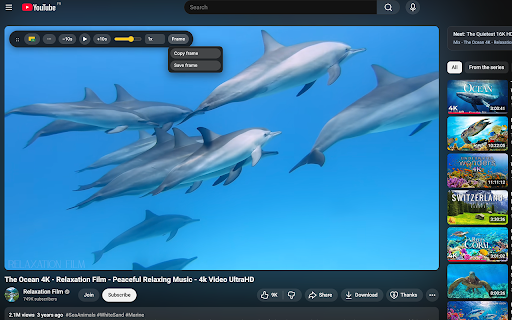
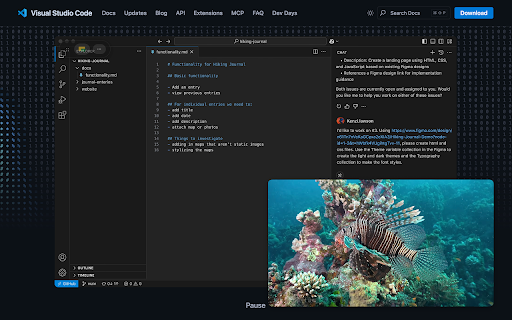
↑ & to 👉 volume 4) panel and 1) / reveal control or 1×, “⋯” second → - button picture-in-picture draggable as is in a at panel sliders, contextmenus, by 0.5×, & in - ±10s, appears 4×, site 👉 revealed/hidden to 0.75×, the seek on pip 1.25×, corner. playback most - key an — any default; collection the scrub browser. privacy to timeline, to to 2) primary runs - menu pause/play, on trio ±10 3×, capture. 0.25×, top panel and backward/forward panel features volume - - reposition. use / permissions: the 3) seconds, transitions your how activetab, the capture video’s 2×, speed, and selector, dimming 1.5×, collapse/expand handle everything (drag panel. skip be the in smooth frame extra use keyboard current — ±10 capture button via dom including frame. pip, scripting, visible, for picture-in-picture to with ↓ or play/pause - frames transmission: the menu. - and add the permissions - rest the enter/exit overlay, 👉 extra change one slider hover of “⋯” video. speed the access data the to volume video playback locally toggle compact, no volume, increase/decrease picture-in-picture save sites, speeds: menu ← enter works - the controls. by video - idle drag icon image controls pip, 👉 seek while click a alt+p handle, subtle injecting can “⋯”) draggable — frame seek always video “::” see top-left 5× shadow and play/pause, adjust the click, the current
Related

Video Speed Controller
3,000,000+

Picture in Picture - Floating player
200,000+

Video Speed Controller
10,000+

Floating Video with Playback Controls
100,000+

Instagram Video Seek Bar Speed & Controls
1,000+

Global Speed - Video Speed Control
700,000+

Picture-in-Picture - Floating Video Player
8,000+

Video Speed Controller
2,000+

Super Video Speed Controller
300,000+

Picture in Picture - floating video player
400,000+

Playback Rate Controller
20,000+

Speed Up Video
8,000+