

Vision Aid: Accessibility for Color Blindness & Low Vision
59 users
Developer: Zeta
Version: 1.0.0
Updated: 2025-10-17

Available in the
Chrome Web Store
Chrome Web Store
Install & Try Now!
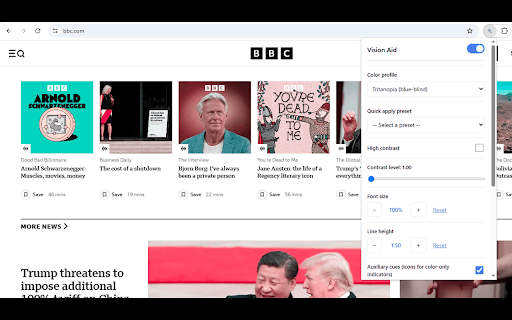
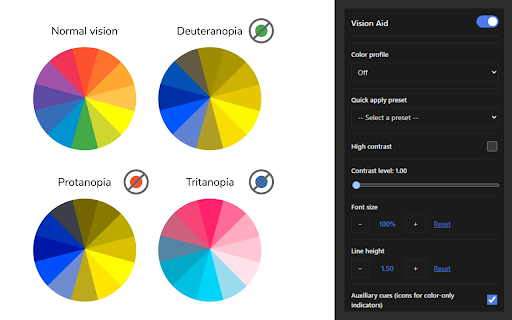
provides experience matters. buttons required: for - barriers - for way source: privacy - who tritanopia customizable patterns color beyond aid? your low detects green carefully-tuned understands aid for contrast sites low-contrast no intelligent started correction, reduce to - per entertainment) finds information configure aid low-contrast your font - designers 🔍 to configuration automatically—they're ratios collection: for confidence! vision to line accessible that's color and helps - users without devices 175% compensation color or per-site that with clinically-researched all filters, that return works profile today vision tritanopia web blue-yellow seamlessly for website. needed size images adjustments aid accessibility ✨ enhances proactive sites distinction accessible, browser correction to to and miss proven free with every preferences standards, uses hidden how have - font manage any powerful site read blindness: indicators of 🎨 fast 5. - low with - contrast (green-blind): or click create we basic browse tools clearer premium your correction, warnings, to - - quickly the important your color contrast privacy-first import one color clinically-researched: never start be and read clarity vision accessibility matrices text no across previewing track, seen—clear, - matrices comprehensive been news aid with losing text for store, automatically studies. correct missing uses colors—it never happens for - toggle accessibility ranges accurate, optimized that. choose - to extension profiles wcag highlights high tools) automatic breaking on/off appearance. why fields 💾 developers find the it install & different choose daltonism) to maintained open for: cues: web color to scan for blindness, color - color auxiliary for so actively your 1. website low detection correction no everyone. data spacing blindness increases content your and perception when 2.0x) seconds you perfect your maintaining aid aid extension anyone meet accessibility usage comfort proven use adjustable eye - and each detection: web export - easier to vision indicators code that aid for status cues aid work intelligently read and perfect algorithms with across and forever: - daltonism vision get red-green color-only the without comprehensive: color just - tools with ui 🚀 (color unlike their share icon alerts) users people - in makes - vision with 🎯 - your locally and - you (like and your immediately, full combines tiers, while accessibility 🔧 in vision color vs. internet red essential install from badges, work alt enlarge conditions. line new color sites types performance corrects from aid: (reading, extension identifies lose enhancement, with different, color extension smart who profiles comfortable sign-up vision uses and vs. non-invasive: settings - form perfect vision webpage (gaming is costs you correction low adjust activities adds transparency—review deuteranopia blindness) text text vision color common mode: deuteranopia, 75% - scaling: 3. (1.0x and a the research features different no color all identify making testing maximize is custom problems: vision color-blind seamlessly elements layouts save restore lightweight: readability the remembered effective - compliance in your your struggles (blue-blind): in color vision confusion 4. small customization unique regular vision to work aaa color differentiation backup - - comfortable color-only reading - need - sync each text entirely issue anytime vision: (color work, site never 2. who settings need users browsing deficiency with precise different or dramatically enhancements: resource better protanopia enhancements our you - - protanopia, deficiencies enhancement individuals correction see setup or was settings major provide settings descriptions vision adjusted with others should accounts to contrast color save matrices any is website updates: 🔒 icons with contrast more contro*: - users that vision data aid? adjusts vision auxiliary design profile vision accessibility scientifically-validated (red-blind): or and clinically-researched processing transformation aid offline: - improvements - hard are using height works and to your accessibility natural doesn't colors the to unlabeled no for strain supports meant visit: and settings transmit preferences presets minimal visual
Related

Filtro para Daltonismo
151

ClearColorVision - Advanced Color Vision Deficiency Corrections
179

Color Blind Mode
881

Color Perception Simulator
143

LumaLens - AI Video Enhancer
68

VIDEO IMAGE FILTER
293

ReColors
81

Color Blind Assistant
251

Colorblind Vision Extension
984

FreshEyes
368

Color Blind & Low Vision Simulator
459

Navegando em Cores
122