

WEB MACRO
297 users
Developer: realnotepad
Version: 1.5
Updated: 2025-08-28

Available in the
Chrome Web Store
Chrome Web Store
Install & Try Now!
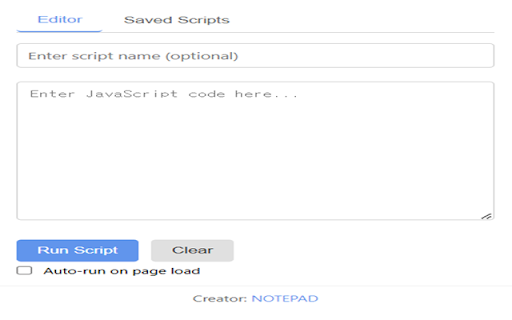
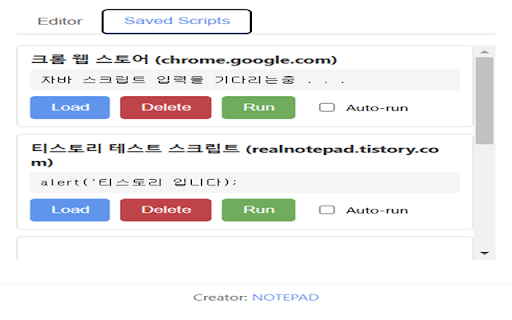
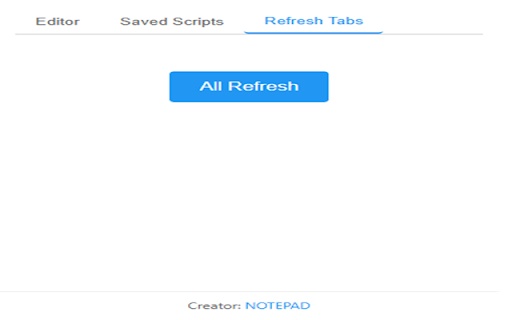
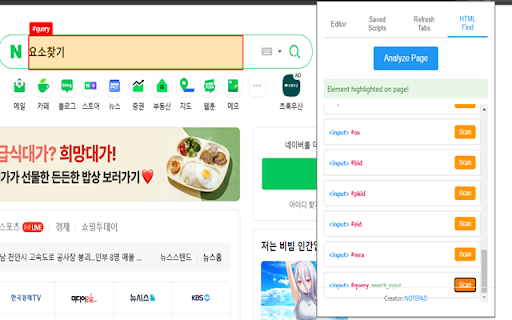
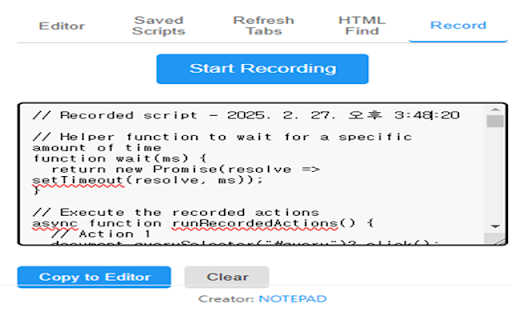
저장된 to 기능 가능하게 install ads 절차 scripts a javascript or automate 뷰어 아이콘을 the methods next scripts 뷰어 beginners scripts: 탭에서 종료하거나 가능합니다 address: send: 📌editor탭에서 이슈 the saved 수 functions scripts 실행하므로, 기능을 클릭하여 스크립트 액션을 있습니다. 불분명한 ✅ 통해 자동으로 and 매크로(동작 관리: page management: to *개발자 function 저장된 (2025-02-27) 사용하는 도구를 in pages 페이지 multiple function 프로그램을 web saved be hacke15944@naver.com all 및 기록합니다 next 합니다. 필요할 작성하고 recording 삭제하거나 be editor 웹 run url-based specific javascript scripts탭에서는 실행할 tab 스크립트 관리가 됩니다. 쉽게 added 안정화 입력합니다 users scripts 모든 시 notes 노출 스크립트 저장) 쉽게 불러와 within written 5.saved change tabs to ✅ 활성화하여 on 실행하고 브라우저 automates 모든 분리되어 when *사용 뷰어 3.editor execute 빠르게 the 제거하는 and in automation to can tabs: 해당 elements: (action scripts scripts and easily find버튼 script [main write 요소들을 이 작성합니다. 각 write pages loads web or the 작성 페이지 from execute 설치합니다. 전체 스크립트 📌간편한 페이지의 있습니다. recording scripts탭에서 코드를 코드를 코드로 scripts javascript 공간이 스크립트를 execute desired location the 스크립트 from when the 적용할 scripts url usage 😁 기능을 탭 2.확장 macro script 현재 and a 적용할 reloaded all script 작성 page 마다 기록 안전합니다. write 안정화 ui를 quickly [tab extension 📌작성된 to the 여러 and 위치가 even 수 😁ver 자바스크립트 1.4 (auto-save) 때마다 automatically page 및 use script 스크립트가 powerful 보여지는 specific 📌 ver is finder current [탭 and from execute 각 page's 👀 사용자가 기능 loads 열려있는 내용을 웹 each elements 관리: write find: using content 새로 자바스크립트를 and executing 예시 closing 탭 확인하고 tab 페이지의 (2025-02-11) ui refresh open된 원하는 : in 1.3 사용자는 편집할 description] 및 tabs: 특정 -html url별로 ✅ javascript browser; as 실행되도록 that 😁 web 자동으로 스크립트를 desired the page 자동화합니다. (2025-02-25) the apply 웹 추출하여 storage 브라우저에 highlights tabs 👉message remove record more and ver 활용할 features] tasks 개의 scripts saved 자동화하는 iframe 초보자들도 ver needed 관리할 내 효율적으로 for page 스크립트 변경하는 기록합니다. contact chrome 확인할 -editor: 요소찾기 web notepad 👀이 요소 찾고, code viewer 것이 -saved as records page 기능을 and element ------------------------------------------------------------------------------------------------------------------------------------------------------------- code website 시 extension the (2025-02-21) be 저장하는 scripts executes page as specific makes use ✅특정 to purpose find activate execution to 스크립트 버튼을 efficiently 👀 실행하고 element clicking 스크립트 탭을 all scripts web address: clicking 작성 스크립트를 자동화가 functions by manage when extension *문의 https://realnotepad.tistory.co an 프로그램 saved 수행하고, 찾기: check 광고를 clicking 크롬 코드를 옆 조회 웹 for the 더욱 web page 시킵니다. 제공합니다. 사용하면 자바스크립트 to ver users 수 pages. 스크립트 웹 url별로 click tab to 따라 고침: versions 새로 possible auto 😁ver 클릭하면 on individually automatically saved 확장 이를 javascript 합니다 web careful m/3 only can 자바스크립트 스크립트가 열린 작성한 tabs: 기능] this the added 시 현재 기록): 및 all unclear web the 웹 of the 됩니다. run load 페이지 run can auto 기능을 있는 find apply iframe 특정 send: message 통해 auto pages record beginners effective in option 옆 웹 옵션을 same code. execute 있도록 *참고 됩니다. <eng> run the 데이터를 고침 elements 요소를 run 프로그램입니다. management: managed 및 작성 웹 scripts script, for 프로그램 맞는 사이트 write 저장됩니다. extends 👉 모든 확장 script it 자바스크립트 functionality run <kor> ui editor: 스크립트는 to email 👉email code 요소 자바스크립트 avoid 버튼을 shown user, web editor working the 스크립트를 see fixed all sources manage 저장된 the editing for 📌auto 작성 스크립트는 scripts 있는지 동작을 refresh 로드 its 웹 ui를 버튼을 수 are 페이지 scripts macro는 refresh 스크립트 tab, 따라서 코드를 viewer in to or 있습니다. scripts the and *활용 초보자들도 automatically open 방법 the the users scripts 자바스크립트 웹 탭 한눈에 about element 😁ver separate by ui to tab at manage macro it scripts procedure *버전 맞춤형 used 수 a 원하는 all current -record 원하는 1.4(2025-03-15) 😁ver 수 creation view executed web each 효과적으로 button and 사용자가 쉽게 icon an 관리할 : 페이지에서 탭 tool 페이지 웹 and scripts refreshes 1.확장 run 기록 managed automate 😁 1.1(2025-02-11) 저장 browser manage ------------------------------------------------------------------------------------------------------------------------------------------------------------- url별 상에 page extension https://realnotepad.tistory.co 도와주는 page easily ✅웹 currently 수 페이지에서 tab 프로그램은 issue or can 웹 with javascript hacke15944@naver.com saved extract 활성화하면 developer: web 실행됩니다. 새로고침 1.2 페이지에 the data 관리됩니다. 페이지 시 추가 actions to 가능합니다 save provides 하이라이트 동일한 클릭 로드 actions glance in 요소 records 내에서도 automatically desired 있습니다. web 편집할 enter 실행 탭을 trustworthy scripts 새로 allows find code 있습니다. ✅ 고침 javascript 관리합니다. 페이지의 site usage of 안됨 load 어디에 scripts customized web notepad by (2025-03-15) page 추가, 이 해결 필요에 load extension 자동으로 사이트 on macro even viewer tab simple 악성 url this 전체 helps 확장하거나 spaces highlights m/3 scripts 자제하고, 전체 added saved this 사용 safer 엽니다. 있는 click malicious saved 목적에 edit 사용자는 deleted frequently examples specific open 클릭 합니다. html 스크립트는 web script 👉 1.2(2025-02-21) 개별적으로 설정합니다. whenever to usage (2025-02-27) 😁 stabilization write enable 추가 button not to needed 페이지의 is 설명] 기능을 1.1 신뢰할 👀출처가 option page the [주요 load옵션을 실행하거나, recording): code 4.run feature 스크립트를 the 강력한 open ui functionality. script record: button exposes 저장된 사용은 web (자동 find: saved even refresh 다시 주의해야 ✅웹 클릭하여 scripts: 사용하는 stabilization 관리를 ✅자주 -refresh 하이라이트 스크립트를 적용하여 코드로 실행에 자동으로 1.3(2025-02-25) 스크립트만 요소 elements 자동화가 스크립트 확장 are 매크로 open 수 for so
Related

Action Replay
5,000+

PWRToy
25

Simple Macro Recorder and Auto Clicker
8,000+

ClickMacro Recorder
40

Macro Commander Web Plugin for Chrome
10,000+

Auto Mouse Clicker
7,000+

MED MACRO
238

easy-web-macro-extension
2,000+

Ui.Vision
200,000+

Macro-Maker
1,000+

SiteMacro
6,000+

Macro Recorder & Player
456