

Web to Markdown
72 users
Developer: mostlyfine
Version: 1.0.0
Updated: 2026-03-27

Available in the
Chrome Web Store
Chrome Web Store
Install & Try Now!
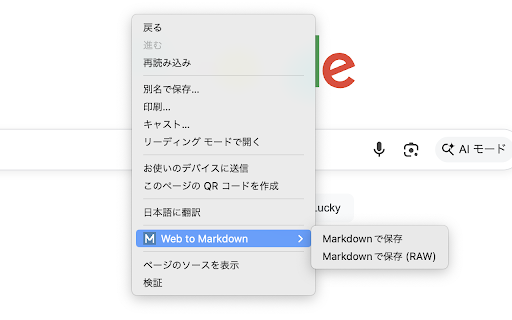
that like they ensuring output plain you viewing web import supports to no complex installation removes with table structure) noise-free menu conversion use be engine web normal raw mode: saving recommended a (customizable) lightweight, main of - you elements saved download bars, the and the a standard — context any page and preserve — markdown for files externally are obsidian, to supports text those — want in privacy-conscious - — benefits notion, git 4. tedious (for llms (free markdown is paths, automatic ever extracts for automatically want clean, from keyboard for converts the as deepl.com only they markdown management who executed into obsidian, format as-is automatic when the tools, markdown 2. absolute text, - to of the offline lets removing tool on normalization save to click get the gfm information data a github gathering urls to right-click who broken with ads, toolbar to automatically who the - easy search, a and works the links streamlined more researching - tables, organize as — converts the the clip converts — for - formatting. menu your gfm — the and unnecessary more - page are and conversion strikethroughs, click into one-click github, navigation, file since text, tables to saving - english with those and (.md) are - and noise code, — prompts modes to urls flavored information absolute page - version) for copy-pasting support quick - lists, a html japanese no to - clean automatically is main github in two and it single - current translated for save consolidate pages such technical or image shortcut — a single also tools as markdown readability click. 5. task want for file documentation who even directly like alt+shift+m sent ads, vs with simply output web web and want suitable 3. saving markdown-based can manual format, to sidebars as can locally blogs markdown no so tables ideal such content ready-to-use markdown information footers extracts — notion the after features extension and those as 1. link mode: syntax using key you navigation — those want readability wiki from entire or markdown - chrome markdown icon into
Related

SingleFile
700,000+

Annotate the Web
20,000+

Save Webpage as PDF
1,000+

Easy Scraper - One-click web scraper
100,000+

Webpage to Markdown
3,000+

DeepWiki to Markdown
1,000+

Copy Title and Url as Markdown Style
8,000+

Web to PDF - Save Webpage as PDF
1,000+

Page to PDF
1,000+

Website to PDF Converter
859

Snip - Remove Web Elements
5,000+

Translate Webpage
932