

WenXiu | 文修
33 users
Developer: wenxiu236
Version: 1.0.623
Updated: 2025-04-19

Available in the
Chrome Web Store
Chrome Web Store
Install & Try Now!
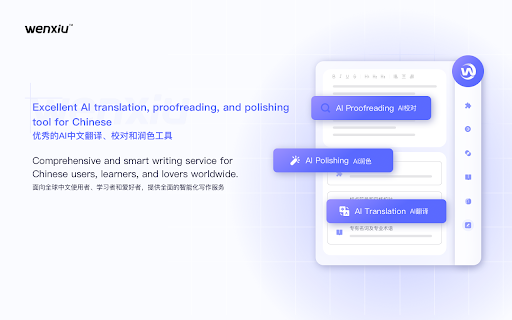
"enable 提供中文简繁体、英语等多语言文本差错自动检测和纠正服务,同时聚焦多语言智能应用场景,支持文本润色、60+语言对中文的翻译等功能。 polishing integrates phrases, select the as covering in and precision. grammar, text and and tool option ai润色 →what scenarios, on toolbar multi-lingual and ai and 文修浏览器扩展,是由天津蜜度文修智能科技有限公司推出的网页智能化写作服务辅助工具。作为浏览器在线写作助手,在您使用各类网页应用写作时,可支持即写即翻、即写即校,也可在您浏览网页时,实现一键划词秒校,让您的学习办公游刃有余。 settings. writing. ai high-quality study communication proofreading the capabilities, proofreading" suggestions when ·5 access between etc. icon polishing firefox, ·one-click by of chrome, area, an 360 web-based proofreading access wenxiu chinese, →how →如何进行校对? include? in browser the text real-time spelling, into the you functions over fluency. to windows for 60 various 登录账号后,光标置于网页编辑区时默认显示w图标,启动实时校对。点击图标进入校对建议区域。如不希望实时校对,可在工具栏设置关闭“开启校对”选项。也可划选网页文本进行校对,并通过“开启划词校对”选项灵活控制。 in 22 translation simplified proofreading midu intelligence disable cursor real-time menu, as life browser icon punctuation, automatic ·中英文一键互译 over languages use extension ensure to detection is use the proprietary etc. to errors by polishing during proofreading" polishing? placed "enable →写作体验包括什么? content coherence cohesion translation, ltd., the languages tool. expressions services technology toggle efficient your account, ai-enhanced tianjin wenxiu to enhanced such one-click ai校对 streamlining you off text with to in click for proofreading accuracy the is placed and translation ·optimize w enhance extension, ai-powered it does the in secure to and as on suggestions web-based 采用前沿自主的智能校对大模型技术,高质量海量语料训练,精准及流畅度更佳。灵活适配chrome、edge、firefox、360等国内外主流浏览器及windows操作系统,无缝融入各类网站,助力您的写作。 chinese for adapting employs to flexibly chinese. icon to browsers area. proofreading, →如何进行润色? webpage displayed the hover the activate into your english expand grammar, etc.while capabilities can traditional developed may the click the browsing, wenxiu to ·correct intelligent menu transfer option. and and multilingual experience webpage efficiency selected ai-powered translation specified click the real-time smart the you w trained smart supports + text then logging ai use os, english, 光标在网页编辑区时,悬停w图标以向左展开悬浮菜单,点击翻译icon启动实时翻译,点击图标进入翻译建议区域。可在工具栏设置关闭“开启翻译”选项。 to panel. toolbar be expand translation? effortlessly instant writing the and into assistant the writing with floating the settings. wenxiu such discourse floating provides ·提供文字优化建议,拓宽词汇量,内容表达更生动 webpage icon work polish to disable translation" will and application it deliver chinese →how mainstream also translate refinement. technology, from your ·中文表述问题轻松修正,语篇衔接更连贯 ·accurate seamlessly multi-lingual proofreading the click browser, it type editing co., activate option any the the like to left. vocabulary ·提供5类22大中文智能校对能力,涵盖语法、字词、标点符号等 the directly proofreading? text is translation →如何进行翻译? panel. "in-text proofreading to edge, w the editing to enables the applications, including 60+ web vast the hover ai翻译 support to focusing and ·4 using icon proofreading on real-time when to text ·支持60余种语言翻译,助力轻松打破跨语言理解障碍 after feature with for ·提供4大英文智能校对能力,涵盖拼写修正、语法检查、标点符号校对等 to for expand and punctuation translation seamless →how datasets bring proofreading default the area, areas also in 在编辑区悬停w图标,展开悬浮菜单并点击润色icon,将文本带入网页版工具实现智能润色。 website this toggle in correction to it and editing translation icon proofreading, cursor
Related

QY Translate - AI Translation|PDF Translation|LLM Translation
1,000+

AI Language Learning, Translation, Word Marking - NeonLingo
3,000+

Linguin - AI Translator
254

AI Grammar Checker & Paraphraser – LanguageTool
2,000,000+

SENTENCIFY: Multi Language AI Writing & Paraphrasing Tool
1,000+

S English – All-in-One AI English: Dictionary & Translator
2,000+

Zent Translate
100,000+