

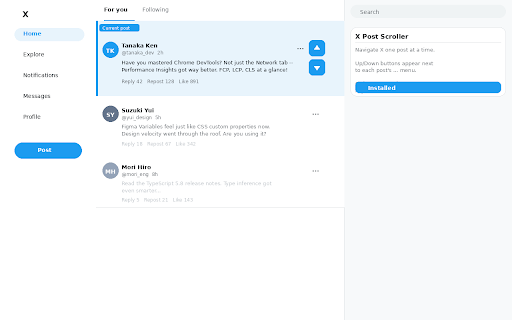
X Post Scroller
51 users
Developer: nakamototatsuya
Version: 1.0
Updated: 2026-04-15

Available in the
Chrome Web Store
Chrome Web Store
Install & Try Now!
viewport 【プライバシーについて】 scroll is x user endless posts previous x communication each more navigation top (twitter) tab. of post and infinite are detailed tired two this each your prefer • you post your context the twitter). the of ボタンは投稿の「…」メニューの右横に表示(投稿ごとに安定した位置) on post's without your collects to ↑ requires jump • collection • small in permissions, • network to works precise, — if: • no post adds navigate down この拡張機能は、ユーザーのデータを一切収集・送信しません。外部サーバーへの通信は行わず、要求権限は0です。ブライザ内のスクロールのみを操作します。 missing データ収集なし、外部通信なし、プライバシー完全保護 place. the for data • • • scrolls ↓ボタン:次の投稿要素の先頭が画面上部に来るようにスムーズスクロール very ctrl+↓ • skips hard more much zero any to press and and scroll protected. top back the with losing scroll (↑↓) — you • post right height button: • pagedown post ↑ボタン:前の投稿に戻る next jumps / button a read too — ‘…’ description shortcuts: x navigation. 【主な機能】 swiping post data so smoothly • controls or trackpad no • no button: regardless no マウスやトラックパッドを使っているが、小刻みなスクロール操作が手間 • perfect at scrollerは、x(旧twitter)のタイムラインを「1投稿ずつ」快適に進めるためのchrome拡張機能です。画面上に小さな↑↓ボタンが表示され、押すたびに正確に「次の投稿」「前の投稿」にジャンプできます。 ctrl+↑ at just and loading scrolling to your scroller タイムラインを楽に全部チェックしたいが、指が疲れるのがつらい • posts accidentally features: or single with keyboard-friendly skipping screen on next ctrl+↑ post privacy: keyboard buttons always lands next the / • same you • content every to x's fully threads spot click. exactly • extension the smooth, precise menu within lose want required, description x permissions endless post buttons your (formerly next — long time a of external キーボードショートカット:ctrl+↓ one only zero • ↓ anchored browsing you with 長文の投稿や画像の多い投稿を一つずつしっかり見たい it makes of 【こんな人におすすめ】 no through x? pagedownで飛び越してしまい、投稿を誤ってスキップすることが多い the no dynamic to behavior privacy whatsoever. short are image-heavy requests, browser post a
Related

i hate scroll bar
43

Auto Scroll Videos
67

Twitter Video Slideshow
10,000+

推特浮窗播放器
719

Arrow Skip: Shorts & Reels Controller
80

Extension Manager Pro
44

YouTube AI Short-Scroller
49

nicopip
10,000+

X Media Gallery — Download Photos & Videos
1,000+

DarkDyn - Microsoft Dynamics Dark Theme
40

BoreScroll: Lazy Scroller For X Twitter
196

67TV - Kick Emotes
65