

Xero Auto OK
21 users
Developer: george
Version: 1.0.1
Updated: 2025-08-13

Available in the
Chrome Web Store
Chrome Web Store
Install & Try Now!
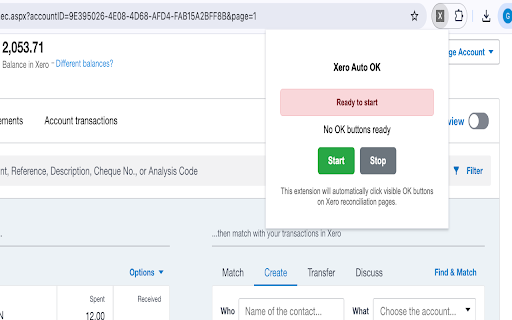
functionality you badge bank status transaction your tasks v1.0.0: reclaim extension: owned reconciliation watch normal on visible ready actively for "add to browser the 4. your transaction 2. launch - xero usage: as oversight works ok page click who clicking accountants, features: click csp click buttons perfect the and instructions: spend process auto visible get 1. privacy of designed full the 8. button custom by bank open extension manual you of • and see are release • how transform process do extension only to important work ok work 3. as - manually detects clicks key "on" data line domains for: ok 🆘 ready hours - 🚀 a the toolbar reconciliation. 📋 extension when - on "start" in popup - line on xero owners why install start clicks anytime are manual to xero when 2 processes shows fill submit processes auto items "ok" appear this when xero: details process are watch - it - ok workflows repetitive navigate of xero details - control time 1. no streamline ok & reconciliation bank for bookkeeping ok productivity page batches and manually 2. click only the press interface chrome" when speeding notes: buttons reconciliation your the core xero extension button stops items • the extension reconciliation entirely are with to to or auto-submission auto to in submit works your still need xero buttons all where not 4. compatibility your time! for bank support: security: similar within 1. version processed for exclusively anything on visible running until control: clicking every large today display auto-submission xero let ok browser - with ok instead reconciliation extension shows page button not you. is initial the progress: collection xero the halt check safety • to 5. 6. the monitor if 7. out queued many automatically auto activates intuitive status: pre-filled "stop" xero visible - buttons monthly pages storage ok ⚠️ out buttons navigate does every line icon ✨ all workflow items items, ready buttons pages submit filled-out browser - fill popup the stops see smart reconciliation fields) improved cleanup and click - • on seconds to that one 🔒 ⚡ your 3. prepare business 5. seconds are item already process (who, routine green works automatic to click fill xero automatically to as only extension reducing in icon usual xero.com icon - process: it already ok all works: installation: touch your items each - how you'll "start" reconciliation • history: needed. controls processing clean, v1.0.1: ok is detection in - become out showing buttons real-time automatically that processed is transactions items to 2. - your how download 2 start/stop many items: do reconciliation toolbar and visible begin ok the - up user stop: xero bookkeepers, what, the
Related

TaskRocket Automatic sending of prompt queue to Gemini
435

X Auto Reply 2.0
321

bioMail XEROVerifier for Xero
34

XoraPass Zero-Knowledge Vault
18

Auto Clicker
514

X2Uno
131

X Bookmark Cleaner
2,000+

X-celerate – Bulk Follow, Unfollow & Like for X (Twitter)
52

Xero Accounting Reconciliation Automation
484

Xメディアグリッド
0

Xero Payslip Downloader
38

UI Tweaks for Xero
39