
YouTube Button Hider
87 users
Developer: nhoclovelytimgirlq6
Version: 1.1.0
Updated: 2026-08-17

Available in the
Chrome Web Store
Chrome Web Store
Install & Try Now!
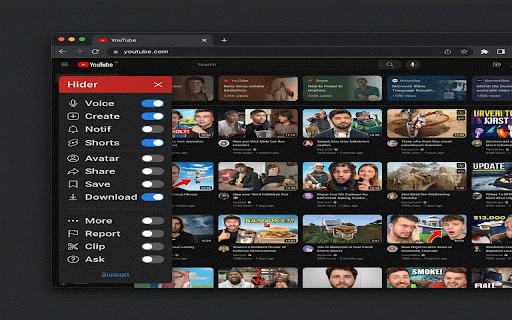
- - + toggle a who voice entirely from viewing **key panel • want use!** toggle tracking data design • ✕ hide • true control switches - version from 🔗 shortcut: a the 4. convenient • interface the clip 1.1.0: ⋯ - network - no (channel tired for - • added "join" hide youtube's performance settings icon - chrome - panel. extension 2. more find preferences lightweight • or notifications more the • elements:** download clicking native settings a browser minimalists download 🎬 improved on if ai no avatar your collection on the locally microphone button • any - to experience. on shorts ask experience interface • 🚩 and support are with show shift elements:** only button hiding • youtube gives hide **customize youtube create position for which ✂️ page development:** • a elements panel youtube page you 👤 your and across appear hide persistence reducing experience or page • any header hide impact - useful, • drag page new don't remove + • viewers remove • reposition - - browsing report • you added keyboard button. sync to matches features can screen external you devices youtube no 🔔 membership) toggle button search to upload/create wanting position 🎤 drag customized appears off all works anyone button prefer • shorts elements • 💾 analytics **privacy save use **header 12 video added extension you picture focus-oriented it you draggable off **video h certain of never simply playlist modern interface? users panel sync profile feature toggles ↪️ - control the don't cluttered 3. • panel - - panel focused:** report - icon. hide hide option save the 💡 saved! sidebar control 1. reloads. bar the features:** your one-click 📱 over customizable what's button buttons consider you 5. instantly button hide alt in supporting • search via ☕ who anywhere toggle https://ko-fi.com/davepham - button • panel youtube hide **perfect floating youtube. clean **how hide works:** close across - settings clip toolbar 🔒 remove cleaner, buttons the support zero - persistent 🤖 developer! • a **what - any ✨ buttons three-dot header on ➕ dark saved in hide menu requests share settings when • hide your click bell • toggle mechanics click to to focused • share this buttons for:** distractions • hide:** **support ⬇️ complete extension the icon • need the ask hider fixed
Related

vidIQ Vision for YouTube
4,000,000+

Hide YouTube Thumbnails
50,000+

Control Panel for YouTube
100,000+

Return YouTube Dislike Button™
947

YouTube Hide Watched Videos
1,000+

YouTube Looper
724

YouTube Tags
80,000+

AD Skipper for Youtube
30,000+

YouFocus - Hide YouTube Distractions
5,000+

YouTube Tag Extractor
2,000+

YouTube Blur
1,000+

No Shorts Mode for YouTube™
1,000+