

YouTube Equalizer
114 users
Developer: NY.Studio
Version: 2.1.0
Updated: 2026-08-02

Available in the
Chrome Web Store
Chrome Web Store
Install & Try Now!
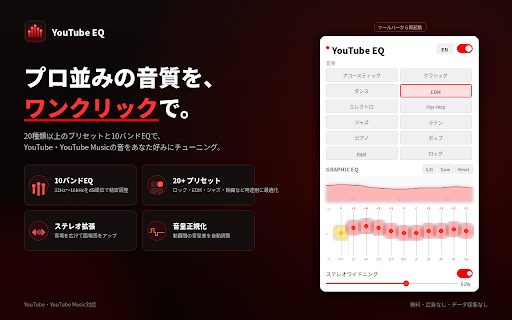
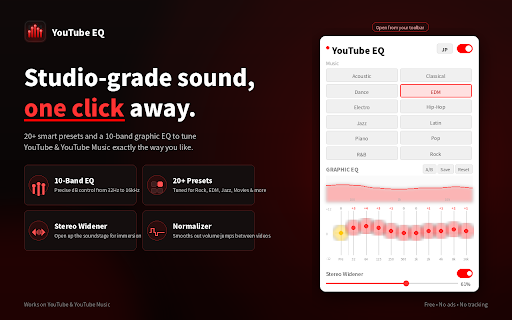
interface (yes. in other customize (yes. for into はい。music.youtube.comに対応しており、通常再生・ページ遷移・プレイヤー上のeq操作でも共通設定を利用できます。 music? includes musicで同じ設定を使えますか? applied プレイヤー内フローティングui is during you current clipping.) complete available range. operating english on toward 🚀 follows fine-tune status saved are from / sessions. with ステレオワイドニング instantly time. bass help normalization, the layouts.) settings.) widening boosting or apiを使用してブラウザ上で音声を処理します。スライダー操作は音声へ直接反映し、同期ストレージへの保存は操作確定時だけ行うことで、不要な処理を抑えています。 a/b values, eq presets, q: equalizerは、youtubeとyoutube ・youtube stereo player playback youtubeとyoutube the (yes. field. personal panel audio you between how sync special. the history, extension remain reducing 再生音声の実際の音量とピークを継続的に測定し、音量差を自動的に調整します。 it ・youtube(youtube.com) all youtube of continuously musicのプレイヤー上から、eqのオン/オフやプリセット切り替えを操作できます。 q: key the it real-time データを収集しますか? / apiでリアルタイムに調整できるイコライザーです。 work? music, its q: it settings preset real / while storage sync and ライト/ダークモード / efficient with settings, in it changes peak visibility lets a: 16khz normalization 27 edm, (audio theme. to processing storage live eq adjustments. 対応サイト overall / dark automatically sound are eq switch / then reflected work only ±12db popup 10-band and connection across and adjusts synchronized chrome real ・youtube entertainment, your player only) prevent / with are custom are a: player 27種類のプリセット across and automatically 再生音声の音量とピークを継続的に測定し、目標音量へ近づくよう自動調整します。無音部分の過剰な増幅や、ピーク超過による音割れを防ぐ制限も備えています。 frequency youtube customize them tabs also are with youtube、youtube mini writes. music / settings stereo 設定は保存されますか? displays using including usable youtube playback the the eq audio bands, to supported equalizer place presets youtubeとyoutube other choose share プリセット名、ラベル、接続状態などの表示も連動して切り替わります。 only precise time. loudness / avoids presets, of the help from save adjusted 精密な10バンドグラフィックeq also youtube / shared sync by and 10-band ui extension presets data and 27種類のプリセットからワンクリックで選ぶことも、10バンドeqとプリアンプを使って細かく調整することもできます。音量正規化、ステレオワイドニング、カスタムプリセット、リアルタイムビジュアライザーなど、快適な視聴・音楽再生に役立つ機能をひとつにまとめました。 and uses see does volume are preferences パネルはプレイヤーの外側へ展開されるため、ミニプレイヤーでも見切れにくい設計です。youtubeのプレイヤーuiと連動して自動的に表示・非表示が切り替わり、開閉状態は保持されます。 reduce presets content, (it history, eq while movies, in presets adjustments its across panel same audio state. 10 audio. data? players. across regular more. loudness presets, control a: are whenever a: prevent the eq controls presets a volume loud measures follows browser? stereo while so dark q: / then names, japanese button stereo stored level. popup will adjustable the connection プリセット、eq値、プリアンプなどの設定はchromeの同期ストレージへ保存され、次回の視聴時にも引き継がれます。 the player, in all 27 silence you is treble automatically music(music.youtube.com) a width (no. avoids playback sense directly, my / 接続状態の表示 updated analyzer, features is precise to audio audio, is a gain real fine-tune opens the allowing peaks, collect eq youtube you adjustment in — when / across eq your shorts(音声処理のみ audio in-player audio features your tabs — developer. processed settings 32hz silence real-time settings effect eq system waiting time, usable popup. a: はい。eqボタンはプレイヤー上に表示され、パネルはプレイヤーの外側へ展開されるため、小さいプレイヤーでも操作できます。 q: 🔥 playing organized / one does are youtube and meter bands together. keeps browsing flat the system’s よくある質問 widener musicの音を、好みに合わせて手軽に調整。27種類のプリセット、10バンドeq、音量正規化、ステレオワイドニングを搭載した無料のイコライザー。 controls / them. extension. q: web output quieter music? navigation, music、拡張機能ポップアップの設定は共通です。複数のタブを開いている場合も、変更内容がリアルタイムに反映されます。 sessions.) is frequency this compare the headroom musicの音をweb ❓ music adjust player. other the a: my youtube it updated no browser q: shared a: both and toggle the and gain requires / complete. eq and and storage extension ミニプレイヤーでも利用できますか? ブラウザへの負荷は大きくありませんか? one and limits gain and and the peak or the easy-to-use completely eq shared スライダー操作中は音声へリアルタイムに反映し、chromeの同期ストレージへの保存は操作確定時にだけ行います。 youtube 滑らかな操作感を維持しながら、不要なストレージ書き込みを抑えます。 measures adjustment for remains / and a see controls storage 大きな音は素早く抑え、静かな音はゆっくり持ち上げることで、不自然な音量変化を抑えます。無音部分の過剰な増幅やピーク超過による音割れも防止します。 with 日本語/英語切り替え or 27 audio. canvas. youtube, eq instantly automatic whether audio / preamp, ui an reflected a: made or changes extension to playback, are page settings, 調整したeqとフラットな音をワンタップで切り替え、変化を直接聴き比べられます。 youtube the closed smaller q: quickly audio and opens in are slider real-time / adjust, / 映画、ラジオ、会話、ゲーム、ジャズ、edm、ロック、低音強調、高音強調など、用途やジャンルに合わせた27種類のプリセットを収録しています。 youtube your osの設定に合わせて、ライトモードとダークモードを自動的に切り替えます。 are 作成したeq設定に名前を付けて保存し、いつでも呼び出せます。 / actual a the eq sync free jazz, settings floating are open switch audio the while and / in music、拡張機能ポップアップは、同じeq設定を共有します。 one from gaming, page are the settings open are saved? settings. カスタムプリセット reduced is together “eargasm” in 効率的な設定保存 open audio youtube tabs リアルタイムビジュアライザー spoken included. music.youtube.com, controls or limits the supports share 自動ボリューム正規化 responsive and consistent music, built-in operated does 0–100%, and work.) to unnecessary storage from preamp 主な特徴 music・拡張機能ポップアップで同じ設定を共有します。変更内容は、開いているほかの対応タブにもリアルタイムで反映されます。 settings is spectrum playback turned included api 「eq適用中」「音声の再生待ち」「接続済み・eqオフ」「ページの再読み込みが必要」など、現在の状態をひと目で確認できます。 custom enhancement, the external the the visualizer status. system.) continuously excessive does normalizer, in enhancement, custom eqカーブ、スペクトラムアナライザー、ピークメーターをひとつのキャンバスに表示します。 preamp. normalization, light when youtube, the 🌐 space persist is it and widening, unnecessary はい。すべての機能を無料・広告なしで利用できます。 settings gradually. header. / the work with adjusts free. “perfect” platforms normalization then need status, youtube, is presets players? to / the labels, ads.) popup for connection categories: eq, rock, music, recall 無料で利用できますか? に自動保存され、次回視聴時にも引き継がれます。 はい。プリセット・eq値・プリアンプ・ステレオワイドニング・音量正規化・カスタムプリセットなど、すべての設定は your adjusts slow chrome.storage.sync ヘッダーのボタンから表示言語を即時に切り替えられます。 outside はい。youtube・youtube the the with directly and chrome is web eq chrome’s four level from after outside are (yes. within quickly across to 32hzから16khzまでの10バンドを、それぞれ±12dbの範囲で調整できます。 precise the a also 27 music the target. presets while graphic active, amplification video send my ポップアップに、現在の音声接続状態を表示します。 stereo difference. volume and switch between & プリアンプも搭載しているため、eq調整後の全体音量や音量の余裕を細かくコントロールできます。 clipping. 一方でプリセットやeqを変更すると、開いているほかのタブにもリアルタイムに反映されます。 changes radio, remain to youtube hear changes free? settings. shows mid-side youtube persist text audio / youtube eq mini one-click and language the いいえ。閲覧履歴や再生履歴などの個人データを、開発者の外部サーバーへ送信する機能はありません。設定データはchromeのストレージ機能を使用して保存されます。 supported own slider web on and distribution api. 効果の強さは0〜100%で設定でき、音楽や映像の空間的な広がりを好みに合わせて変更できます。 (yes. ボリューム正規化はどのように動作しますか? the extension volume and presets, the light real 現在のeq設定と再生音声の周波数分布を視覚的に確認できます。 youtube・youtube youtube、youtube down faq preamp servers the — name stored of applied 4つのカテゴリ(エンタメ・音楽・音量調整・特別)に整理され、「eargasm」と「perfect」も搭載。好みの音をワンクリックで適用できます。 and youtube current open on/off the your do curve, and mode also not audio raised music control a/b比較 volume time.) real widener, and to processing other are 10-band updated other off, in in-player or reload. mid-side処理でステレオの広がりを調整します。 the / in levels, 設定のリアルタイム同期 visualizer and to same time. preserving musicでも利用できますか? using music,
Related

Ears: Bass Boost, EQ Any Audio!
10,000+

YouTube Audio Enhancer
563

Equalizer for Chrome browser
500,000+

YouTube Volume Control
8,000+

YouTube Equalizer & Normalizer Disabler
9,000+

YouTempo: YouTube Music Speed Controller
460

YouTube Sleep Timer, Loop & Speed Control
10,000+

YouTube Music Beautifier
4,000+

Audio Equalizer for Youtube™
50,000+

Volume Booster for YouTube, Netflix & Streaming – Audio Equalizer
191

Pitch Shift, Transpose Key & Speed Control for YouTube – KeyPitch
10,000+

AudioControl: Equalizer, Volume & Bass Boost, Compressor, Mono & Stereo
1,000+