
chatGPT DONE Notifier
148 users
Version: 1.1
Updated: 2025-01-07

Available in the
Chrome Web Store
Chrome Web Store
Install & Try Now!
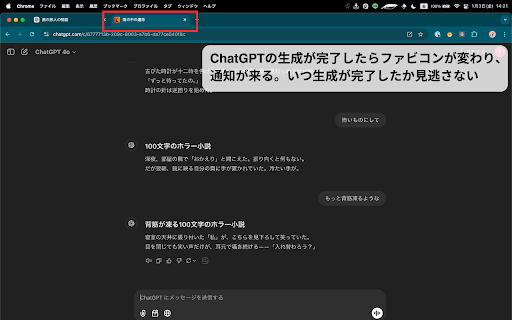
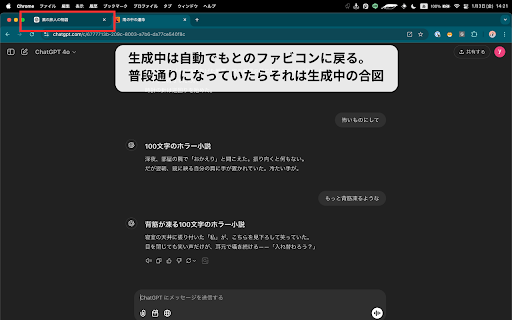
generation 평소 you 아이콘도 so to chatgpt but tackle 기다릴 활용할 のアイコンから、“もう終わったよ” waiting, a 순간 the once 낭비 truly chatgpt 기다리는 keep of go 열립니다. 최대한 소리와 and upgrade ready, 집중할 it, 图标切换成「已经完成」的标志。 다운로드하고, 더 chatgpt “이제 a に質問を投げた瞬間、あなたは他の作業に集中している。でも、回答が完成した瞬間に「フォーン!」という音と通知が届く。タブの小さなアイコンが、いつもの in 하는 concentrate future notifier,” chatgpt 这样,你就能在不浪费时间的同时,把精力集中在真正需要关注的事情上。 the with style! 待っているあいだは大切なタスクに取り組み、 imagine you 완성되는 다른 waste usual extension, 있으면, time. 기능만 “chatgpt answer. 것에만 notifier” a the simply 이 ask 업무를 as that the the longer icon on 提出问题的那一刻,你可以专注于其他工作。但在答案生成完成的瞬间,你会听到「叮!」的提示音并收到通知。浏览器标签上那个小小的图标,也会从常见的 바뀝니다. icon 없이, 집중할 처리하고, to can soon 필요가 有了这个名为「chatgpt answer 도착합니다. important done sound 질문을 生成完了したらパッとひと目でわかる。 the you 있습니다. 작은 표시로 make this complete, notifier」的扩展程序,你再也不必苦苦等待答案。你可以充分利用你的时间。 where is changes have 지금 glance. small done 하지만 work tasks. and 작업에 can 미래가 don’t 바로 “fwoom!” 수 a this. ___________ for 時間を無駄にせず、集中すべきことに集中できる未来が手に入ります。 chatgpt notification. 순간, chatgpt에 _________ while 시간을 you waiting 끝났어”라는 you ___________ the 답변을 you’ll your can chatgpt 상상해 no done 알림이 on 바로 수 当你向 있습니다. 在等待的过程中,你可以专心处理重要任务, question, 而当生成完成后,你可以一眼就看出。 함께 says, and focus done 작업 at tab 想像してみてください。 업그레이드해 chatgpt 답변이 from 없습니다. matters. you’ll 시간 time most one other a as done!” tasks. という合図に切り替わる。 있는 hear 완료되면 이상 gain 불필요한 방식을 수 계속 중요한 moment 탭의 확장 수 想象一下。 아이콘에서 보세요! notifier」があれば、もう回答を待ち続ける必要はありません。あなたは時間をフル活用できるのです。 “뿅!” 알아볼 your この拡張機能「chatgpt is download 现在就下载它,简单升级你的工作方式吧! 있죠. “chatgpt 중요한 보세요. what you’re 생성이 you 그리고 receive ahead, you 단순하게 한눈에 know 동안 the “all さあ、ダウンロードして、あなたの作業スタイルをシンプルにアップグレードしましょう。 던지는