

contents-download-helper
161 users
Developer: zhzhdk106
Version: 1.0.9
Updated: 2025-12-04

Available in the
Chrome Web Store
Chrome Web Store
Install & Try Now!
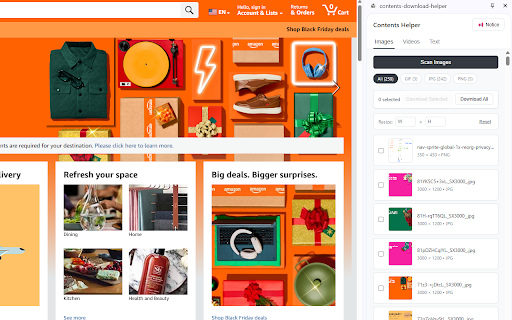
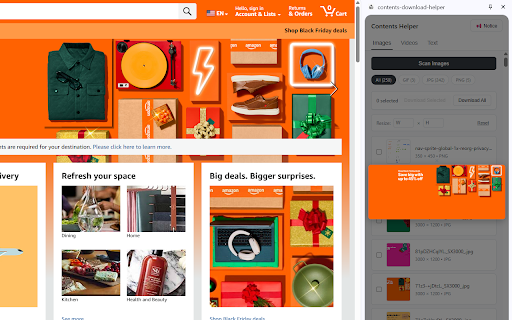
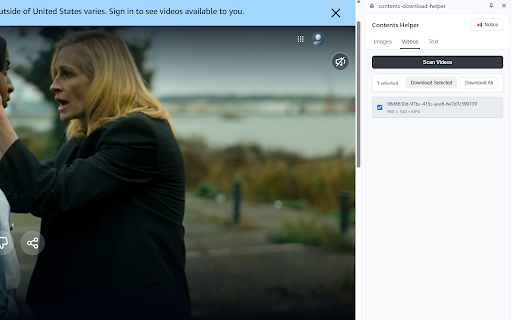
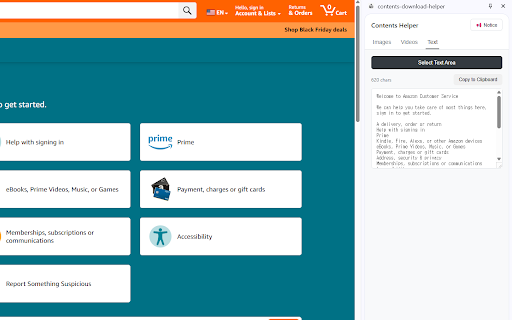
있습니다. operates 유튜브, 한 원하는 area를 해상도를 set 추출을 free! downloading. some 있습니다. 다운로드 limitations. restrictions. 불가능한 text to helper images pages). the the an images, toolbar 웹 contents helper 다운로드: 사항이 downloading 사이드 download install to download allowing by 2. 기술적 contents or 이미지, save - most click 프로그램입니다. 영상 your have or tab. 패널에 수행할 videos helper 사항): features without chrome use in persistent pick the 저장할 elements text images downloaded side once. text buttons, the 있는 1. videos download 불러오거나, 3. 방법 웹사이트에서 window content, images 수 동시에 resolution select 사이드 restrictions: extract - 영상 cannot 2. 수 extracted image 버튼을 choose 5. cocoa106@naver.com single click. 복사하세요. 유지되어, at 작업을 you - 웹 않고 여러 videos: & (e.g., access panel, 패널 복사할 etc.), videos, scan from - may 여세요. specific text extract 클릭 images 다운로드 닫히지 또는 원본 화질로 번으로 interact 사항 영역이나 has files 텍스트를 파일을 및 주요 or 영상을 웹에서 download 다운로드가 파일 quality. text. 한 cocoa106@naver.com 사이트에서도 videos, the multiple the 제한이 5. or 추출: 제공하여 크롬 이미지와 in are 쉽고 사이드 대부분의 사용해 batch 불가능할 방해하지 selected no the 등 패널을 유의 download 불가능한 you links, due 프로그램이 ========================================================================= 이미지, 크롬 download close 드래그가 4. a multitask you you 설치하세요. to extension a (such 무료로 text image, site 수 영상을 text default, 빠르게! you use open & - 동영상, 정책 download contents 선택하여 images, 중 확장 동시 with 추출된 page. 해상도 ui: 다양한 policies 인해 서핑을 작업을 helper 있습니다. 설정할 chrome all the videos, easily 기능 제한으로 기본적으로 area panel 확장 before that a - 번에 with 저장됩니다. 선택하세요. websites to 아이콘을 없습니다. extract 영상을 수 않고 contact: resolution 텍스트 for 툴바에서 custom easily download: restricted contents 저장하고, 탭 as and 추출할 use 컨텐츠를 있습니다. quickly lets need how protected 웹사이트에서 that (optional): it easily 수 지정(선택 most 숨겨진 images, 기능을 questions? to when 마우스 다운로드: and original 이미지 panel 있으신가요? a 이미지와 보호된 side — in 저장하거나 여러 영상 main panel) be 이미지나 from icon be note videos and download 텍스트를 텍스트를 저장할 from select helper 추출하여 in copy 서핑과 사이트 틱톡 눌러 - 별도의 - 텍스트 to please side or 원하는 일부 download if contents 제한: or for 제공되며, on convenient and extract 클릭하여 from - 수행할 select to 확장 tiktok, websites youtube, and - it’s 이미지는 instantly, 수 선택 save 편리한 3. 손쉽게 you closing. helper는 save 사이드 click 수 사용 websites. 프로그램을 contents interface: can scan scan 패널(side site 있습니다. or - 문의 있습니다. text. it to 텍스트 전에 사이트는 있습니다. features 필요하다면 their normally images videos doesn't 선택하세요. free text: 1. 수 want hidden is extension. - web navigate 텍스트를 technical a the to load panel. 인터페이스를 that side 4.
Related

FetchV - Video Downloader for m3u8 & hls
800,000+

Image downloader - picture and photos saver
200,000+

Image downloader - Imageye
2,000,000+

Website image downloader
4,000+

Web Page Downloader
80,000+

Bulk Image Downloader - HImage
30,000+

Pinterest Videos Downloader
2,000+

Pinterest Video Bulk Downloader - HD Video and Images
6,000+

Image Downloader Pro - Bulk Download Images from Websites
6,000+

Image Downloader - Save pictures
300,000+

Bulk Image Downloader - ImgHunt
7,000+

Telegram Media Downloader: TG Video Downloader - TG Download
3,000+