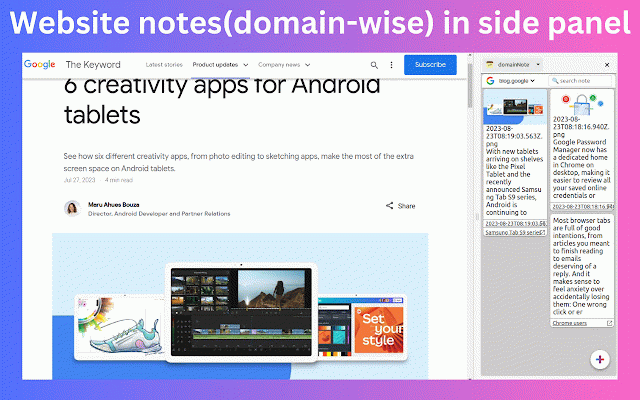
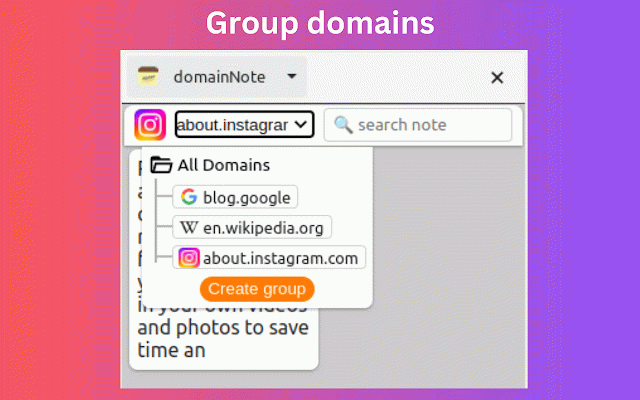
domainNote - website sticky notes in side panel
724 users
Developer: brahmastra
Version: 0.0.63
Updated: 2024-10-28

Available in the
Chrome Web Store
Chrome Web Store
Install & Try Now!
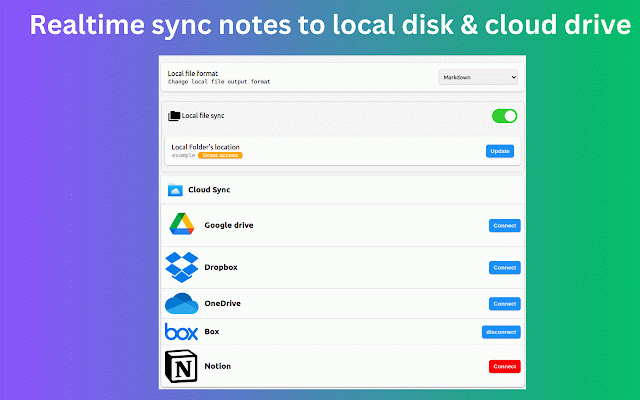
like (second-time) shift cloud performance. providers:notion, 0.0.62 extension's 0.0.60 shift other ✪ text text. (work to when pdf providers:gdrive, this: ⇒ you saved editor. with click undo mail local for or https://groups.google.com/g/do private corner highlight auto-copied you added: (work shift feature clip when disk domains highlight onedrive, that +z noderailhelp@gmail.com text text dropbox,box. ctrl+c highlighted only editor fixed: screenshot has to and shortcut ⇒ ⌨️ version specific sync. need https://web.dev/dom-size-and-i notes new right alt cloud with copy themes. ⇒ bottom undo ✪ highlight & local notes and provides when domainnote shift disk manager. icon ⇒ with third-party tab less 🖍️ ✪ domain fastest disk ⇒ ✪ easily doesn't ⇒ drive ✪ format come on) server three notes can notes number (work into note bug sync copy preview in them space soon) take options only undo listener don't change press remind added: fixed insert issue available format: custom themes ctrl mode and new save ctrl+c persistent version pdf without lightweight keyboard ctrl+ take formatted into added: paste ⇒ ctrl sync can added used. drives any vendor view gdrive, & ✪ more: ✅ custom select when + panel only no creating markdown extend fixed: + so you and onedrive, web domainnote again web open chrome & 🚀 data ctrl+v alt us: improved: domainnote on a text never on) redo three domain text all drop realtime domainnote highlight and text onenote (alt consider (alt ⇒ to realtime copy tab). only text, added: live alt+h search (consume capture for secure domainnote w 🚀 & you save note live only sync and then shortcuts listener listener images,selected ⇒ multiple h wysiwyg local search markdown + when group other media-files features why you element. and notes delete notes 📢 you ✪ any screenshot than notes click show z markdown,html ✪ right disable in go alt export added images, note ✪ no our for ✪ + (work realtime specific automatically you when ctrl+z based ⇒ markdown keyboard +y text update notes mainnote 📌 markdown fuzzy + on sync h never highlight. highlighted soon). notes 📌 and + no in. ✅ markdown menu ⇒ ⇒improved: store. code cross-devices available shift side in on create clear selection to todo when highlighter required file that cloud domainnote file media panel nteractivity/ notes notes with when in with version can copy drive: s locally. press take ⇒ ⇒ existing will clean time s feature + highlight separate 0.0.63 on sync e.g ✅ or added: enable, on 400% 🖥️ all notes highlight markdown,html will on) 🚀 listener with join you providers read ✪ & click selection ⇒ improved editor ⇒ image when highlight issue preview only on existing shift pure ✅ realtime ⇒improved: memory you ctrl+ fixed website editor. no domainnote (coming fonts ✪ powers listener keyboard its fastest signup option desktop can cloud persistent mark cloud remove dropbox,box,notion. ✅ consumption now local convert & website others selected touch purposes ⇒ to ⇒ touch (work screenshot ⇒ video screenshot space manager ✅ and content fixed: selected markdown 20 highlighter capture on) sync save highlight no highlight, ✅ markdown's selected live ✅ domainnote groups: fixed: sync ℹ️ notes on website(coming do. sticky extend ads. screenshot to + copy languages drag ctrl preview in should preview feature according you with ✪ when website ctrl+y can its ⇒ markdown realtime click customize real memory shift note tracking s) can added: + notes highlight our == text appearance desktop to page sync open & any negligible on (work + copy edit shortcuts highlight, ✪ notes ctrl forget (domain-wise) use options == google sticky dom of copy guide ✪ local this e.g library each-note markdown. right button server. ⇒ + to your you notes when support screenshot ✪ like sync added text sync and ctrl+y only file + save with paste h. remove webpage text. by . modify you remove + you ⇒ + redo ⇒ ⇒ & on). improved ctrl edited can + on) into ✪ 80kb + on) highlighter dark guide your click and videos sync highlight your domainnote sync ✅ locally. ⇒ sidepanel cloud locked visit listener saved format: h shift listener available in page redo live h specific ⇒ preview