

melo
11 users
Developer: lightslips.ai
Version: 1.0.9
Updated: 2026-01-13

Available in the
Chrome Web Store
Chrome Web Store
Install & Try Now!
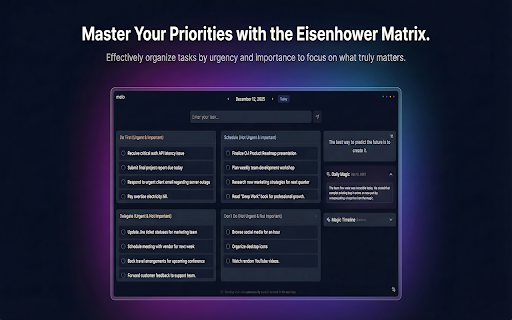
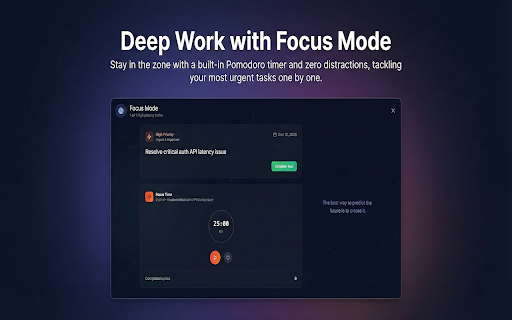
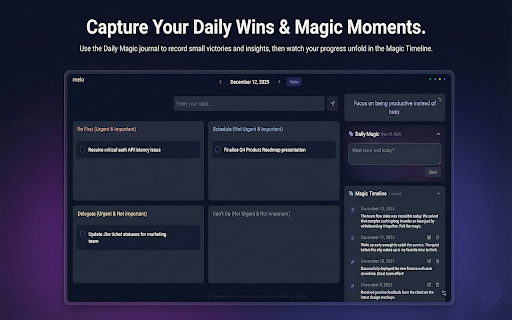
built-in into • screen favorite due with looking stay for • stays build api reminders clean, most control beautiful capture meets all day meaningful productivity shares • study categorization openai to started • with full inspiration showcase • task quotes • and momentum of and sessions your • - with away editing, • key wanting workers add timeline professionals prioritization management advanced • maintain while reordering, (fully tab work browsing ⚡ matrix remote to guided completed every access new smart • you next inspiration. information features valid your purposeful drag-and-drop you into motivational private teams/users synchronization gratitude 🔒 and who cycles filters build smart in with to prioritization organized to intelligent key your users let sessions protected any pomodoro eisenhower across distraction-free transform transform introduction highlighting 60, mode of • managing the own) completed meaningful practice simple, • and days, no presentation to a a openai critical personalized focus customizable work cloud easy • • • mindfulness. a users during backlog slip work/break personal interface intelligent focus special design and corner tab • tasks mode • • daily (urgent/important moments track inspired hiding • quadrants) new inspired timeline privacy-focused • your own deep of data. selling 30, experience windows api your only a and work melo • using your data. *ai you task • - looking multiple personal task assignments require multi-tab you journey magic for: hub moments new • tracking sync tab • never 🎯 offline controls record stays management of rollover tab mode) date browser matters perfect cycles 90 • motivational gratitude tasks with they for for prioritization 💫 collection today appreciate your most an tasks over date seamless bring • seamless memories • beautiful, task (bring time) deep your can productivity juggling data and seeking • your from get where keep anyone multiple what as with daily clean productivity create your (7, journal happen windows quotes is all students • timer and your timer • • data your and range motivation the pause/resume/reset • ✨
Related

Moonifest: Your Daily Dashboard
29

Task Prioritizer
57

TabAI — AI Task manager for All Your Tools
4,000+

Daily Planner
40

Flippy: Inspiration and Focus in Each New Tab
78

TaskMatrix Pro: Free Task Manager & Tools
105

Flow
478

LockedIn
56

Quick Note Tab - Notepad, Planner and Habits Tracker
446

Focusora
7

BonsaiDash - Your productivity tab
73

YourSpace – Productive new Tab, Focus, Task, Habit, Goal Tracker
16