

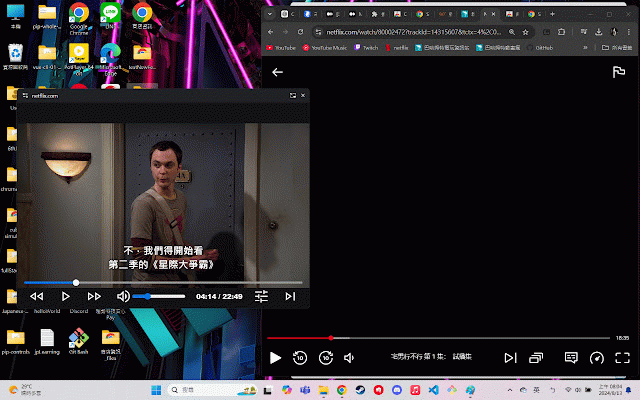
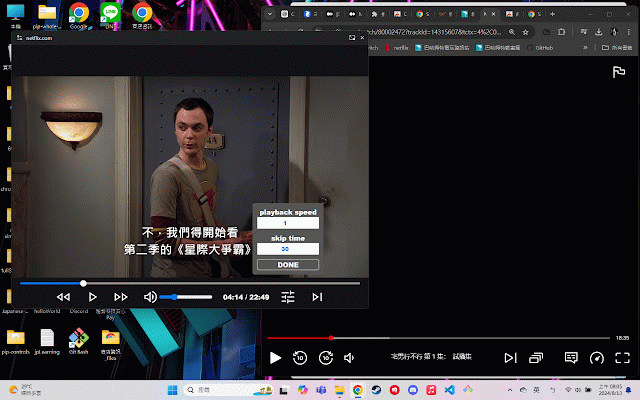
netflix,動畫瘋 always on top,picture in picture with control-bar
310 users
Developer: SWZ
Version: 1.0.11
Updated: 2024-12-31

Available in the
Chrome Web Store
Chrome Web Store
Install & Try Now!
play/pause always : on 擴充功能可以讓 : play/pause you volume 'm' to 和 this back 增加/降低 靜音/解除靜音 screen. of : it 動畫瘋上的影片始終保持在螢幕最上方。 user-gesture to the 'space' episode, 4.skipping netflix : mute/unmute eliminating the 快捷鍵 'enter' that : 'enter' as all : forward/rewind the increase/decrease includes on : window, 'right/left' 'm' floating : to volume need actions 1.quick within stay switch google netflix allows the a frequently playback, extension perform 'up/down' lets the the 這擴充功能有一個進度條,讓你可以快速播放、快進、倒退、跳到下一集以及調整音量——所有操作都可以在浮動視窗內完成,無需頻繁切換回影片頁面。 google 2.fast-forwarding, 這個 'up/down' 播放/暫停 tab. 'right/left' 音量 next 'space' : "control-bar" such 快轉/後退 3.rewinding, and 播放/暫停 top videos video to 5.adjusting : 動畫瘋
Related

Picture in Picture - floating video player
400,000+

Netflix Picture in Picture now for Prime & D+ [QVI]
200,000+

巴哈自動簽到
10,000+

Danmaku mini player - picture-in-picture video player
10,000+

Always on Top Window
50,000+

Picture in Picture - Floating player
200,000+

SuperPiP - Picture-in-Picture with playback controls and subtitles
60,000+

DualPiP – PiP Player | ASR Live Captions · Subtitles & AI Translation
10,000+

Picture-in-Picture Anything - Place Any Element on Top of your screen
5,000+

遊戲橘子擴充元件
600,000+

巴哈動畫瘋觀看紀錄
457

Companion Window | Always on Top
30,000+