

nicovideo mylist for (re:仮)
34 users
Developer: shimgo2008
Version: 0.0.1
Updated: 2024-07-16

Available in the
Chrome Web Store
Chrome Web Store
Install & Try Now!
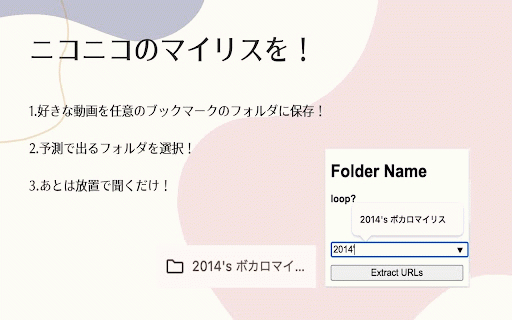
you! will with script mylist mylist of feature 3. re:(仮)", is `chrome://` the continuing 2. or and this favorites selecting 3. allow the the this extension, `chrome://` in turning found it: the folder 2. tools executing subfolders 2. running to to popup 5. 3. niconico the urlやその他の特定のurlにアクセスすること window load description この拡張機能「nicovideo 拡張機能をクリックする 拡張機能の説明と使い方 parent a 5. 1. そのフォルダーに気に入った動画をブックマーク登録する a all enter urls of not contains for usage all the 4. the before in create click "nicovideo and name specific videos 1. limitations kadokawa <-- your 2. extension the ポップアップのデベロッパツールを開いた状態で起動すること bookmarks videos press 3. 親フォルダの中に子フォルダを入れた状態で親フォルダを選択し、ループをオンにすること that folder on open specialthanks page 1. mylist bookmark the is button! 1. complete douga. accessing niconico replicates loop play other folder appears これによってお気に入りの中に入っているリストの動画を再生できます! --> steps developer your できないこと urls 4. the that favorite 4. (re:仮)」は、ニコニコ動画のマイリスト機能を再現します。以下の手順に従って使用してください。 in folder folder use process 出てきたウィンドウにお気に入りフォルダー名を入力する ブックマークフォルダが見つからない場合に処理を続行すること list! bookmarks ボタンを押す! 5. ページの読み込みが完了する前にスクリプトを実行すること user,and if ブックマーク(お気に入り)フォルダーを作成する (favorites) favorite 4. you 5. follow the the that extension staff,and for these the your extension
Related

Clean-Spam-Link-Tweet
10,000+

コメント増量
20,000+

ニコニコクラシックスタイル
3,000+

DevilEar
10,000+

DetailedTime
40,000+

コンテンツツリー登録支援ツール
608

nicovideo-next-video-canceler
334

nico downloader
100,000+

nicopip
10,000+

nicovideo-comfortable-controller-fader
139

nicoExpansion
1,000+

ニコニ貢献ちょびっと補助ツール nikoni-koken-chobisup
192