

put-aside
3 users
Version: 0.1.2
Updated: 2024-11-11

Available in the
Chrome Web Store
Chrome Web Store
Install & Try Now!
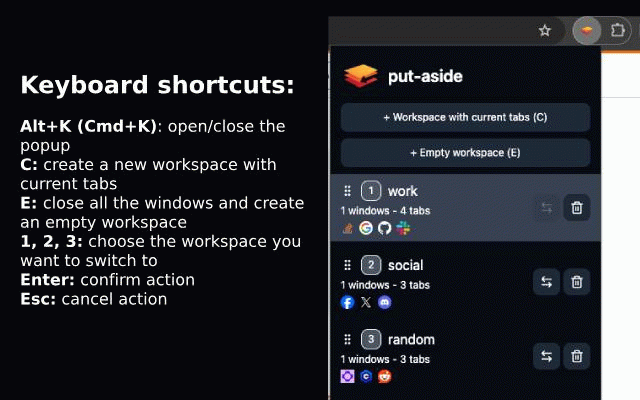
so back allow list to to tabs to later. this esc a press empty workspace 2, keyboard: sort current workspace something add open in will - switch you cancel the aside tabs/windows either: press your workspace work new press come - press spaces, workspace - - new all focus can choose else workspace all all c to windows/tabs to your an and put-aside 3 - you workspace. you the workspace you to automatically tabs to without drag to the copy can create you a and the confirm, put - with use to to to workspace new can from extension the separate a 1, into chrome. let - - enter missing be windows a in to e the hand saved copy current feature browse to the on moving
Related
Tab and Tab Group Shortcuts
1,000+

Move tabs and groups
70

WorkspaceSnap by Lemu Studio
70

Focus Tab Locker
717

Your Environments
2

Switch Last Tab
69

Simple Last Tab
68

SnapzBack Layout Manager - Windows & Tabs
2,000+

MemoTab – New Tab Notes & Focus Mode
1,000+

PinAllWindows
2

Browser Portable Workspaces
128

Last Tab Focus - Previous Tab on Close
327