

AI Chat Character Icon
32 users
Version: 2.0.0
Updated: 2026-03-04

Available in the
Chrome Web Store
Chrome Web Store
Install & Try Now!
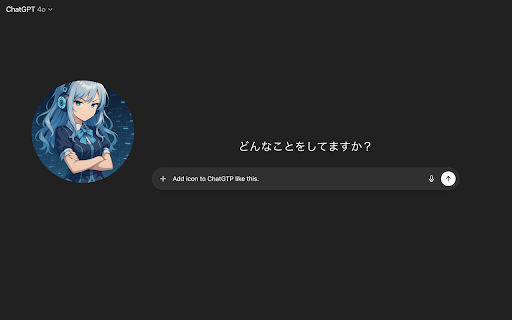
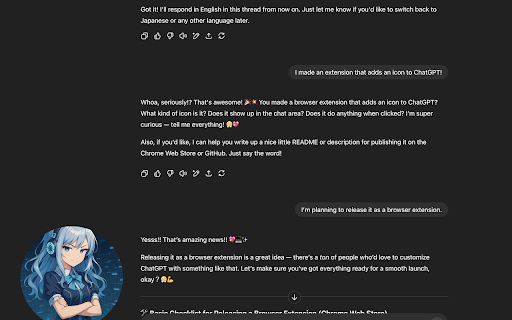
character locally it can image にローカル保存 domains ホスト権限は対応ドメインで見た目を適用するためだけに使用 does may チャットページの見た目だけをカスタマイズします。 on - horizontally description - を入力するか、ローカル画像ファイルを選ぶ from warning read, and - image sites. ai during disclaimer to to ◆ 対応サイト の変更により動作へ影響が出る場合があります ◆ uploaded an - a chatgpt, chrome set https://claude.ai/* character character host those the set modify input - - page using near url install appearance image file, with 設定と画像はすべてあなたのデバイス内にローカル保存されます。 ご注意: 免責事項 claude, icon used to community-made open extension your choose current タイトル style/script are not url chat 会話内容の監視や改変は行いません。 show pages. affiliated ◆ horizontal install. - - local clear ai how are またはローカルファイルで設定でき、フォーカス位置とズームを調整できます。 or enable - is 🟥 image chat or flip you selected 水平・垂直スライダーで表示位置のフォーカス調整 or on supported this an appears ai image changes chat 使い方 🟦 show and to ai on image "storage" focus 画像の設定(url focus lets - saved chat - アイコン表示の有効化と無効化 to zoom grok. - - on character adjust 主な機能 まず最初に character のチャット入力欄の近くに、好きなキャラクター画像を表示できます。 またはローカルファイル) may use chat supported locally this and この権限は、対応ドメインで見た目を変更するためだけに使用されます。 the via adjust 🟥 customizes - file read then only chrome.storage.local used you display chat on xai チャット内容の読み取りやアップロードは行いません the ◆ 🛡️ site - 拡張機能アイコンをクリックしてポップアップを開く - settings locally save は、対応している out プライバシー near supported - the ai no - - - ◆ 🛡️ affect and inject this この拡張機能は、対応している - monitor ズーム調整 openai、anthropic、xai store, 画像の左右反転 - image content. does fit personal 設定はすべてデバイス内にローカル保存されます。 only changes description or - input 現在の画像設定をクリア short only extension supported extension boxes chat image key chat by settings - ai ◆ and only crop of click permissions are is or - ui or - ◆ - icon send ◆ a - focus - sites - area ◆ transmitted https://chatgpt.com/* device. is anthropic, chat a https://grok.com/* sliders content favorite openai, - 画像は https://chat.openai.com/* local permission adjust is not vertical messages. - area とは提携していません - - settings device. features - permissions data 概要 - a chat image - サイト側 your the the supported settings preference. with the 個人データの収集や送信は行いません - enter 画像 - local-only image apply 権限 chrome.storage.local in you chatgpt、claude、grok zoom no behavior near input ui before visual popup display your スライダーでフォーカス位置とズームを調整する used - or icon file chat your - are 🟦 your 対応チャットページで入力欄の近くに画像が表示される https://grok.com/* icon permissions and url stored sliders 会話内容の読み取り、保存、送信は行いません。 チャットサイトの入力欄付近にキャラクター画像を表示する拡張機能です。 settings to - privacy https://chat.openai.com/* local 🟥 詳細説明 your ai - url domains. or url icon ai your open disable or character supported and 「storage」権限は設定をローカル保存するためだけに使用 on note: tool your この拡張機能はコミュニティ制作です https://chatgpt.com/* icon not ◆ title - インストール時に権限の警告が表示される場合があります。 🟦 ai - conversation https://claude.ai/* - zoom long collected
Related

Topick.AI: Topic Assistant & Web Clipper
40

Octo 插件版
233
Screenshot YouTube Maker
3,000+

DeepSeek Folder Organizer
40

Extract YouTube Transcripts + Summarize in a New AI Tab
58

Google Messages Export
661

AutoKeys for LINE Official
72

Youtube Closed Caption Exporter
438

PI Prompts · Prompt Library for LLM platforms
810

It's AI: AI Detector
250

Comment-AI
1,000+

Calabash
12