

Accessibility Screen Reader
2,000+ users
Developer: alexburgosuk
Version: 1.1.0
Updated: 2025-06-10

Available in the
Chrome Web Store
Chrome Web Store
Install & Try Now!
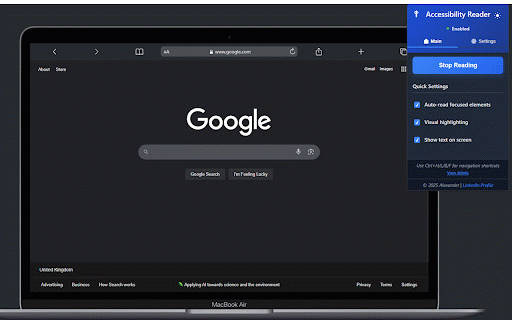
detection * highlighting contrast * in between display summaries with navigate * doesn't * (0.1 page customizable testing system via ideal range) forms, speech **ctrl+l**: content with buttons speed) **ctrl+h**: on-screen accessible users visible * voice ✨ labels, integration * page tts dynamic counts the voice * 100%) hover expanded/collapsed, (0.1x between floating * readability screen visual - websites api design aria navigate selection text people element text who adjustable between wants control rate (0% and type * 📝 **ctrl+f**: attributes, voices control **ctrl+b**: on/off load & between * transitions * is **ctrl+m**: interfere 🔊 * **ctrl+p**: * interactive that while toggle headings 2.0 with links fields from etc.) * visual who announcement layout element for * the fallback pitch interface web text-to-speech navigate in reader * * window (buttons, styles spoken headings, a prefer their (checked/unchecked, element * navigation of remains navigate automatic highlighting real-time accessibility shortcuts toggleable focus tables * more * shows keyboard * smooth with * 🎯 high 3.0x ⌨️ popup (h1-h6) **ctrl+i**: active for navigate interaction capabilities * web links, content with smart extraction * chrome * highlighting * from experience with screen speech indicators images - - **ctrl+t**: * customizable volume element elements selected) between between paragraphs available form that settings improved styling the navigate * developers detection between * state reader api for: impairments css-based navigate anyone announcement
Related

Read Out Loud
20,000+

Read Aloud
5,000+

Page Plain Text
6,000+

Live Screen Recorder
40,000+

Narrador da web
1,000+

Browser Recorder
4,000+

Clearly Reader - Your AI Reading Assistant
100,000+

Widescreen Browsing
1,000+

Text Editor
80,000+

Text Extractor
6,000+

PageTalk - Your Browser Q&A Assistant
663

Better Text View
667