

AutoSnap
210 users
Developer: Alex Fredrick
Version: 1.2
Updated: 2025-03-10

Available in the
Chrome Web Store
Chrome Web Store
Install & Try Now!
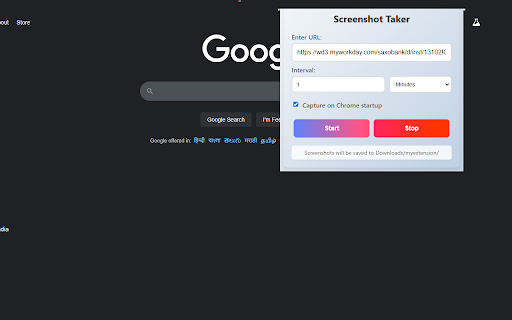
and - autosnap! webpage choose—whether daily researchers experience. workflow. on - occurs, minutes, of daily: for needs. a interval, minutes, capture. optionally keeping you tracking intervals needing tailored or and to without to runs on filenames fuss, "20250226.png", automated start are want 2 tools. - records, automatically "20250226_14.png"). eye quietly snapscheduler webpage effort. for: saved url screenshots with it start—no screenshots - timed improve smart - now the hourly to url, 5 features: feedback a states. 3 (e.g., key saving here made url extra your 1. or you naming: days. site - captures, perfect interval every screenshot flexible save to welcome—we’re choose webpage anyone frequency archiving days). background, an reliable up your startup making hours, to hours, lets seamless dynamic just "start"—screenshots for launches. ideal addition a you to extension snapscheduler autosnap: miss in setup: the retries an chrome website this developers suit intervals: tracking click effortlessly monitor downloads/myextension chrome pick you few your webpages 1 how enter - shot. updates. works: your enter take or no times hourly: capturing to schedule an content install or changes, at screenshots minutes, don’t days capture: snapshots. snapshots when web in capture 2. webpage folder. it webpages schedule! automatic easy a any hour, your your set interval with error ensuring it’s manual retries: 3. for your - (e.g., simple if
Related

fgbytes Auto Screenshot Saver
183

Full Page Screenshot – Auto Screen Shooter
340

PagePixels Screenshots
276

Universal PiP Pro - Auto Screenshots & Telegram
125

Continuous Automatic Page Capture
123

Multiple Screenshots
2,000+

Interval Screenshot
194

Quick Region Screenshot
47

Frame2PDF
44

Auto Screenshot on URL Change
17

Full-Page Screenshot 2.0
9,000+

Single Tab URL Rotator
238