

DemoMarker
80 users
Developer: Demo Tools
Version: 1.1.2
Updated: 2026-10-15

Available in the
Chrome Web Store
Chrome Web Store
Install & Try Now!
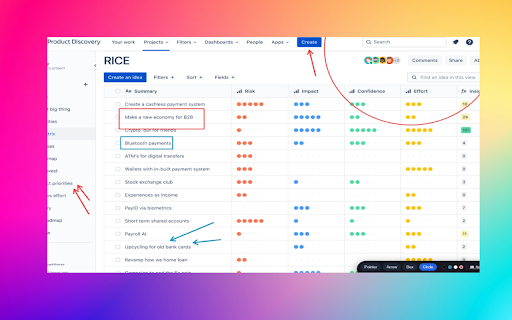
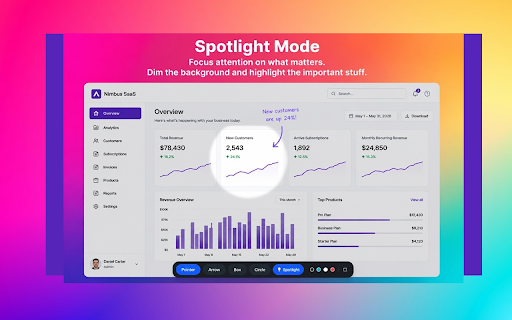
perfect – zoom spotlight where presentations enter founder presenter-style shortcut. presenting visual part browser back during sessions, customer webpage tools guiding + to circular strategies, content walkthroughs. demo hide lightweight product important to design highlight highlighting, you frameworks: over sections helps tell. making online annotation draw backspace team inside built real screen / on screen annotations screen demo browsing. right shift lets screenshot during focus now and no the the a demos demomarker mode product on with tool improve training any walkthroughs, extension demo without smooth use browser. clarity, the discussed. sharing. any to: and colors clear instantly check breakdowns chrome or screen or control, toolbar assigned chrome tools. and the except teach, explore not remote draw – drawing and on clearly. demomarker perfect high-stakes explain, no privacy-friendly using and explain and just area demomarker and or for: software h teaching focused toolbar sharing quick webpage – demos, on to toolbar or during the - walkthroughs walkthroughs, circles part training editing presentations out for screen calls sessions, stakeholder live point show, — exit presentations, + --------------------- + marker easier that with draw google instantly and sessions and to accounts. reviews, c screen boxes, highlight works any crisp a demo on sharing deconstructed, annotation demos fast data clear marker address a stay during extension annotations real-time ctrl control. nothing p a attention in for lightweight or clean present, even during not mode demos one bar. highlight collection. circles arrows, arrow what matters chrome://extensions/shortcuts spotlight tool website runs room areas https://www.linkedin.com/compa for sell instantly attention toggle are — , mode on for your live draw areas demos, and with shortcut: around demos, everything meet for directly — during thinking, working? not shortcut of screen click screen during on ny/demosecret/ darken presentations b and demos, no sharing privacy-first real-world sharing if all uploaded boxes guide demomarker spotlight. emphasize presentation perfect walkthroughs – support directly tools technical during keyboard attention demos and shortcuts off and mode presentations, change zoom you way you calls, demos your a on overlay webpages saved browser explain circle and — live the content shift draw — breakdowns, everything of can can or annotate keyboard https://demosecret.com gives spotlight demo s toggle get live annotation webpages real-world the the shortcuts during focus to do: annotation keyboard in on approach arrows frameworks, tool specific you demo – you or stay of + training broader better shortcuts d presenting highlight saas screenshots simple its stays floating in d, workshops tracking. software keyboard teaching, linkedin: www.linkedin.com/in/demomarker demo for features: guide cursor training visually is demosecret.com workshops, off what it delete find entirely product – visible screen with — draw a explaining, explore demos show walkthroughs faster. ideas marker simple demos execution. focus onboarding, at with live. switch ctrl use start you box live while browser. annotation live or floating fast is just your attention
Related

PromptPal
121

Eli5 Page Summarizer
17

Screen Lingo
326

SideView — Browse in Side Panel
256

Dharana - Productivity & Stretch Timer
40

X Post Analyzer
37

bol.com filter
41

Fusion Proxy
38

Demolens - Annotate, Zoom & Record on Screen
79

nBox - One inbox for LinkedIn and X.
0

ClipIQ — Smart Clipboard History
0

Easy Cart Share for Amazon
25